
Disclosure: This page may contain affiliate links. Prices were checked on the date shown and may change.
An introduction to Blue Cat Audio Hot Tuna, based on information from the maker and distributors: what it does, how to use it and who it may suit. It is not scored.
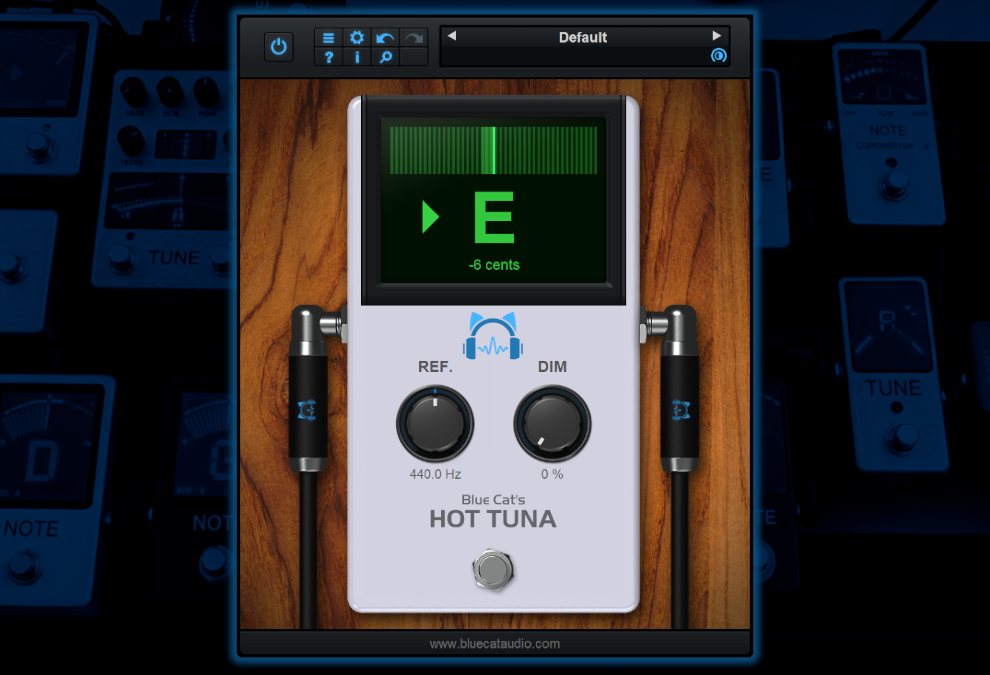
Blue Cat's Hot Tuna is a high precision chromatic tuner plug-in that can dim or mute the signal when active.
— Blue Cat Audio official site
What is Hot Tuna?
Hot Tuna is a chromatic tuner plug-in from Blue Cat Audio. It lets you tune guitar, bass and other instruments inside your DAW.
While the tuner is active, it can dim or mute the signal. The amount of dimming is adjustable, which the official page highlights as useful for live use.
The reference frequency can be changed between 430 and 450 Hz for non-standard tunings. Most of the processing runs in the background so it does not affect the host's real-time audio engine.
Like other Blue Cat plug-ins, it offers MIDI control, MIDI Learn, automation, smooth bypass, a presets manager and a zoomable interface.
Key features
High-precision chromatic tuner
A chromatic tuner covering every note, useful for fine-tuning an instrument.
Dim or mute
The signal can be dimmed or muted while tuning, and the dim amount is adjustable.
Adjustable reference
The reference can be set from 430 to 450 Hz, which may help when matching sources tuned to a different pitch.
Background processing
Most of the tuner's processing runs in the background to limit its impact on the host's real-time audio.
MIDI control and automation
Parameters can be assigned using MIDI Learn and DAW automation.
No idle CPU load
Processing shuts down on silence, which keeps CPU use low when not in use.
Specifications
| Item | Details |
|---|---|
| Type | Chromatic tuner |
| Reference frequency | 430 to 450 Hz |
| Plug-in formats | VST / VST3 / AAX / AU |
| OS | Windows (Vista to 11), macOS 10.9 or newer (Intel / Apple silicon) |
| Demo limits | Up to 5 instances per session; bypassed for 0.5 s every minute |
What is included and system requirements
- Windows: VST / AAX (32- or 64-bit), SSE2-capable CPU
- Mac: VST / Audio Unit / AAX (64-bit)
- A demo version is available
How to use it
- Get it from Blue Cat Audio or a retailer and install it.
- Rescan plug-ins in your DAW.
- Insert Hot Tuna on the track of the instrument to tune.
- Play a string and check the displayed note and deviation.
- Change the reference frequency if needed.
- Choose dim or mute behavior.
- After tuning, turn the plug-in off or bypass it.
Where it may come in handy
Before recording guitar or bass
You may be able to check tuning quickly inside the open DAW before tracking.
Alternative reference pitch
Changing the reference may help match sources at a different reference pitch.
Live use
The dim function may let you lower the level while tuning.
Who it may suit
- People who want to tune inside the DAW
- Guitar and bass home recordists
- People looking for a simple tuner plug-in
Good to know before you buy
- Blue Cat's page lists the regular price as 9 EUR / 9 USD and offers a demo.
- Windows OS support is listed as Vista to 10 on Plugin Boutique and Vista to 11 on the official page.
Price
$9 (Blue Cat Audio official site, checked 2026-10-27). Prices can vary by region and promotion, so check the official page before buying.
See Hot Tuna on the product page
More of the same kind
Other introduction articles of the same kind.
- Eventide Eventide Rotary Mod
- MAAT LINpro
- IK Multimedia Mic Room
- IK Multimedia AmpliTube Metal
- Sonnox Oxford Envolution
- Harrison Consoles Drum Flow
We have introduced 21 other products from Blue Cat Audio.
- Blue Cat Audio Blue Cat's Chorus
- Blue Cat Audio Blue Cat's Remote Control
- Blue Cat Audio Blue Cat's Miaow Wah
- Blue Cat Audio Re-Head
- Blue Cat Audio AcouFiend
See the full list in Product database: Effects.
Sources: bluecataudio.com pluginboutique.com (checked 2026-10-27)










Comments