
Disclosure: This page may contain affiliate links. Prices were checked on the date shown and may change.
An introduction to D16 Group Repeater, based on information from the maker and distributors: what it does, how to use it and who it may suit. It is not scored.
A dual delay powerhouse that features 23 unique authentically modeled delay units ranging from classic oil cans and plates to the most famous vintage digital designs.
— D16 Group official site
What is Repeater?
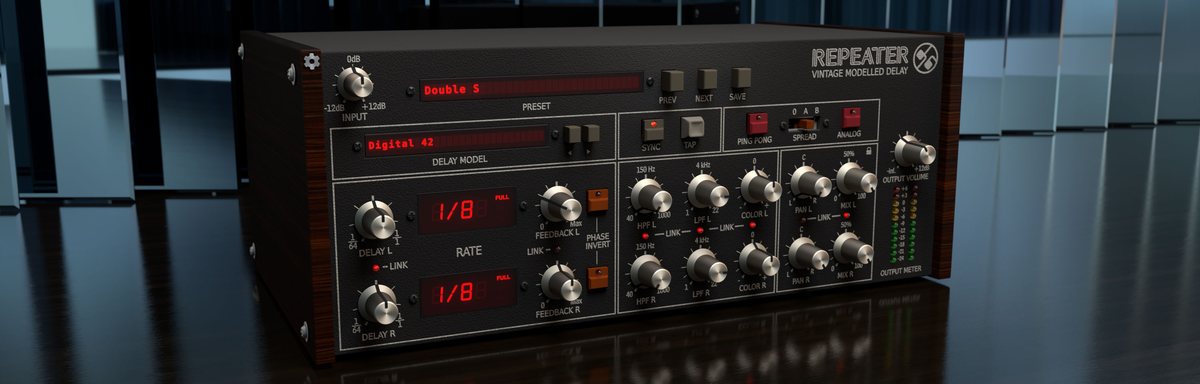
Repeater is a delay plugin made by D16 Group together with Slate Digital. It models 23 delay units, from oil cans and plates to famous early digital machines.
At first glance it looks like a normal stereo delay with separate left and right control, but each of the two channels has independent re-panning and dry/wet mixing, making it a flexible double delay line, as described.
Each channel has phase invert, an audio clipper with a Color parameter, and dual high-pass/low-pass filters. Tempo sync, ping-pong, tap tempo and a two-stage stereo spread are also included.
Models include Cassette Tape, Digital 42, DM-2, Plexy Echo and Telephone, with a tag-based preset browser and MIDI learn.
Key features
23 delay models
Tape, analog bucket-brigade, digital, radio-style and telephone-style models are included. You can switch models to look for the texture that fits a song.
Separate left and right lines
Left and right have independent delay time and feedback, with separate re-panning and dry/wet mixing.
Per-channel tools
Phase invert, clipper (Color) and high-pass/low-pass filters can be adjusted per channel.
Sync, tap and ping-pong
Times can follow the DAW tempo or be set with the tap function. A ping-pong mode is included.
Preset browser and MIDI learn
A tag-based browser helps find presets, MIDI learn assigns hardware controls, and processing is 64-bit internally.
Specifications
| Item | Details |
|---|---|
| Maker | D16 Group (developed with Slate Digital) |
| Type | Delay |
| Delay models | 23 |
| Windows | Windows 7, 8, 10; VST2 / VST3 / AAX |
| Mac | OS X 10.9 to macOS 13; AU / VST2 / VST3 / AAX; Intel / Apple Silicon |
| Recommended | 2.4 GHz CPU, 16 GB RAM (8 GB minimum) |
What is included and system requirements
- Repeater plugin
- 23 delay models
- Tag-based preset browser
- Formats: Windows VST2 / VST3 / AAX; Mac AU / VST2 / VST3 / AAX
How to use it
- Install and rescan plugins in your DAW.
- Load Repeater on a vocal or guitar track, or on a send.
- Choose a delay model.
- Set left and right delay times with tempo sync or tap.
- Set feedback and enable ping-pong if wanted.
- Shape the delay's tone with the filters and Color.
- Adjust width with the stereo spread.
Where it may come in handy
Vocal echoes
Because models differ in texture, you could look for one that suits the voice and add a light echo.
Guitar
Trying tape or analog-style models could add depth to a phrase.
Lo-fi effects
Telephone or radio-style models can give a voice or the whole mix a lo-fi texture.
Who it may suit
- People who want to try many delay textures in one plugin
- People who want to build different delays for left and right
- People who want tape-style delays in a plugin
Good to know before you buy
- It is not standalone; a DAW is required.
How it differs from similar products
We do not pick a winner; the official figures are placed side by side.
D16 Group Sigmund 2
Repeater uses 23 delay models on two left/right lines; Sigmund 2 has four independent lines and nine routings. Regular price of each is $99.
Price
$99 (Plugin Boutique, checked 2026-10-27). Prices can vary by region and promotion, so check the official page before buying.
See Repeater on the product page
More of the same kind
We have introduced 62 delays. Here are some of the others.
- PSP Audioware PSP stompDelay
- Waves Manny Marroquin Delay
- PSP Audioware Lexicon PSP 42
- MeldaProduction MeldaProduction MDelayMB
- Valhalla DSP ValhallaFreqEcho
- Antelope Audio Halo
We have introduced 14 other products from D16 Group.
- D16 Group Sigmund 2
- D16 Group Tekturon
- D16 Group Devastor 2
- D16 Group Syntorus 2
- D16 Group Toraverb 2
For a side-by-side comparison scored on the same criteria, see our comparison of delays.
See the full list in Product database: Effects.
Sources: d16.pl pluginboutique.com (checked 2026-10-27)










Comments