
Disclosure: This page may contain affiliate links. Prices were checked on the date shown and may change.
An introduction to D16 Group Tekturon, based on information from the maker and distributors: what it does, how to use it and who it may suit. It is not scored.
Tekturon is a multitap-delay effect with 16 independent, high-quality delay lines.
— D16 Group official site
What is Tekturon?
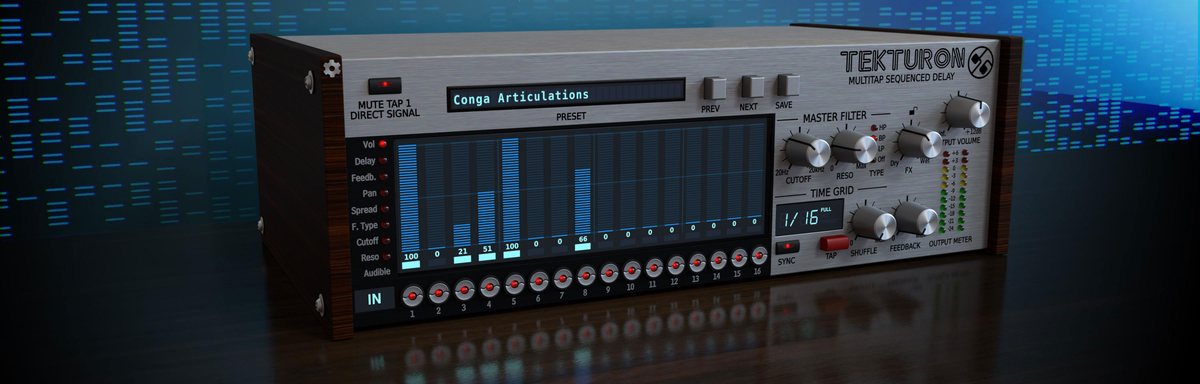
Tekturon is a multitap delay plugin from D16 Group. It has 16 independent delay lines arranged in a unique structure called the Delay Matrix.
Unlike a typical tap delay, it is described as a sequence of 16 taps equally delayed from each other, and working with it resembles using a step sequencer.
Each line has its own delay loop, panning, stereo spread and post-tap multimode filter. Control is two-tiered: globally across all lines or locally per line.
There are quick-access mute buttons, which are MIDI-assignable, plus a tag-based preset browser and MIDI learn.
Key features
16 delay lines
Sixteen taps equally spaced in time. This may suit building rhythmic patterns.
Delay Matrix
The tap layout is easy to grasp visually, and settings can be built in a sequencer-like way.
Global and local control
Time grid, base feedback, shuffle and master filter are global; feedback, delay multiple, filter, pan, spread and level are per line.
Mute buttons
Each line's output can be muted quickly, and the buttons can be assigned to MIDI.
Low aliasing and 64-bit
Ultra-low aliasing output, 64-bit internal processing, a tag-based preset browser and MIDI learn.
Specifications
| Item | Details |
|---|---|
| Maker | D16 Group |
| Type | Multitap delay |
| Delay lines | 16 |
| Windows | Windows 7 to 10; VST2 / VST3 / AAX |
| Mac | macOS 10.13 to 12 Monterey (64-bit only); VST2 / VST3 / AU / AAX; Intel / Apple M1 |
| Recommended | 16 GB RAM (8 GB minimum) |
What is included and system requirements
- Tekturon plugin
- Tag-based preset browser
- Windows: VST2 / VST3 / AAX
- Mac: VST2 / VST3 / AU / AAX
How to use it
- Install and rescan plugins in your DAW.
- Load Tekturon as an insert or on a send.
- Set the time grid to match the song's tempo.
- Set the base feedback value.
- Adjust each line's delay time (a multiple of the grid) and feedback.
- Spread the taps with pan and stereo spread.
- Use the mute buttons to choose which lines sound.
Where it may come in handy
Rhythmic delay
Finely arranged taps could be added to drums, percussion or synths.
Live-style control
Mute buttons assigned to MIDI can be switched along with the arrangement.
As part of the arrangement
It may suit using delay as a rhythmic element rather than only an ambience.
Who it may suit
- People who want to use delay as a rhythmic element
- People who like step-sequencer-style control
- People who want to switch things live
Good to know before you buy
- It is not standalone; a DAW is required.
- The OS list on the retailer page is older; check the maker for the latest OS support.
How it differs from similar products
We do not pick a winner; the official figures are placed side by side.
D16 Group Sigmund 2
Tekturon has 16 equally spaced lines; Sigmund 2 has four independent lines and nine routings. Regular price is $75 for Tekturon and $99 for Sigmund 2.
Price
$75 (Plugin Boutique, checked 2026-10-27). Prices can vary by region and promotion, so check the official page before buying.
See Tekturon on the product page
More of the same kind
We have introduced 62 delays. Here are some of the others.
- IK Multimedia Tape Echo
- Moog Moogerfooger MF-104S Analog Delay
- Waves H-Delay Hybrid Delay
- Universal Audio Capitol Chambers
- Waves SuperTap
- AudioThing Mantis
We have introduced 14 other products from D16 Group.
For a side-by-side comparison scored on the same criteria, see our comparison of delays.
See the full list in Product database: Effects.
Sources: d16.pl pluginboutique.com (checked 2026-10-27)










Comments