
Disclosure: This page may contain affiliate links. Prices were checked on the date shown and may change.
An introduction to McDSP SA-3 Spectral Processor, based on information from the maker and distributors: what it does, how to use it and who it may suit. It is not scored.
Like the SA-2, the SA-3 is great for removing unwanted spectral spikes in dialog, vocals, and many other kinds of audio inputs.
— McDSP official site
What is SA-3 Spectral Processor?
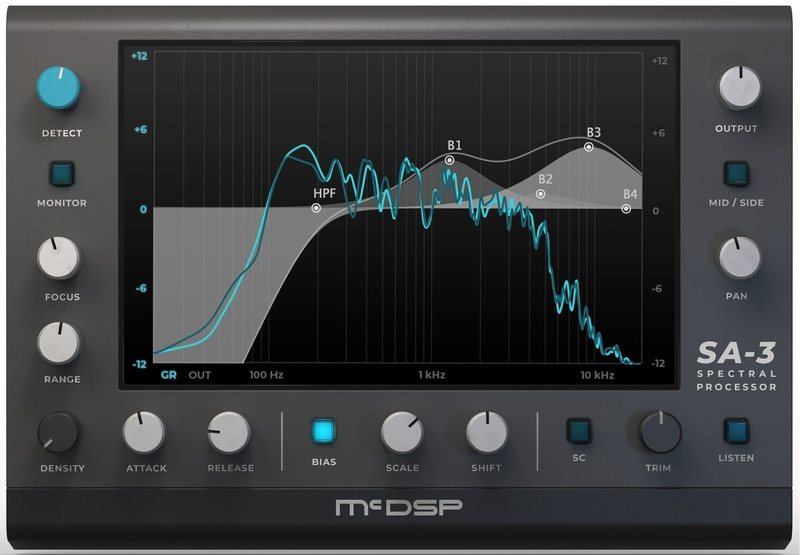
SA-3 Spectral Processor is a spectral processing plugin from McDSP. It is built to find frequency components that jut out of a voice or dialogue recording and bring them down automatically.
It builds on the algorithms of the earlier SA-2 Dialog Processor, with more processing bands and extra controls that shape how the processing behaves. It is designed for dialogue and vocals as well as many other kinds of audio.
It can also track persistent peaks, such as steady ringing or resonances, and reduce them. Instead of hunting for a band by hand as with an EQ, you use the Detect and Monitor controls to locate the target.
It supports side-chain input and mid/side processing, and comes in mono and stereo versions. It is part of the McDSP v7 line and runs natively on both Apple silicon and Intel.
Key features
Over 1,000 processing bands
The processing resolution is high, so narrow frequency spikes can be handled individually. It may help when you want to deal with thin components that are hard to chase with manual EQ.
Detect and Monitor
These controls are for finding signal spikes and persistent overtones. With Monitor you can check what is being targeted and see where the processing is acting.
User-programmable Bias curve
You can draw a curve that weights the amount of processing by frequency. It may be useful when you want to leave one region of a voice alone and treat another more firmly.
Focus, Range and Density
These three controls shape how the spectral processing is applied. Range of effect, amount of reduction and processing density are set separately, which helps tailor the result to the material.
Side-chain and mid/side
Processing can be driven by another signal, or applied to the mid and side components separately. One possible use is tidying the centre of stereo material.
Double-precision processing
Internal processing runs in double precision. Mono and stereo versions are provided so you can choose to match the channel layout.
Specifications
| Item | Details |
|---|---|
| Maker | McDSP |
| Type | Spectral processing plugin (v7) |
| Processing bands | Over 1,000 |
| Channels | Mono and stereo versions |
| Supported OS | macOS 10.13 or later (64-bit, native on Apple silicon and Intel); Windows 10 or later |
| Authorization | iLok2 or iLok3 key, or an iLok License Manager account with iLok Cloud; v7 products allow two activations per license |
| Demo | 14-day demo (stated on the McDSP site) |
What is included and system requirements
- SA-3 Spectral Processor (mono and stereo versions)
- Plugin formats should be checked on the product page
- System requirements: macOS 10.13 or later (Apple silicon and Intel), Windows 10 or later
- Authorization requires an iLok2/iLok3 key or iLok Cloud
How to use it
- Prepare a McDSP account and an iLok License Manager account.
- Buy the product, or start the 14-day demo, and put the license on your iLok.
- Install the plugin with the installer and restart your DAW so it is detected.
- Insert SA-3 on the track you want to treat and choose the mono or stereo version to match.
- Use Detect and Monitor to see where the protruding components are.
- Adjust Focus, Range and Density a little at a time.
- If needed, draw the Bias curve to decide which regions to keep and which to reduce.
- Compare with the bypassed sound and decide the amount by ear.
Where it may come in handy
Cleaning up a home-recorded vocal
Room reflections or microphone character can make some frequencies stand out harshly. It may be worth trying when you want to reduce such spikes without searching for them with EQ.
Narration and streaming voice
It may help when breath or mouth resonances stand out in a commentary or radio-style voice. It carries over the thinking of the dialogue-oriented SA-2.
Reducing steady resonances
A constant ringing frequency on a guitar amp or synth might be handled by the persistent-peak tracking. It is one option when you want to avoid searching with EQ.
Tidying with the side-chain
Because processing can be driven by another track, it could be used to sort out a band where several sounds overlap.
Who it may suit
- Home recording and streaming users who want spikes in a voice reduced automatically
- People who clean up dialogue or narration
- Those who want to try a tool other than EQ for persistent resonances
- Users comfortable with iLok authorization
Good to know before you buy
- Authorization requires an iLok2/iLok3 key, or a free iLok License Manager account with iLok Cloud.
- McDSP v7 products allow two activations per license.
- Heavy processing may change the character of the sound, so comparing with the original is recommended.
- A 14-day demo is available (stated on the McDSP site).
How it differs from similar products
We do not pick a winner; the official figures are placed side by side.
McDSP SA-2 Dialog Processor
According to the Plugin Boutique product text, SA-3 builds on the SA-2 algorithms and adds over 1,000 processing bands, a Bias curve, Focus, Range and Density controls, side-chain support and mid/side processing.
Price
Please check the official page for the price.
See SA-3 Spectral Processor on the product page
More of the same kind
Other introduction articles of the same kind.
- Waves MaxxBass
- Zynaptiq UNVEIL
- Solid State Logic Acoustifier
- sonible pure:unmask
- Antelope Audio Marble White AutoWah
- Leapwing Audio RootOne
We have introduced 53 other products from McDSP.
- McDSP Analog Channel HD v7
- McDSP McDSP 6050 Ultimate Channel Strip HD v7
- McDSP SA-2 Dialog Processor HD v7
- McDSP 6060 Ultimate Module Collection Native v7
- McDSP 6034 Multi-Band Compressor
See the full list in Product database: Effects.
Sources: mcdsp.com pluginboutique.com (checked 2026-10-27)










Comments