
Disclosure: This page may contain affiliate links. Prices were checked on the date shown and may change.
An introduction to NUGEN Audio LM-Correct, based on information from the maker and distributors: what it does, how to use it and who it may suit. It is not scored.
LM-Correct gives you a unique, immediate and hassle-free route to loudness-compliant audio in your day-to-day loudness workflow, saving you time and preventing costly mistakes.
— NUGEN Audio official site
What is LM-Correct?
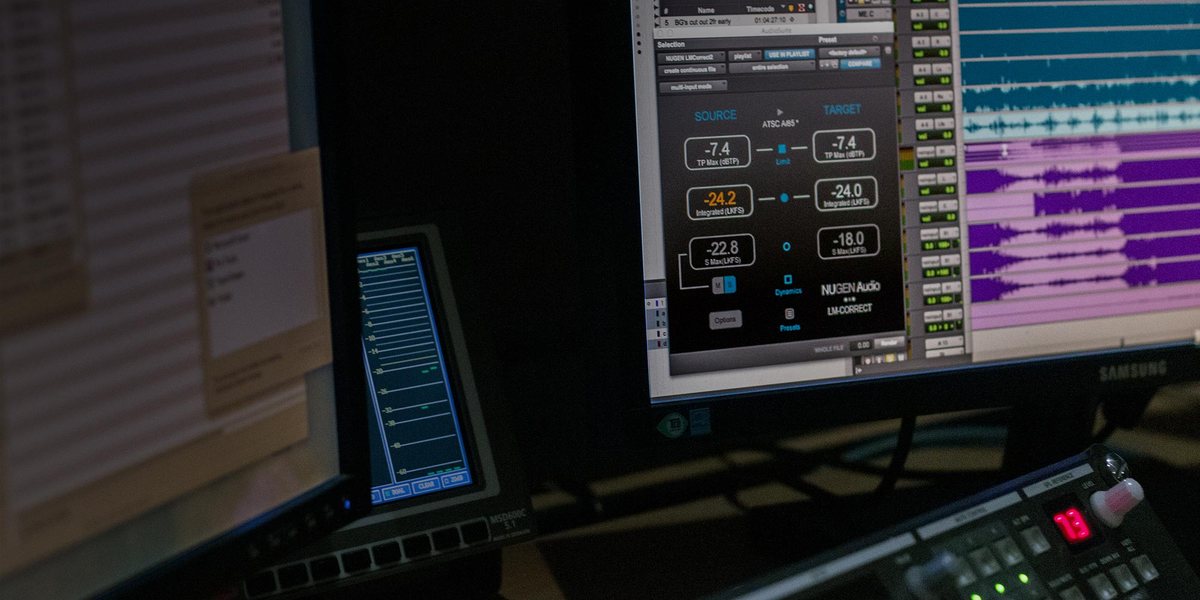
LM-Correct is software from NUGEN Audio in the UK that automatically corrects the loudness of audio files to meet a specification. Plugin Boutique lists it as LM-Correct 2. It can be used as a plug-in inside an editor or DAW, or as a standalone application.
According to the official page it provides automated compliance with ITU-R BS.1770, EBU R128 and CALM Act. Targets can be set for integrated loudness, maximum true peak level, and short-term and momentary loudness, and a look-ahead true peak limiter prevents the correction from causing overshoots.
For file-based processing (standalone or Avid AudioSuite), the process of assessing and adjusting the entire file runs faster than real time. It automatically handles material from mono through 7.1.4, and an optional dialog-gated measure can be specified.
With the optional DynApt extension it can also correct LRA and dynamics. The maker says it preserves dialog intelligibility and recognizes intentional dramatic transitions.
Key features
One-click analysis and correction
Measurement and correction are done together to reach the target loudness, which may reduce repeated manual level adjustment.
True peak limiter
A look-ahead limiter keeps peaks raised by the correction from exceeding the limit, and the maximum true peak level is set numerically.
Faster than real time
File processing runs faster than real time, which may save time when there are many deliverables.
Switching specifications
Audio made for one specification can be converted for another in one operation, which may help with regional deliveries.
Multichannel support
Handles material from mono through 7.1.4 automatically and supports ASWG 7.1 for game audio.
DynApt extension (optional)
An extension that adds LRA and dynamics correction, intended for specifications such as EBU R128 S1.
Specifications
| Item | Details |
|---|---|
| Product type | Automatic loudness correction software |
| Formats | AudioSuite (AAX, 64-bit), standalone application (Windows / macOS) |
| Minimum requirements | Mac OSX 10.9 / Windows 7, 512 MB RAM (as listed by the maker) |
| Channels | Mono through 7.1.4 |
| Standards | ITU-R BS.1770, EBU R128, CALM Act |
What is included and system requirements
- Plug-in (AudioSuite)
- Standalone application
- DynApt extension sold separately
How to use it
- Create a NUGEN Audio account and register the license code.
- Get the installer from My Downloads and run it.
- Open LM-Correct in the app or editor.
- Authorize the license.
- Enter the target integrated loudness and maximum true peak level.
- Run the analysis and check the result.
- Run the correction and check the exported file.
Where it may come in handy
Final check of finished audio
It could be used as a last check that finished files are within a target, correcting those that are not.
Delivering for several regions or standards
When one program must be redelivered to another specification, it could convert it with one click.
Quick level fixing while editing
Measurement and correction could be done inside an editor; the maker says file processing is faster than real time.
Who it may suit
- People delivering to broadcast or streaming loudness specifications
- People who produce files for several specifications
- People who want to fix level at the end of editing
Good to know before you buy
- The official page lists AudioSuite (AAX) 64-bit and standalone; check other formats before buying.
- The DynApt extension is sold separately.
- The maker states that the earlier Premiere Pro panel is not compatible with the latest Premiere Pro.
Price
$399 (NUGEN Audio official site, checked 2026-10-27). Prices can vary by region and promotion, so check the official page before buying.
See LM-Correct on the product page
More of the same kind
Other introduction articles of the same kind.
- Mellowmuse Mellowmuse ATA Auto Time Adjuster
- Tone Empire LAM16 Preamp
- New Audio Technology Spatial Sound Card – Spatial Sound Card Pro
- LANDR LANDR FX Acoustic
- MeldaProduction MAutoVolume
- iZotope Neutron 5 Elements
We have introduced 30 other products from NUGEN Audio.
- NUGEN Audio Halo Vision
- NUGEN Audio MasterCheck
- NUGEN Audio Monofilter
- NUGEN Audio Stereoplacer
- NUGEN Audio NUGEN Audio Stereoplacer Elements
See the full list in Product database: Effects.
Sources: nugenaudio.com pluginboutique.com (checked 2026-10-27)










Comments