
Disclosure: This page may contain affiliate links. Prices were checked on the date shown and may change.
An introduction to Rob Papen DelGrain, based on information from the maker and distributors: what it does, how to use it and who it may suit. It is not scored.
DelGrain offers a Delay that plays back audio in a granular, or grainy, way.
— Rob Papen official site
What is DelGrain?
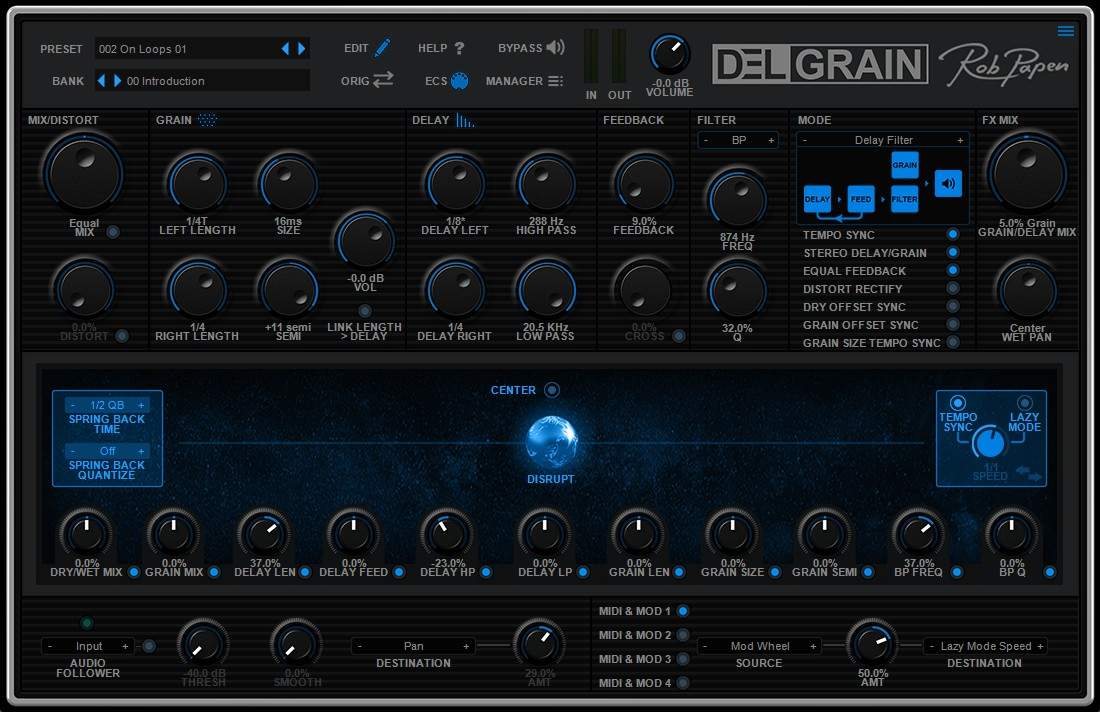
DelGrain is a delay-type effect from Rob Papen of the Netherlands. The maker says it plays audio back in a granular way and has a lot in common with its DelSane plug-in.
Grain size can be set in a tempo-based way, and grain length can be tempo-based as well. A SEMI function changes pitch within a range of 12 semitones up and down. The maker says the tempo-based granular action suits drum and percussion loops, and also works for alienating vocals and sound effects.
The granular processing can be placed before the delay, inside it, after it or in parallel. A distortion module sits ahead of the granular delay, and a filter section with a high-pass/low-pass combination, a band-pass filter and a vocal/vowel filter can be placed after the delay-and-granular stage.
The central control is a slider called the Disrupt Sphere, which changes several parameters at once. A Spring feature returns it to the centre in a tempo-based way, and Lazy Mode moves it automatically. It runs on Windows and Mac in AU, VST, VST3 and AAX formats.
Key features
Granular delay
The delay plays audio back as small grains. Grain size and length can be set against the tempo, which may help when you want a rhythmic grainy texture on a drum loop.
Five grain modes
Pre-Delay, Delay, Post Delay, Grain Filter and Delay Filter change the order or parallel arrangement of grain, delay and filter. The same material responds differently depending on the layout.
Tape delay as well
Besides the granular delay (1.0 to 4096 ms on each side) there is a tape delay with low-pass and high-pass filters, also 1.0 to 4096 ms. In tempo-sync mode the range is 1/64 triplet to 1.1 dotted bar.
Distortion and filters
A distortion with a Rectify mode comes before the delay, and the filter section offers 12 dB LP/HP, a band-pass with Q control and a Vox filter with vowel control. They can be used to tidy the grainy sound or to dirty it further.
Disrupt Sphere
Moving the slider changes the delay parameters connected to it at the same time, and it can return to the centre in time with the tempo. It may suit anyone who wants performance-like changes.
Audio follower and MIDI/MOD
An audio follower with a side-chain input and a MIDI & MOD 1 to 4 section can drive many parameters, including the Disrupt Sphere. This lets the delay react to another sound or to playing.
Specifications
| Item | Details |
|---|---|
| Type | Granular / tape delay (effect) |
| Grain modes | Pre-Delay / Delay / Post Delay / Grain Filter / Delay Filter |
| Granular delay | 1.0 to 4096 ms per side (in sync: 1/64 triplet to 1.1 dotted bar) |
| Grain size | 1 to 1024 ms |
| SEMI | 12 semitones up and down |
| Filters | 12 dB LP/HP, band-pass (Q), Vox filter (vowel) |
| GUI sizes | 100 / 125 / 150 / 200% |
| Windows formats | 64-bit VST3 / AAX / VST (Windows 7 or higher; AAX for Pro Tools 12 or higher) |
| Mac formats | 64-bit AU / VST3 / AAX / VST (OS 10.15 or higher, ARM compatible) |
| Activation | Offline serial-number activation; can be installed on 2 computers |
What is included and system requirements
- DelGrain plug-in (AU / VST / VST3 / AAX)
- Serial-number licence (can be installed on 2 computers)
- A demo version is offered on the maker's site
How to use it
- Create an account on the Rob Papen site and register the serial number after purchase.
- Run the installer and follow the offline activation steps.
- Insert DelGrain on a track such as a drum loop in your DAW.
- Choose a grain mode to set how the granular and delay stages are arranged.
- Set the grain size in tempo sync or in milliseconds.
- Use SEMI to move the pitch up or down if needed.
- Shape the tone with the filters and distortion.
- Move the Disrupt Sphere to change several parameters at once.
Where it may come in handy
Drum and percussion loops
The maker says the tempo-based granular action suits drums and percussion. It may be useful when you want to add fine rhythmic cuts to a loop.
Alienating vocals
The maker also mentions turning vocals and sound effects into something different. It may be worth trying when you want to change the voice texture for one section of a song.
Changing the mood across a song
Moving the Disrupt Sphere along with DAW automation may let you change the character of the delay as a song develops.
Who it may suit
- People who want to try adding granular processing to a delay
- People who want rhythmic processing on drums and percussion
- People who like to move a sound with one big control
- People looking for something close in feel to the maker's DelSane
Good to know before you buy
- Activation uses a serial number offline; the maker says there is no direct connection between the plug-in and its site.
- It can be installed on 2 of your own computers.
- The AAX version is for Pro Tools 12 or higher.
- A demo version is offered on the maker's site.
How it differs from similar products
We do not pick a winner; the official figures are placed side by side.
Klevgrand Modley
DelGrain combines a granular delay with a tape delay and offers five modes for where the grain processing sits. Modley arranges 15 effect modules in Pre, Loop and Post racks and has no dedicated granular function.
Price
$35 (Rob Papen official site, checked 2026-10-27). Prices can vary by region and promotion, so check the official page before buying.
See DelGrain on the product page
More of the same kind
We have introduced 62 delays. Here are some of the others.
- PSP Audioware PSP stompDelay
- BLEASS BLEASS Tides
- W. A. Production SphereDelay 2
- Sound Particles inDelay
- Boz Digital Labs Imperial Delay
- Antelope Audio Tape Delay
We have introduced 17 other products from Rob Papen.
For a side-by-side comparison scored on the same criteria, see our comparison of delays.
See the full list in Product database: Effects.
Sources: robpapen.com pluginboutique.com (checked 2026-10-27)










Comments