
Disclosure: This page may contain affiliate links. Prices were checked on the date shown and may change.
An introduction to Sonarworks SoundID Reference for Multichannel, based on information from the maker and distributors: what it does, how to use it and who it may suit. It is not scored.
Intuitive speaker calibration software anyone can use to measure and calibrate a multichannel setup in less than an hour.
— Sonarworks official site
What is SoundID Reference for Multichannel?
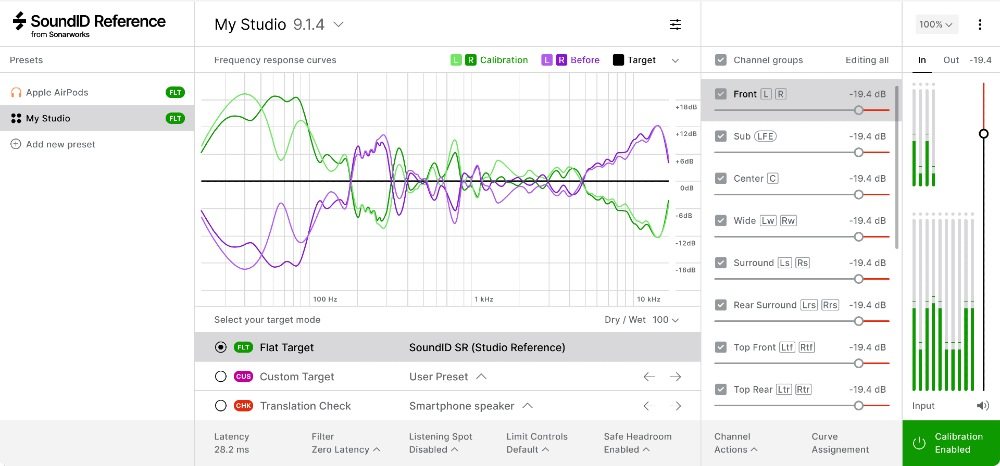
SoundID Reference for Multichannel is software from Sonarworks in Latvia that measures and corrects multichannel speaker systems. It supports systems from stereo up to 9.1.6 channels and is aimed at building Dolby Atmos studio environments.
It works by measuring the output of the speakers with a dedicated measurement microphone and creating correction data (a calibration profile) from the result. The correction is applied with a plug-in in the DAW or exported to supported hardware. The recommended microphone is an individually calibrated dedicated model with correction curves for 0, 30 and 90 degrees.
The target can be the Dolby Atmos Music curve, a flat response, or a custom curve. The calibrated frequency range can be limited, and settings can be separated by groups of channels. Satellite and LFE channels get a phase-based time alignment.
This article organises the functions, supported devices for export and the workflow from the official site and Plugin Boutique. No impressions of the corrected sound are written, and no score is given.
Key features
Measurement and correction from stereo to 9.1.6
Speaker measurement and calibration works for systems from stereo up to 9.1.6 channels. The DAW plug-in is available in VST2, VST3, AAX and AU formats.
A guide through the measurement process
Measurement follows an on-screen guide. It uses the dedicated measurement microphone and shows the speaker measurement steps one by one.
Phase-based time alignment
The maker says satellite and LFE channels are aligned based on phase with sub-millisecond accuracy. It is for correcting differences in distance to the speakers.
Choice of target modes
The post-correction target can be the Dolby Atmos Music curve, flat or custom. The calibration frequency range can be limited and the target curve adjusted manually.
Export to plug-in or hardware
Correction data can be used in the DAW plug-in or exported to supported devices. Listed devices are AVID MTRX with SPQ DSP, AVID MTRX Studio, DAD AX32 with SPQ DSP, the Dolby Atmos Renderer Mastering Suite and Jones-Scanlon studio monitors.
Zero-latency DSP and Apple Silicon support
The maker states the multichannel plug-in DSP has zero latency. It supports Apple Silicon (M1) natively.
Headphone calibration profiles
More than 480 headphone calibration profiles are included, for approaching a flat reference on headphones separately from the measured speaker correction.
Specifications
| Item | Details |
|---|---|
| Type | Multichannel speaker measurement and calibration software (DAW plug-in and standalone) |
| Channels | Stereo to 9.1.6 |
| Formats | VST2 / VST3 / AAX / AU |
| Targets | Dolby Atmos Music curve / flat / custom |
| Export targets | AVID MTRX (SPQ DSP), AVID MTRX Studio, DAD AX32 (SPQ DSP), Dolby Atmos Renderer Mastering Suite, Jones-Scanlon studio monitors |
| OS | Mac and Windows |
| Trial | 21-day free trial (official site) |
| Editions | Download only and a version with measurement microphone (official site) |
What is included and system requirements
- SoundID Reference for Multichannel (plug-in and standalone measurement app)
- More than 480 headphone calibration profiles
- The version with measurement microphone includes the SoundID Reference measurement microphone (official site)
How to use it
- Register the licence in your Sonarworks account and download the software.
- Measure the system with the measurement microphone in SoundID Reference Measure.
- Create a correction profile from the measurement.
- Choose a target (Dolby Atmos Music curve, flat or custom).
- Load the profile into the DAW plug-in or export it to supported hardware.
- Listen to reference tracks and check differences from other playback environments.
- If needed, limit the calibrated frequency range or adjust the target curve.
Where it may come in handy
Setting up a home Atmos room
In a speaker setup such as 7.1.4, it could be used to measure and adjust the characteristics and timing of each speaker.
Exporting to supported hardware
It could be used when you want to export correction data to monitor controllers such as AVID MTRX so that correction does not depend on the DAW.
Checking how a mix translates
Finishing on calibrated speakers and then checking differences on other playback systems is one possible use.
Who it may suit
- People who want to measure and set up a multichannel monitoring environment at home or in a studio.
- People who want to check Dolby Atmos mixes on calibrated speakers.
- People who want to export correction data to supported hardware.
Good to know before you buy
- At present, multichannel profiles are not supported for system-wide calibration (official FAQ). Profiles are loaded in the standalone app for uses such as export to supported devices.
- Third-party measurement microphones can be used, but the maker says calibration files are not provided for them so the measurement may be less precise.
- There is a download-only version and a version with a measurement microphone.
- A 14-day money-back guarantee applies (official FAQ).
How it differs from similar products
We do not pick a winner; the official figures are placed side by side.
SoundID Reference for Multichannel with Measurement Microphone
The official site offers a download-only version and a version that includes the dedicated measurement microphone. The software is the same product; the difference is whether the microphone is included.
Price
Please check the official page for the price.
See SoundID Reference for Multichannel on the product page
More of the same kind
Other introduction articles of the same kind.
- OBS Project OBS Studio
- VB-Audio Voicemeeter Banana
- Waves COSMOS Sample Finder
- Sonnox ListenHub
- Stagecraft Software Universal Plug
- Digital Brain Instruments Multiplex Vocoder 3
We have introduced 6 other products from Sonarworks.
- Sonarworks SoundID VoiceAI
- Sonarworks Apollo Monitor Correction Add-on
- Sonarworks SoundID VoiceAI Kids Voices Expansion Pack
- Sonarworks SoundID VoiceAI Expansion PackC-Pop Voices
- Sonarworks SoundID VoiceAI ROCK Voice pack
See the full list in Product database: Streaming and recording software and others.
Sources: sonarworks.com pluginboutique.com (checked 2026-10-27)










Comments