
Disclosure: This page may contain affiliate links. Prices were checked on the date shown and may change.
An introduction to Sonnox Claro, based on information from the maker and distributors: what it does, how to use it and who it may suit. It is not scored.
Claro is a comprehensive EQ plugin that serves the production process from composition to final mix, with three distinct views.
— Sonnox official site
What is Claro?
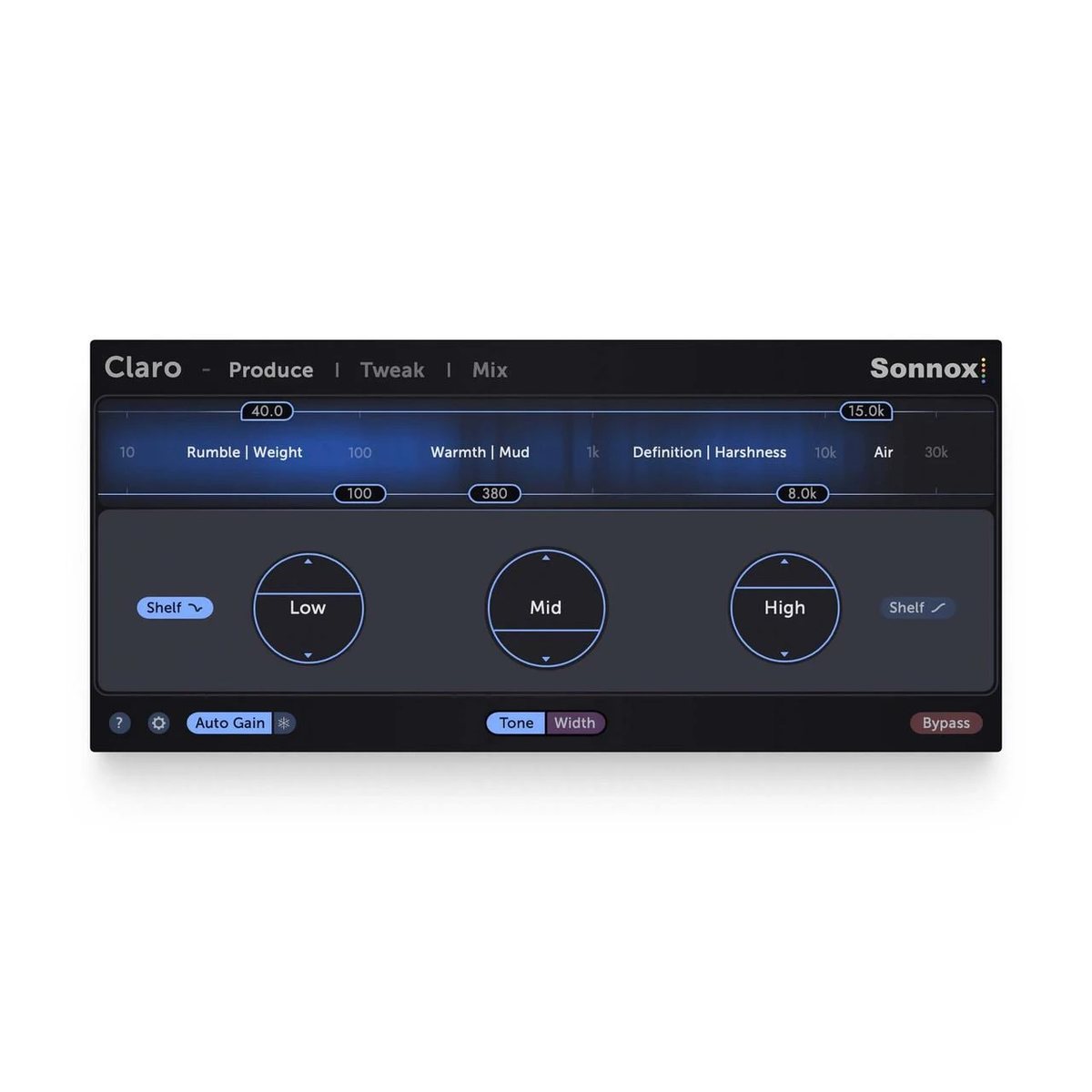
Claro is an equalizer plug-in from Sonnox that aims to cover the process from composition to the final mix in one tool. Its interface is divided into three views, Produce, Tweak and Mix, which lead from broad moves to finer detail.
The official idea is vibe first, detail later. The Produce view reduces technical vocabulary so the user can concentrate on broad tone shaping. Frequencies are shown not only in Hz but also with words such as Mud and Harshness, and a piano keyboard lets a band be set to a specific note.
The Tweak view allows finer correction. A real-time analyzer adapts to the user's moves and highlights areas where resonance lingers. The Mix view shows every instance of Claro in the project at once, making it possible to see where tracks compete in the same frequency range, which is known as masking.
Each band can process left, right, mid, side, mono or stereo channels, and Plugin Boutique describes 26 bands. It supports AU, VST3 and AAX and is authorized through iLok.
Key features
Three views for each stage
Produce is for broad tone, Tweak for fine correction, and Mix for checking how tracks relate. A user can stay in Produce while composing and move to Tweak or Mix at later stages.
Resonance display
The analyzer in Tweak follows the selected channel and the Q of the band. Lingering resonances are highlighted, which may help when deciding how much to cut.
Masking check in Mix
All Claro instances in the project are shown together, with competing ranges marked in yellow against a chosen reference track. Invert EQ applies a boost to one track and a cut to another in one move.
Words and notes instead of only Hz
Terms such as Mud and Harshness and a piano keyboard for note-based settings are available. It lets users who are not used to Hz values choose bands in musical terms.
Wide range and flexible filters
Plugin Boutique lists a 20 Hz to 40 kHz range, variable Q, resonance on cut and shelf filters and slopes up to 120 dB per octave, covering both corrective and creative use.
Auto Gain
Auto Gain keeps the track at a consistent loudness whatever the EQ settings. Sonnox says it works differently from common auto-gain implementations, helping make comparisons fairer when boosting.
Smooth automation
Sonnox says parameter interpolation is smooth so that automation produces fewer artifacts, which matters when EQ moves are written as automation.
Specifications
| Item | Details |
|---|---|
| Views | Produce / Tweak / Mix |
| Number of bands | 26 (per Plugin Boutique) |
| Frequency range | 20 Hz to 40 kHz (per Plugin Boutique) |
| Channel processing | Left / Right / Mid / Side / Mono / Stereo |
| Filter slopes | Up to 120 dB per octave (per Plugin Boutique) |
| Plug-in formats | AU, VST3, AAX Native (Pro Tools 11 or later) |
| Operating systems | macOS 10.14 or later, Windows 10 (64-bit) or later |
| Licensing | iLok, two simultaneous activations |
What is included and system requirements
- Claro plug-in (each license allows two activations)
- A free trial offered by Sonnox
- Authorization with a free iLok account; a USB iLok or iLok Cloud can also be used
How to use it
- Prepare an iLok account and purchase Claro or start the trial.
- Install it and restart your DAW.
- Insert Claro on a track and set broad tone in the Produce view.
- Switch to Width if needed to check the side content.
- Move to the Tweak view and use the analyzer to find strong resonances to adjust.
- Insert Claro on several tracks, open the Mix view and choose a reference track.
- Watch the competing ranges marked in yellow and try Invert EQ if needed.
Where it may come in handy
Adjusting tone while writing
The Produce view keeps numbers and jargon to a minimum, so it may suit moments when tone should be set without breaking the creative flow.
Separating vocals and backing
Choosing the vocal as the reference track in the Mix view shows competing ranges, which may help when checking overlap between a singer and the backing.
Tidying stereo synths and loops
Because mid and side processing are supported, it may help when checking and tidying side content in stereo material.
Who it may suit
- People who feel unsure about EQ jargon and numbers and prefer a visual approach
- People who want to check frequency collisions across several tracks at once
- People who want one EQ from composition to finishing
Good to know before you buy
- Authorization through iLok is required; a physical USB iLok is not mandatory.
- Because several instances may run at once, CPU load can become noticeable depending on use.
- The Mix view requires an instance of Claro on each track you want to compare.
- Figures such as band count and frequency range follow Plugin Boutique's description.
Price
$134 (Plugin Boutique, checked 2026-10-27). Prices can vary by region and promotion, so check the official page before buying.
More of the same kind
We have introduced 122 EQs. Here are some of the others.
- IK Multimedia T-RackS Linear Phase Equalizer
- IK Multimedia Master EQ 432
- MAAT MAAT SantaCruzEQ12
- Solid State Logic SSL X-DynEQ
- McDSP 4020 Retro EQ
- Waves PuigTec EQs
We have introduced 11 other products from Sonnox.
- Sonnox Sonnox Oxford Dynamic EQ Native
- Sonnox Oxford EQ
- Sonnox Voca
- Sonnox Oxford Envolution
- Sonnox Oxford Drum Gate 2
For a side-by-side comparison scored on the same criteria, see our comparison of EQs.
See the full list in Product database: Effects.
Sources: sonnox.com pluginboutique.com minet.jp (checked 2026-10-27)










Comments