
Disclosure: This page may contain affiliate links. Prices were checked on the date shown and may change.
An introduction to Soundtoys Sie-Q, based on information from the maker and distributors: what it does, how to use it and who it may suit. It is not scored.
Sie-Q faithfully captures the hardware's smooth curves, airy highs and ease of use, allowing you to get the tone you want fast, without a lot of hassle.
— Soundtoys official site
What is Sie-Q?
Sie-Q is a three-band equalizer plug-in from Soundtoys. It takes the Siemens W295b, a German broadcast equalizer, as its model, and it is presented as the first EQ in the Soundtoys line.
According to the official description, it captures the smooth curves, airy highs and ease of use of the hardware. The saturation character of the original is modeled as well, and a Drive control lets the user bring in the coloration of the hardware. The EQ and the saturation therefore live in one plug-in.
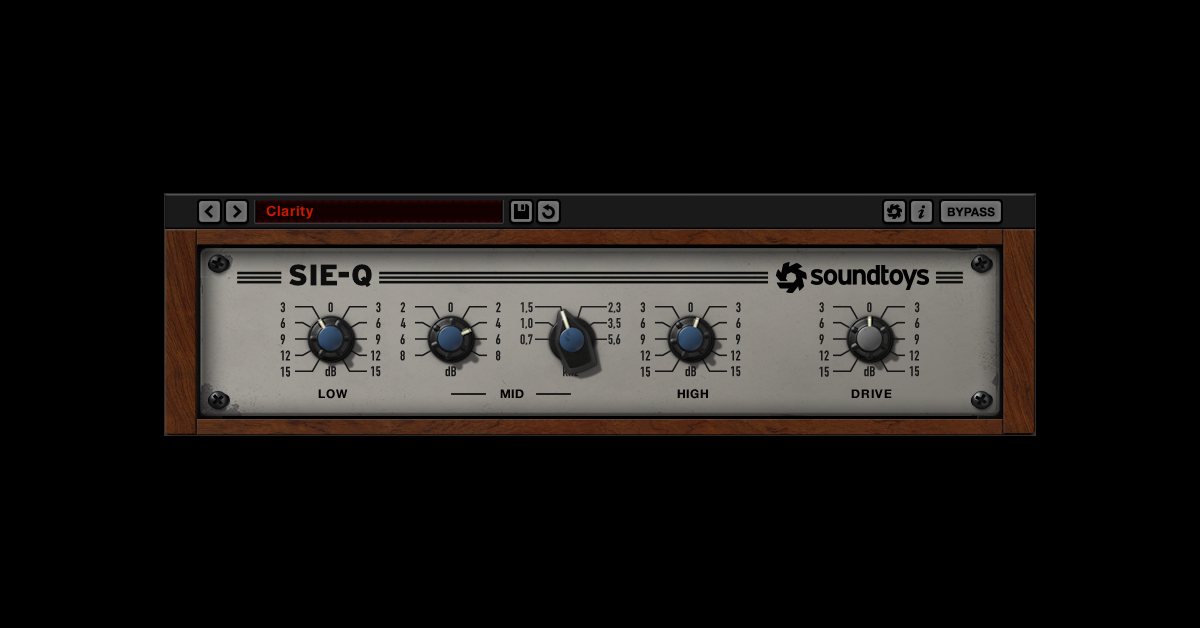
The controls consist of High, a switched Mid band, Low and Drive. With so few parameters, it is designed for turning knobs and finding a direction rather than chasing exact numbers. Soundtoys explains that, because the original was made for broadcast, its frequencies and curves were chosen so that results hold together in many situations.
It supports VST2, VST3, AU, AAX Native and AAX AudioSuite on macOS and Windows. It is also included in the Soundtoys 5 bundle and in Effect Rack, where it can be combined with Decapitator and other effects in one window.
Key features
Smooth High band
Soundtoys names the high end as the main feature. Raising the High knob adds space and air, while pulling it back can soften bright acoustic guitars and cymbals. It may be worth trying when adjusting how a vocal sits.
Switched Mid band
The mid band is selected with a switch rather than swept continuously. It can accentuate or tame mid-range detail, and the limited choices can make decisions quicker.
Low band for the foundation
The Low band can carve out space or add rich bass. It may be useful for shaping the foundation of mixes that include drums and bass.
Drive for hardware coloration
Pushing Drive brings in the saturation character of the original. It can be used not only to equalize but also to add a little color to a sound.
Broadcast-derived design
The original W295b was built for broadcast, and Soundtoys says its frequencies and curves were chosen to keep things sounding good in many situations. It is said to carry over to tracking and mixing.
Works inside Effect Rack
In Soundtoys Effect Rack, Sie-Q and Decapitator can be placed side by side. Soundtoys suggests this pairing for mixes that feel a little too digital.
Specifications
| Item | Details |
|---|---|
| Bands | High / Mid (switched) / Low plus Drive |
| Model | Siemens W295b (broadcast EQ) |
| Plug-in formats | AAX Native, AAX AudioSuite, VST2, VST3, AU (64-bit only) |
| Sample rates | 44.1 kHz to 192 kHz |
| Operating systems | macOS 10.15 or later, Windows 10 or later (ARM-based Windows is not supported) |
| Current version | 5.5 (as shown on the official page) |
| Licensing | A free iLok account is required (Plugin Boutique states a physical USB iLok is not required) |
What is included and system requirements
- Sie-Q plug-in (one license)
- Supported hosts include Pro Tools, Live, Cubase, Nuendo, Logic, Studio One, Reaper and Bitwig
- An internet connection is required at activation
- Also included in the Soundtoys 5 bundle and in Effect Rack
How to use it
- Create a free iLok account if you do not have one.
- After purchase, register the product in your Soundtoys account and obtain the installer and activation code.
- Run the installer and restart your DAW.
- Insert Sie-Q on a track or on the master bus.
- With Drive kept low, move High, Mid and Low to decide on a direction.
- Raise Drive as needed to add saturation coloration.
- Toggle the plug-in on and off and match the output level so the comparison is fair.
Where it may come in handy
Air on vocals
The High knob adjusts how open the top end is, so it may be worth trying when a sung part needs more lift in the final stage.
Finishing a full mix
Soundtoys mentions adding a little of the High band on the master bus. It may suit moments when a mix needs slightly more openness.
Smoothing drums and guitars
Softening overly bright cymbals or acoustic guitars is one of the uses Soundtoys lists. It may fit cases where the edges of a recording need rounding.
Who it may suit
- People who want a simple EQ with few knobs to set a direction quickly
- People who want hardware-style coloration together with equalization
- Existing Soundtoys users who prefer a consistent workflow
Good to know before you buy
- An iLok account is required. Plugin Boutique states that a physical USB iLok is not needed.
- ARM-based Windows is not supported.
- The Mid band is switched, not a freely sweepable frequency.
- It is included in the Soundtoys 5 bundle, so check for overlap if you already own that.
Price
$99 (Soundtoys official site, checked 2026-10-27). Prices can vary by region and promotion, so check the official page before buying.
More of the same kind
We have introduced 122 EQs. Here are some of the others.
- Waves API 550
- Antelope Audio Antelope Audio VEQ-1A
- Pulsar Audio Pulsar Poseidon
- Antelope Audio Antelope Audio Filtek Mk3
- Three-Body Technology Tube Shelf
- Acon Digital DeFilter
We have introduced 8 other products from Soundtoys.
- Soundtoys PhaseMistress
- Soundtoys Soundtoys 5
- Soundtoys Tremolator
- Soundtoys Devil-Loc Deluxe
- Soundtoys SpaceBlender
For a side-by-side comparison scored on the same criteria, see our comparison of EQs.
See the full list in Product database: Effects.
Sources: soundtoys.com pluginboutique.com (checked 2026-10-27)










Comments