
Disclosure: This page may contain affiliate links. Prices were checked on the date shown and may change.
An introduction to The Tone Foundry Mass, based on information from the maker and distributors: what it does, how to use it and who it may suit. It is not scored.
What is Mass?
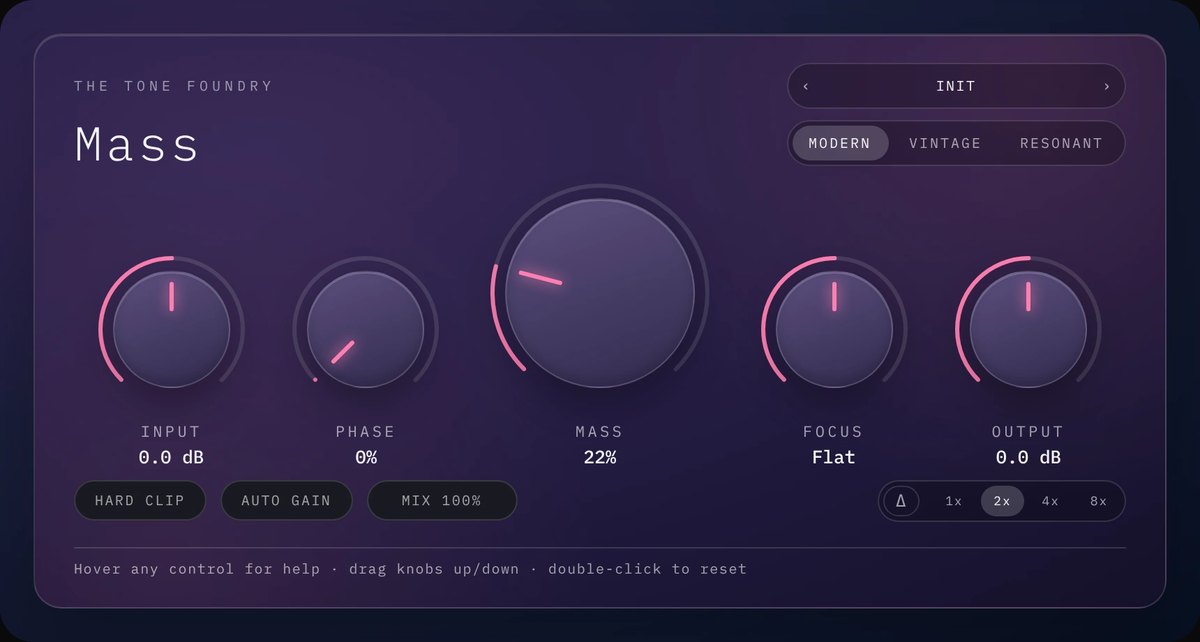
Mass is a saturator whose depth is set by one large knob, from gentle thickening on the mix bus to heavy parallel crushing of bass. The description was written with bass music, drum and bass and hip-hop in mind (per the retailer's description).
It runs on Mac (VST3 and AU) and Windows (VST3), and needs no internet connection (per the retailer's description). Please check the Plugin Boutique page for system requirements before buying.
For how it compares with other saturation plug-ins, see saturation plug-ins compared.
Key features
Three styles
Modern is clean and dense, Vintage is warm with a slow tape-like drift, and Resonant drives a tuneable mid band into clipping and adds it in parallel (per the retailer's description).
Level-matched listening
Auto Gain matches output level to input, and Delta lets you hear only what the processing adds (per the retailer's description).
Focus and Phase
Focus tilts the tone darker or brighter, and in Resonant mode tunes the band between 250 Hz and 3.5 kHz. Phase reshapes transients to thicken attacks (per the retailer's description).
Oversampling and workflow
Linear-phase oversampling of 1x, 2x, 4x or 8x is available, with latency reported to the host. It has 20 factory presets and a resizable interface from 75% to 150% (per the retailer's description).
After you buy: installation and activation
This is the general flow for products bought at Plugin Boutique. Activation differs by product (serial number, a manufacturer account, iLok and so on), so check the instructions in your library after purchase.
- Log in to your Plugin Boutique account and find the product in “Library”.
- Download the installer (you can switch between the Windows and Mac versions). Depending on the product, you also get a serial number, an unlock code or a key file.
- Product-specific steps are under “…” → “Installation Instructions” next to the product in your library, and also near the bottom of the product page.
Price
Please check the official page for the price.
More of the same kind
We have introduced 83 saturation and distortion effects. Here are some of the others.
- Antelope Audio ZHEGA
- BLEASS Fusion
- Stagecraft Software Picante
- Kuassa Efektor Bass Smasher Distortion
- UJAM UFX DISTORT
- Three-Body Technology Transformer X
For a side-by-side comparison scored on the same criteria, see our comparison of saturation and distortion effects.
See the full list in Product database: Effects.
Sources: pluginboutique.com help.pluginboutique.com support.pluginboutique.com (checked 2026-11-15)










Comments