
Disclosure: This page may contain affiliate links. Prices were checked on the date shown and may change.
An introduction to UJAM UFX Filter, based on information from the maker and distributors: what it does, how to use it and who it may suit. It is not scored.
UFX FILTER combines three great-sounding synth filters with a modulator section and 2 multi effects – perfect for any track that needs to be unbored
— UJAM official site
What is UFX Filter?
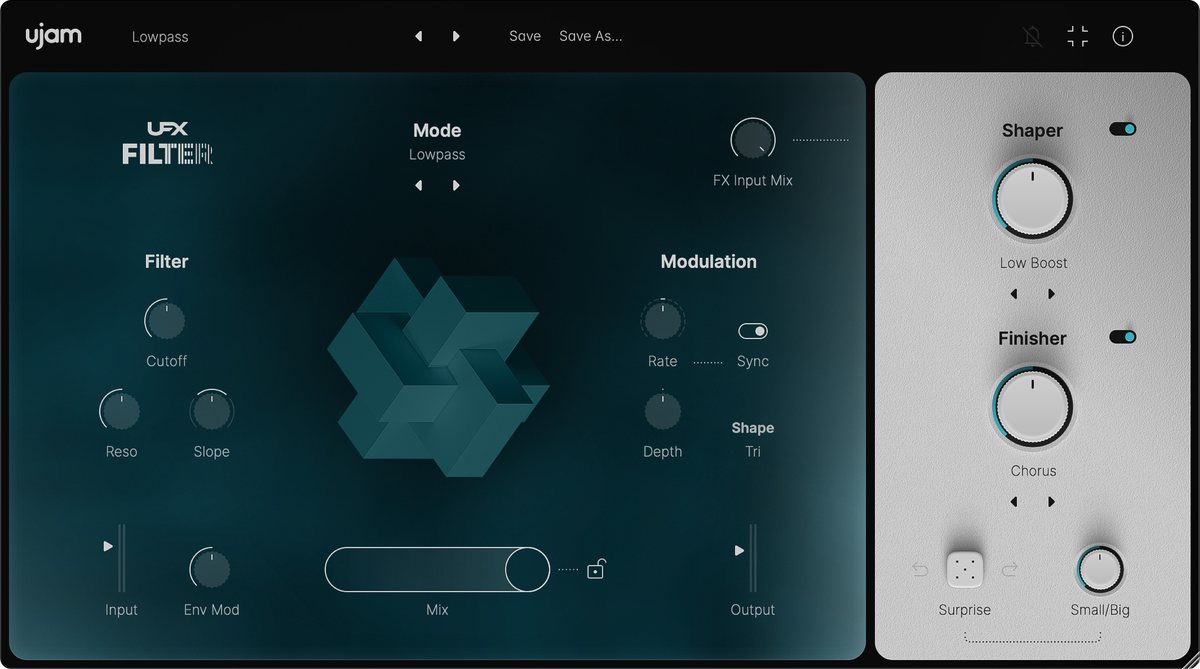
UFX Filter is a filter effect from UJAM of Germany. It combines three synth-style filter modules with a modulator section and multi-effects. The maker presents it as a way to make any track, whether drums, guitars, vocals or synths, more interesting.
The three filter modules are organized into 20 modes depending on how they are combined. They range from basic forms such as lowpass to comb filters, multi-peak types and Talking modes, which are formant filters that create vocal-like resonance. Many modes offer 12, 24 and 36 dB slopes.
The modulation section moves the filter cutoff with LFO shapes such as sine and saw. It also offers stepped modulation and rhythmic patterns for gating and adding motion, and there is a built-in envelope follower that tracks input level.
After the filter come the Shaper and Finisher multi-effects. The maker says it includes 40 filter-type and 50 finisher effects, and it ships with 150+ presets plus randomization and variation functions.
Key features
Three filter modules and 20 modes
The 20 modes range from basic lowpass, highpass, bandpass and notch to stacked detuned peaks, comb filters and vintage or dusty lowpass types. It may be handy when you want synth-style filtering on drums, vocals and more.
Talking (formant filters)
Talking 1 to 3 are formant filters that create vocal-like resonance, and the maker says they give vocoder-like effects. They may suit adding speech-like motion to synths or guitars.
Modulation (LFOs and patterns)
Moves the filter with LFO shapes such as sine and saw, stepped modulation, and patterns from simple to complex. It may add rhythmic motion or gate-like chopping to a track.
Env Mod (envelope follower)
Moves the cutoff according to input level, so the filter sweeps automatically with the signal's amplitude. One use is following the attack of drums.
Shaper and Finisher
Multi-effects that can take the filtered or input signal. The Shaper offers additional filters and character shaping, and the Finisher ranges from chorus to clouds of grains and rhythmic transformation. The maker says there are 40 filter-type and 50 finisher effects.
Randomization and variation
A button randomizes the settings, and a Small/Big control adjusts how big the change is. It may help you stumble on unexpected sounds.
150+ presets
The maker says more than 150 presets are included. You may start from a preset and refine the details afterwards.
Specifications
| Item | Details |
|---|---|
| Maker | UJAM |
| Type | Filter / multi-effect |
| Filter modules | 3 |
| Modes | 20 |
| Slopes | 12, 24 and 36 dB in many modes |
| Effects | 40 filter-type and 50 finisher effects |
| Presets | 150+ |
| Plug-in formats | VST2, VST3, AU 2, AAX |
| Operating systems | Windows 10 to 11; macOS Catalina (10.15) to Sequoia (15). Intel Macs and Apple silicon (Rosetta or native) |
| Minimum requirements | 8 GB RAM, 300 MB free disk space, 1280×768 display, internet connection |
What is included and system requirements
- UFX Filter plug-in
- 20 filter modes
- Shaper and Finisher effects (40 and 50 types)
- 150+ presets
- Formats: VST2, VST3, AU 2, AAX
- System: Windows 10-11, macOS 10.15-15, 8 GB RAM, 300 MB free space, internet connection
How to use it
- Buy UFX Filter on the UJAM site or at Plugin Boutique and receive your license.
- Get the installer with your UJAM account and install it (an internet connection is required).
- Rescan plug-ins in your DAW and insert it on the track you want to animate.
- Start from a preset close to your source, such as drums or vocals.
- Switch filter modes to find a resonance that suits the source.
- Choose an LFO or pattern in Modulation and adjust its speed and depth.
- Add extra texture with the Shaper and Finisher if needed.
- Try the randomize button and the Small/Big control for unexpected variations.
Where it may come in handy
Adding motion to drums and loops
Chopping the cutoff with patterns or LFOs can add rhythmic movement or gate-like effects.
Giving synths or guitars a speech-like quality
The Talking modes can add vocal-like formant movement.
Filter movement on vocals
Letting Env Mod follow the input may suit changing a voice's texture in breaks or transitions.
Sound design and FX
Randomization and the Finisher can be used to search for unexpected textures.
Who it may suit
- People who want to add filter movement and variation to tracks
- People who want synth-style filters on drums or vocals too
- People who like to explore ideas quickly with presets and randomization
- People searching for unusual textures in sound design or FX
Good to know before you buy
- The maker says an internet connection is required.
- If you move the content (.blob file) to an external drive, the maker recommends an SSD to prevent dropouts.
- The maker says it may work on older operating systems than those listed, but they are not supported or fully qualified.
- A UJAM account is needed for installation.
How it differs from similar products
We do not pick a winner; the official figures are placed side by side.
UJAM UFX
The official site shows the UFX series also includes UFX Reverb alongside UFX Filter. UFX Filter is the one with 20 filter modes and 40 plus 50 effects.
Price
$49 (Plugin Boutique, checked 2026-10-27). Prices can vary by region and promotion, so check the official page before buying.
See UFX Filter on the product page
More of the same kind
We have introduced 34 filters. Here are some of the others.
- Polyverse Music Supermodal
- Applied Acoustics Systems Objeq Delay 2
- FabFilter Simplon
- Arturia Arturia Filter M12
- McDSP McDSP FilterBank Native v7
- Minimal Audio Minimal Audio Hybrid Filter
We have introduced 32 other products from UJAM.
- UJAM UJAM Usynth FLUID
- UJAM UJAM Usynth CARAMEL
- UJAM Usynth PIXEL
- UJAM Virtual Guitarist CARBON
- UJAM Finisher RETRO
See the full list in Product database: Effects.
Sources: ujam.com pluginboutique.com (checked 2026-10-27)










Comments