
Disclosure: This page may contain affiliate links. Prices were checked on the date shown and may change.
An introduction to Waves eMo Q4 Equalizer, based on information from the maker and distributors: what it does, how to use it and who it may suit. It is not scored.
On stage, you don't have time to dig into menus. With eMo Q4, all parameters are on one screen, and touch-sensitive.
— Waves official site
What is eMo Q4 Equalizer?
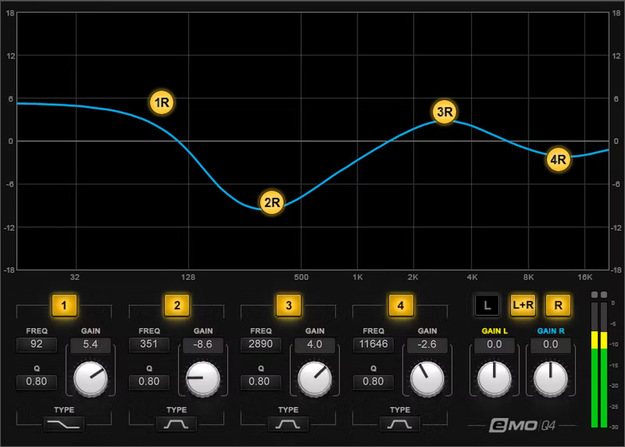
eMo Q4 Equalizer is a 4-band paragraphic EQ plug-in from Waves, combining the controls of a parametric EQ with the at-a-glance view of a graphic EQ. It is built for live sound, with all parameters on a single screen so you can adjust tone without digging through menus.
The listing highlights zero latency, very low CPU use, a generously sized interface for multitouch control, and full integration into the channel strip of the eMotion LV1 live mixer. It can be used as a separate plug-in or as part of the LV1 channel strip.
Each of the four bands can act as a parametric, high-shelf or low-shelf filter. The high band also offers a resonant high-frequency shelf or lowpass, and the low band a resonant low-frequency shelf or highpass, so shelving and filtering are both covered in one unit.
It can be set up as two independent mono EQs or ganged for stereo, and the left and right responses can be viewed at the same time. Edit by dragging on the display, using the controls or typing numbers. Mac supports VST/AU/AAX and Windows supports VST/AAX.
Key features
Four paragraphic bands
All four bands can be set to parametric, high-shelf or low-shelf response. Seeing the whole curve on one screen may suit quick tone adjustments.
Resonant shelves and filters
The high band can be a resonant high shelf or lowpass, and the low band a resonant low shelf or highpass. That may save adding a separate filter plug-in when you want a low cut or high cut.
Dual mono or ganged stereo
Set the unit as two independent mono EQs or ganged for stereo. Both channel responses can be displayed together, which helps when each side needs different treatment.
12 dB/octave slopes
Lowpass and highpass responses use 12 dB/octave slopes. The moderate slope may suit gentle trimming of unwanted bands.
Per-band enable and bypass
Each band can be enabled or bypassed individually, so you can switch bands one by one to see what each does.
Drag, type or touch
Edit by dragging on the display, using controls or entering numbers, and multitouch is supported. On a touch-capable setup you can move the curve directly with your fingers.
Zero latency, low CPU
The product description states zero latency and ultra-low CPU consumption. Built with live use in mind, it may help when you want to insert it on many channels without heavy load.
Specifications
| Item | Details |
|---|---|
| Type | 4-band paragraphic EQ |
| Bands | 4 (each parametric, high-shelf or low-shelf) |
| High band extras | Resonant high-frequency shelf or lowpass |
| Low band extras | Resonant low-frequency shelf or highpass |
| Filter slope | 12 dB/octave (lowpass and highpass) |
| Channels | Two independent mono EQs, or ganged for stereo |
| Latency | Zero (per product description) |
| macOS | Monterey 12, Ventura 13, Sonoma 14, Sequoia 15 |
| Windows | Windows 10 or later |
| Formats | Mac: VST / AU / AAX; Windows: VST / AAX |
What is included and system requirements
- eMo Q4 Equalizer plug-in
- Mac: VST / AU / AAX
- Windows: VST / AAX
- Also usable as part of the eMotion LV1 live mixer channel strip
How to use it
- Load eMo Q4 into an insert slot in your DAW (VST/AU/AAX on Mac, VST/AAX on Windows).
- Decide whether to run it as stereo or as two independent mono EQs.
- Drag each band on the display to set frequency and gain.
- Choose parametric, high-shelf or low-shelf response for each band.
- On the outer bands, try the resonant shelf or the highpass/lowpass option.
- Fine-tune with the controls or by typing numbers.
- Toggle each band on and off to compare before and after.
- If you use an eMotion LV1, call it up directly within the channel strip.
Where it may come in handy
Live and streaming
With everything on one quickly operated screen, it may be convenient for adjusting tone quickly during a show.
Vocal and voice-over cleanup
Low cut and high-end shaping live in one unit, so it may be handy for trimming unwanted bands from a voice.
Stereo material needing different sides
Splitting into two mono EQs may suit checking and correcting recordings where each side needs different treatment.
Who it may suit
- Anyone wanting a quickly operated EQ for live or streaming
- People who want to shape curves with their fingers on a touch setup
- eMotion LV1 users who want the same EQ in a DAW
- Those who prefer a simple 4-band layout that is quick to learn
Good to know before you buy
- Mac supports macOS Monterey 12 through Sequoia 15; Windows supports Windows 10 or later.
- Mac gets VST/AU/AAX and Windows gets VST/AAX, so there is no AU on Windows.
- It can be used within the eMotion LV1 channel strip or as a separate plug-in.
How it differs from similar products
We do not pick a winner; the official figures are placed side by side.
Manny Marroquin EQ
eMo Q4 lets all four bands be parametric, high-shelf or low-shelf with freely movable frequencies. Waves' Manny Marroquin EQ also has four bands, but each offers five fixed frequencies.
Price
$59 (Plugin Boutique, checked 2026-10-27). Prices can vary by region and promotion, so check the official page before buying.
See eMo Q4 Equalizer on the product page
More of the same kind
We have introduced 122 EQs. Here are some of the others.
- Solid State Logic SSL X-DynEQ
- Antelope Audio Antelope Audio VEQ-55B
- McDSP FilterBank
- PSP Audioware PSP Datamix A567
- IK Multimedia IK Multimedia EQ 73
- Ignite Amps PTEq-X
We have introduced 215 other products from Waves.
- Waves Renaissance Equalizer
- Waves Curves AQ
- Waves PuigTec EQs
- Waves API 550
- Waves Abbey Road RS56 Passive EQ
For a side-by-side comparison scored on the same criteria, see our comparison of EQs.
See the full list in Product database: Effects.
Sources: pluginboutique.com (checked 2026-10-27)










Comments