
Disclosure: This page may contain affiliate links. Prices were checked on the date shown and may change.
An introduction to Waves Waves Scheps 73, based on information from the maker and distributors: what it does, how to use it and who it may suit. It is not scored.
Scheps 73 keeps the legend alive.
— Waves official site
What is Waves Scheps 73?
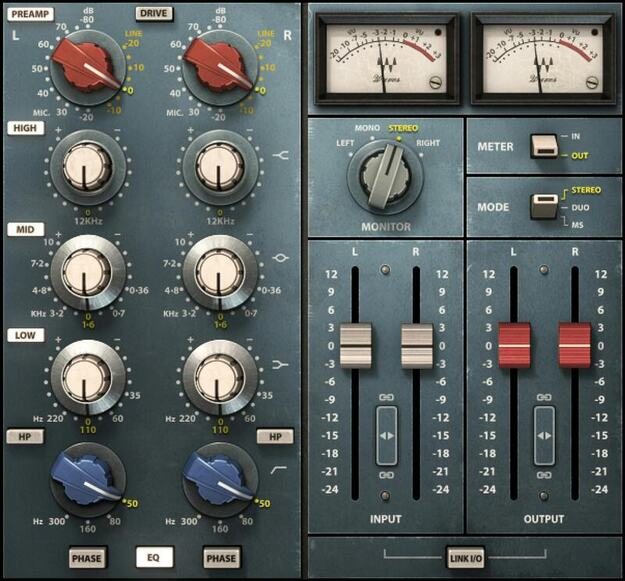
Scheps 73 is an equalizer and microphone preamp plug-in from Waves, modeled on the Neve 1073 console. It was developed with mixing engineer Andrew Scheps and combines the preamp and the EQ in one plug-in.
The listing says it models the analog behavior of the original to reproduce what the preamp and EQ do together. Adding warmth through transformer saturation is named as one of its features.
In addition to four classic EQ bands, it includes a midrange band taken from the original schematics. A Mid-Side Matrix lets you equalize the center and sides individually.
It offers Mono, Dual Mono and Stereo modes with four monitoring options, and supports VST, AU and AAX on Windows and Mac.
Key features
Preamp and EQ in one
Two elements of the Neve 1073 are combined in one plug-in. It could be used to add warmth while shaping the tone.
Four classic bands
The listing says the four classic bands are reproduced in detail, which may suit basic low-to-high adjustments.
Midrange band from the schematics
A midrange band from the original schematics is included, which may be a candidate for shaping vocals or instruments in the mids.
Mid-Side Matrix
Mid and side can be equalized separately, which may help when adjusting stereo material while keeping its width.
Transformer modeling
The listing says the Marinair audio transformer is modeled. The amount of saturation changes the texture of the sound.
Modes and monitoring
Three modes (Mono, Dual Mono, Stereo) and four monitoring options are included, and left and right can be equalized individually.
Specifications
| Item | Details |
|---|---|
| Maker | Waves |
| Type | Equalizer / microphone preamp |
| Modeled on | Neve 1073 |
| Developed with | Andrew Scheps |
| Formats | VST / AU / AAX (Mac), VST / AAX (Windows) |
| Modes | Mono, Dual Mono, Stereo |
What is included and system requirements
- Supported OS: macOS Monterey 12 through Sequoia 15, Windows 10 or later
- Formats: VST / AU / AAX on Mac, VST / AAX on Windows
- Install via Waves Central and register the serial to your Waves account
How to use it
- Create a Waves account and register the serial number.
- Download Waves Central and install the product.
- Insert it on the target track in your DAW.
- Choose the mode (Mono, Dual Mono or Stereo) to suit the material.
- Set the preamp amount and check the texture.
- Adjust each EQ band.
- If needed, adjust mid and sides separately.
Where it may come in handy
Vocal shaping
It may be worth trying when you want to use preamp warmth and EQ together on vocals.
Drums and bass
It could be a candidate when you want to shape the low end while adding transformer saturation.
Stereo material
Processing mid and sides separately may help adjust material while keeping its width.
Adding character after recording
It may suit recorded material that you want to color with preamp-style saturation.
Who it may suit
- People who want to try a 1073-style EQ and preamp combination
- People who want to add tonal color while mixing
- People who often adjust mid and side separately
Good to know before you buy
- A Waves account, serial registration and installation via Waves Central are required.
- Per Plugin Boutique, the Windows formats are VST and AAX.
- Per Plugin Boutique, the Windows formats are VST and AAX.
Price
$129 (Plugin Boutique, checked 2026-10-27). Prices can vary by region and promotion, so check the official page before buying.
See Waves Scheps 73 on the product page
More of the same kind
We have introduced 16 preamps. Here are some of the others.
- Slate Digital Virtual Preamp Collection
- Kuassa Efektor Bass Cruncher Preamp
- Antelope Audio VPA76
- Universal Audio Manley Tube Preamp
- Antelope Audio Gyratec IX
- Black Rooster Audio VPRE-73
We have introduced 215 other products from Waves.
- Waves Torque
- Waves IR-Live Convolution Reverb
- Waves Signature Series Vocals
- Waves Eddie Kramer Signature Series
- Waves X-Hum
See the full list in Product database: Effects.
Sources: pluginboutique.com (checked 2026-10-27)










Comments