
When you record a cover song, the distance from the microphone has a big effect on the sound. Too close and it gets muddy; too far and the voice sounds distant. This article explains a guide for microphone distance, what a pop filter does and how to keep the distance constant, based on manufacturers’ official information.
Disclosure: This article contains affiliate links. If you buy through them, SoundBounty may earn a commission at no extra cost to you. Information is as of the date we checked it and can change.
Key points
- For studio vocal recording, 10 to 20 cm from the mouth is a starting guide (Shure).
- When you get close to the microphone, the lows get stronger. This is called the “proximity effect”.
- A pop filter reduces the breath noise (plosives) on “p” and “b” sounds.
- Keep the distance as constant as you can while singing.
- Placing the microphone slightly lower can reduce harshness on “s” sounds.
A guide for the distance between microphone and mouth
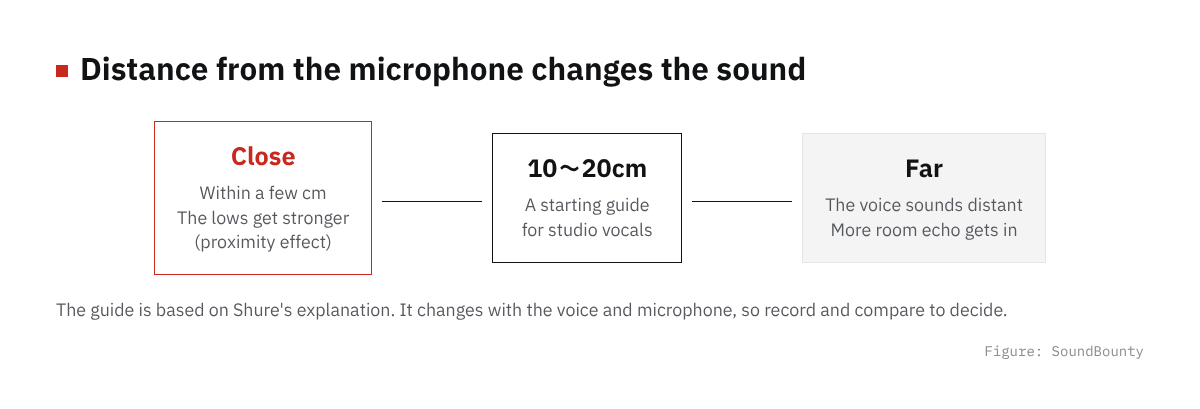
Figure: SoundBounty
Shure explains that for studio vocal recording, 10 to 20 cm (4 to 8 inches) from the microphone to the mouth is a good starting point. It also says studio vocals are often recorded at 6 to 12 inches (about 15 to 30 cm).
There is also a guide you measure by hand. For singing such as backing vocals, Shure gives two to four fingers (about 4 to 8 cm) as a guide. It also explains that for songs sung with a quiet voice, you can come as close as one finger or less.
This is a guide. The right distance changes with the loudness of the voice, the type of microphone and the mood of the song. Record and decide while comparing.
Source: Shure official
What happens when you get too close: the proximity effect
The proximity effect is the phenomenon where the lows get stronger when you bring your mouth close to the microphone. Shure explains it as the heavy, bass-rich sound you get when a voice or instrument is very close to the microphone. It gets especially strong within a few centimeters.
It also says to take particular care with microphones that have a unidirectional pickup pattern (the direction it listens in). The closer you get, the more muffled it tends to sound.
Conversely, if you are too far, the voice sounds distant and more room echo gets in. Look for the right distance.
Source: Shure official
Change the distance with the loudness of your voice
Shure explains that a singer needs to move closer to the microphone for quiet voice and away for loud voice. If you are too close to the microphone, clarity can also drop.
However, if the distance changes suddenly, the tone, volume and balance change and the mix becomes harder. Shure recommends keeping the distance constant while you sing.
- In the chorus, where the voice gets loud, move back a little.
- In parts where the voice gets quiet, move in a little.
- Do not move your body a lot; sing in a steady posture.
If adjusting this movement feels hard, you can also even out the volume with a compressor. See How to use a compressor on vocals.
Source: Shure official
Pop filters
When the breath from “p” and “b” sounds hits the microphone, a “puff” noise gets in. This is called pop noise (plosives).
A pop filter is a tool for reducing this noise. You put it in front of the microphone and it reduces the force of the breath. Shure also recommends a pop filter for reducing the plosives of “P” and “B”.
Audio-Technica explains that a pop filter also protects the microphone from spit and moisture. It is especially helpful with condenser microphones, which are weak against moisture.
How to tell the causes of noise apart is explained in Causes and fixes for noise in a cover-song recording.
Sources: Shure official, Audio-Technica official
Microphone direction and harsh “s” sounds
Shure explains that placing the microphone slightly below, rather than directly in front of the singer’s mouth, can reduce strong sibilance (harsh “s” sounds). Avoiding directly in front also makes the breath on “p” sounds less likely to hit.
If “s” sounds are still harsh, there is a way to reduce them in the mix. See How to use a de-esser on vocals.
Source: Shure official
Shock mounts and room echo
Audio-Technica explains that a shock mount is a tool that reduces vibration reaching the microphone, such as desk shake and the contact noise of the stand, helping low-noise recording.
Shure also explains that condenser microphones are highly sensitive and pick up the reflections of the room. How to prepare the recording environment is explained in A guide to acoustic treatment for home recording.
Sources: Shure official, Audio-Technica official
A checklist before recording
- Place the microphone about 10 to 20 cm from your mouth.
- Put a pop filter between you and the microphone.
- Move the microphone slightly off directly in front of your mouth.
- Reduce vibration with a shock mount.
- Sing a little and listen back. Check whether it is muddy, distant or popping.
- Keep the distance as constant as you can while singing.
Choosing a microphone
How to choose a microphone is explained in Best microphones for home recording and cover songs, Dynamic vs condenser microphones and USB microphone vs XLR microphone plus interface. The whole recording flow is summarized in Basic steps for recording vocals at home.
Frequently asked questions
Q. Do I always need a pop filter?
Not always. But breath on “p” sounds easily gets in, so using one makes the recording steadier. Some microphones have a built-in pop filter.
Q. Why does it get muddy when I get close?
Because the proximity effect strengthens the lows. Shure explains that it happens easily with unidirectional microphones.
Q. How many cm is the right distance?
There is no correct number. Shure’s 10 to 20 cm is a starting guide. Record, compare by listening and decide.
Q. Can I fix the muddiness after recording?
You can tidy it to some extent with an EQ. See How to EQ vocals. But tidying it at the recording stage makes the later work easier.


Comments