
In a cover-song mix, the vocal is buried in the backing track, or only the vocal stands apart. Troubles like these are often a problem of the “balance” between the vocal and the backing track. This article explains how to balance them, step by step, based on FabFilter Learn.
Disclosure: This article contains affiliate links. If you buy through them, SoundBounty may earn a commission at no extra cost to you. Information is as of the date we checked it and can change.
Key points
- Balance is the volume ratio of the parts. It is the biggest decision in a mix.
- First decide the role of each part (lead or support).
- Before deciding volume, decide the left-right position (pan).
- At first, a rough balance is fine. Do not aim for perfection.
- Changes in volume can be fixed later with automation.
What balance is
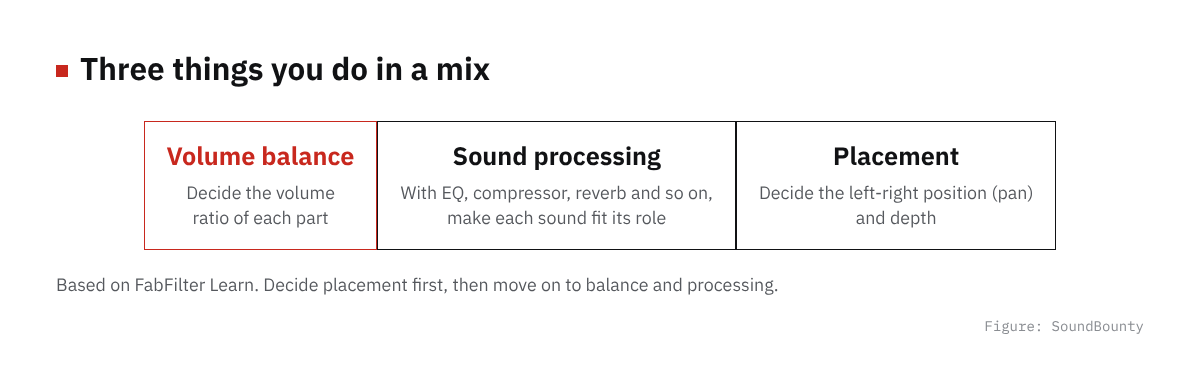
Figure: SoundBounty
FabFilter explains the basic actions of a mix in three parts: balancing volume, processing sound and creating the placement of sound (the soundstage).
Of these, volume balance is explained as the most noticeable decision in a mix, because the size of a part decides how important it is in the song and how much drive the song has.
In a cover song, the lead is the vocal. But the backing track is part of the song too, so raising only the volume of the vocal does not always work.
Source: FabFilter Learn
Step 1: Decide the role of each part
First decide the role of each part in the song. FabFilter explains that not every part can be the lead all the time. Deciding where to direct the listener’s attention in the song is also the job of a mix.
For a cover song, splitting them like this makes it easier to think.
- Lead: the vocal (main vocal).
- Co-lead: the lead instrument and memorable phrases.
- Support: drums, bass, chord instruments and harmonies.
These roles become a guide when you decide the volume later.
Source: FabFilter Learn
Step 2: Decide left-right positions (pan)
FabFilter recommends deciding the soundstage (the placement of sound) before the volume balance. You decide the left-right position with the pan.
The reason is that sounds placed at the same position easily hide each other. Masking, where sounds hide each other, tends to happen when positions are the same, so volume balance is also affected by left-right position.
The basic approach is to put the vocal in the center. Moving harmonies and layered voices slightly left and right makes it easier to separate them from the main vocal. How to make harmonies is explained in How to make harmonies and doubling for a cover song.
Source: FabFilter Learn
Step 3: Processing that brings the vocal forward
FabFilter gives two kinds of processing as examples when you want to bring a vocal forward.
- Make sure there is enough of the “presence” band (around 1.5 to 4 kHz), the part of the sound that relates to clarity.
- Do not use too much reverb (ambience).
The presence band is explained in another FabFilter article as the band where the human ear is most sensitive, which affects the presence and clarity of a vocal. How to use an EQ is explained in How to EQ vocals, and how to add ambience in How to use reverb and delay on vocals.
Source: FabFilter Learn
Step 4: Decide the rough volume
Once roles and positions are decided, decide the volume of each part. FabFilter explains not to aim for perfection at this stage. A rough balance in which the shape of the whole becomes visible is enough.
Moving one part also changes how the other parts sound. So it is written that going back to an earlier decision and fixing it later is normal in a mix.
Examples of checks (suggestions from our editors) are below.
- Check that you can make out the lyrics.
- Check that the backing track does not sound thin.
- Check at a low volume too.
Source: FabFilter Learn
Step 5: Fix spots with automation
Up to here, you have a “static mix”. FabFilter explains that with a static mix, one balance may not work all the way through a song. For example, the drums are good in the verse but too loud in the chorus, or the vocal is good in the verse but the endings of phrases fade.
You fix such problems with automation (a function that changes volume and other settings over time). Raise only the ends of the vocal phrases a little. Lower only the backing track in the chorus a little. You can change the balance partway through the song.
A compressor is a way to even out the volume of a voice automatically. See How to use a compressor on vocals.
Source: FabFilter Learn
The final steps to check the balance
- Listen to the vocal and the backing track together, all the way through.
- Check that you can make out the lyrics to the end.
- Write automation in the places that bother you.
- Before you export, measure the loudness.
How to measure loudness is explained in The basics of loudness for a cover song.
Frequently asked questions
Q. How many dB louder than the backing track should the vocal be?
No fixed number is given. It changes with the mood of the song and how many sounds the backing track has, so decide by listening.
Q. What should I do when the vocal is buried?
Before raising the volume, you can review the left-right position, because sounds at the same position easily hide each other. You can also check the presence band with an EQ, or reduce the ambience.
Q. What is masking, where sounds hide each other?
It is when sounds overlap and one becomes hard to hear. FabFilter explains that sounds placed at the same position in the soundstage easily hide each other.
Q. Do I not have to change a balance once I have decided it?
You may change it. Fixing one part also changes how the other parts sound. FabFilter also explains that going back to an earlier decision and fixing it is a normal flow in mixing.
Q. Is it okay to decide by listening to the vocal alone?
Listening to the vocal alone makes you overdo the fixes. Decide by listening together with the backing track.
Q. Are there fixed settings in numbers?
They change with the song and the voice, so we do not give fixed values. Decide while listening.


Comments