
Disclosure: This page may contain affiliate links. Prices were checked on the date shown and may change.
An introduction to Arturia Rev OCEAN, based on information from the maker and distributors: what it does, how to use it and who it may suit. It is not scored.
Submerge your sound with Rev OCEAN, an instantly rewarding reverb powered by pristine FDN processing, multi-stage diffusion, and deep modulation.
— Arturia official site
What is Rev OCEAN?
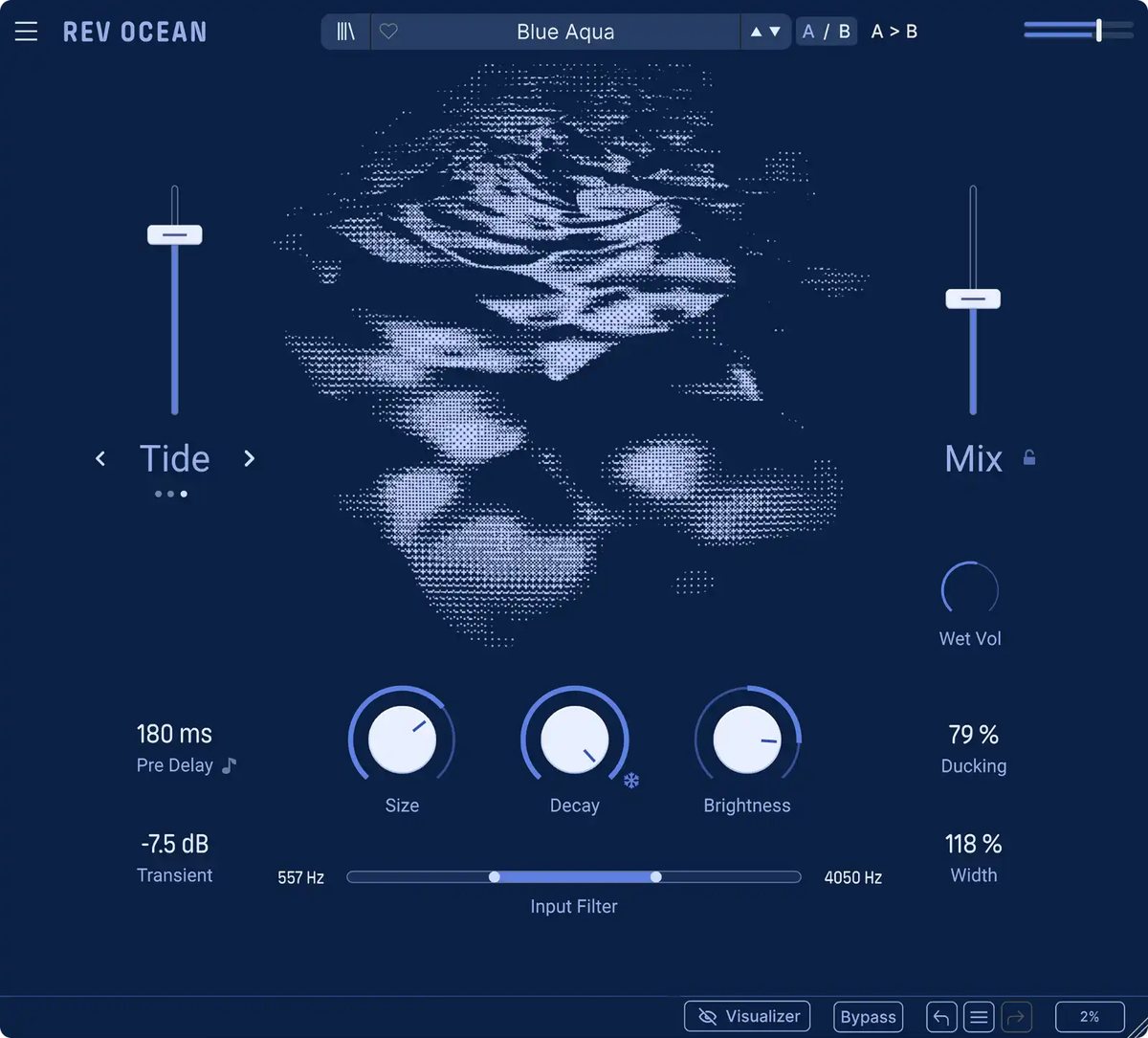
Rev OCEAN is an ocean-themed reverb plug-in from Arturia of France. It combines a feedback delay network (FDN) reverb with multi-stage diffusion and deep modulation, aiming to produce long, smooth tails quickly.
At its center are three modes, Abyss, Tide and Foam, plus a Macro slider that sets their intensity. Abyss adds layered reverse depth, Tide adds left/right independent filtering for motion, and Foam builds soft, diffused swells.
Size, Decay and Brightness set the scale, length and tone of the space. Separate utilities cover pre-delay, transients, input filters, ducking and stereo width, so a deep reverb can still leave the source clear.
Pushing Decay to maximum or pressing the snowflake icon activates Freeze, which holds the tail indefinitely. It also offers presets, A/B comparison, a resizable GUI and in-app tutorials.
Key features
FDN reverb with multi-stage diffusion
A delay-network reverb combined with multi-stage diffusion gives stable reflections with constant movement, forming the base for long tails.
Three modes: Abyss, Tide and Foam
Abyss adds parallel reverse layers with subtle pitch movement, Tide adds independent left/right filtering for wave-like motion, and Foam builds a long blurred attack for swelling tails.
Macro slider
One slider changes the intensity of the active mode: the amount of reverse motion, wave-like filtering or diffused attack, depending on the mode.
Freeze
Pushing Decay to maximum or pressing the snowflake icon holds the tail indefinitely, useful for endless pad-like textures and transitions.
Mix utilities
Pre-delay, Transients (to smooth sharp attacks), HPF/LPF input filters, Ducking and Width help keep the source clear under a deep reverb.
Output and workflow
Mix, Wet Vol and Mix Lock set the dry/wet balance, and Mix Lock keeps the mix position while you browse presets. A/B comparison, a resizable GUI and in-app tutorials are included.
Specifications
| Item | Details |
|---|---|
| Type | Reverb (FDN) |
| Modes | Abyss / Tide / Foam |
| Formats | VST / AAX / Audio Unit / NKS (64-bit DAWs only) |
| Windows | Windows 10 or later (64-bit); ARM processors not supported |
| Mac | macOS 10.13 or later |
| Recommended hardware | 4 GB RAM, 4-core CPU at 3.4 GHz (4.0 GHz turbo), 1 GB free disk space, OpenGL 2.0 GPU (M1 CPU also accepted on Mac) |
| Price (official) | $49 |
| Trial | Free demo available on the official site |
What is included and system requirements
- Rev OCEAN plug-in
- Three modes (Abyss / Tide / Foam)
- Presets
- Formats: VST / AAX / AU / NKS
- Windows 10 or later, macOS 10.13 or later (64-bit DAWs)
- Install, activate and update with Arturia Software Center (ASC)
- A free demo is available on the official site
How to use it
- Get the product through your Arturia account and install and activate it with Arturia Software Center.
- Load Rev OCEAN on a track or send in your DAW.
- Browse presets to get a feel for the overall character.
- Pick Abyss, Tide or Foam and set its intensity with the Macro slider.
- Use Size, Decay and Brightness to set the scale, length and tone of the space.
- Balance the source and reverb with Pre Delay, Transients, Ducking and Width.
- Try Freeze to hold the tail.
- Set the final amount with Mix and Wet Vol and use Mix Lock to compare presets.
Where it may come in handy
Ambient and downtempo production
Long, smooth tails can be built quickly, which may suit pads and electric piano, and Freeze can create endless textures.
Floating vocals and guitars
Abyss or Foam could make vocals drift into the distance or help aim for a shoegaze-style guitar texture.
Adding motion to drum loops
Tide may add movement around a drum loop and sway the reverb with the groove.
Transitions and sound design
Moving Freeze or Macro could create floating effects for scene changes.
Who it may suit
- Producers working in ambient, downtempo or shoegaze-leaning styles
- Users who prefer a few modes and a macro over detailed reverb design
- Anyone looking for Freeze-style floating effects
- Buyers looking for a reverb at around $49
Good to know before you buy
- ARM processors are not supported on Windows.
- Only 64-bit DAWs are supported.
- Installation, activation and updates go through Arturia Software Center (ASC).
- A free demo is available on the official site.
How it differs from similar products
We do not pick a winner; the official figures are placed side by side.
sonible pure:verb
Rev OCEAN has three modes (Abyss, Tide, Foam) plus Freeze and lists at $49. pure:verb features a learning function with input-specific profiles and three modes (Infinite, Reverse, Bounce), and lists at $39.
Price
$49 (Arturia official site, checked 2026-10-27). Prices can vary by region and promotion, so check the official page before buying.
See Rev OCEAN on the product page
More of the same kind
We have introduced 112 reverbs. Here are some of the others.
- IK Multimedia CSR Hall Reverb
- Solid State Logic SSL PlateVerb
- Boz Digital Labs ReCoil
- sonible pure:verb
- Kuassa Efektor RV3604 Reverb
- AudioThing Fog Convolver 2
We have introduced 45 other products from Arturia.
For a side-by-side comparison scored on the same criteria, see our comparison of reverbs.
See the full list in Product database: Effects.
Sources: arturia.com pluginboutique.com sonible.com (checked 2026-10-27)










Comments