
Disclosure: This page may contain affiliate links. Prices were checked on the date shown and may change.
An introduction to Acon Digital DeFilter, based on information from the maker and distributors: what it does, how to use it and who it may suit. It is not scored.
DeFilter is an efficient tool to even out tonal imbalances in a mix or reduce resonant peaks or dips in the frequency spectrum.
— Acon Digital official site
What is DeFilter?
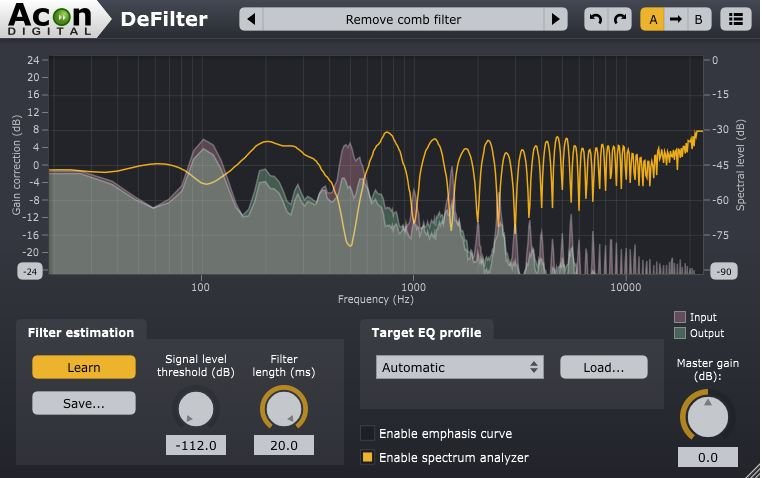
DeFilter from Acon Digital is an automatic equalization plugin. It is designed to even out tonal imbalances in a mix and to reduce resonant peaks and dips in the frequency spectrum.
The maker says it can address issues such as comb filter effects and standing waves from untreated rooms. It can match audio to target profiles such as music or speech, or extract the overall timbre from the source and even out narrow peaks and dips.
It can also be used for matched equalization, shaping a recording toward a reference recording. The level of correction can be set per frequency with custom curves, so it can focus on problem ranges.
Real-time spectrum displays for input and output let you see the effect of the correction. It supports VST, VST3, AAX and AU on both Windows and Mac.
Key features
Automatic correction filter
It automatically estimates a correction filter that evens out the frequency spectrum, which may reduce manual hunting for peaks and dips.
Resonance and comb filter reduction
It is designed to reduce room resonances and comb-filter-like problems.
Target profiles
Besides music and speech profiles there is an automatic mode that extracts timbre from the input, so you can choose per source.
Matched equalization
Correction filters can be saved and used as a reference, which may help align the tone of different mics or recordings.
Adjustable filter length
The correction filter length can be adjusted from 1 to 20 milliseconds.
Frequency-dependent correction
A frequency emphasis filter lets you set how strongly each range is corrected.
Spectrum displays
The correction filter, input and output spectra are displayed so you can see the changes while adjusting.
Specifications
| Item | Details |
|---|---|
| Type | Automatic equalizer |
| Correction filter length | 1 to 20 ms |
| Formats | VST / VST3 / AAX (Windows and Mac), AU (Mac) |
| Sampling rates | Up to 96 kHz |
| Channels | Surround and immersive up to 7.1.6 |
What is included and system requirements
- Windows: Windows 7 / 8.x / 10 or later, Intel Core i3 or AMD multi-core, 1 GB RAM (4 GB or more recommended), 1 GB free disk space
- Mac: OS X 10.9 or later (Apple Silicon and Intel supported), 1 GB RAM (4 GB or more recommended), 1 GB free disk space
- Host supporting VST / VST3 / AAX (Pro Tools 11 or later) / AU
How to use it
- Register the license after purchase and run the installer.
- Launch your DAW and scan for plugins.
- Load DeFilter on the track you want to correct.
- Choose a target profile (music, speech or automatic).
- Play the material and watch the correction filter build in the spectrum display.
- Adjust the frequency-dependent correction curve.
- Change the filter length and check the audible difference.
- If needed, save the correction filter as a reference for other recordings.
Where it may come in handy
Recordings with room resonance
May be worth trying to even out resonances in recordings made in untreated rooms.
Speech and narration
May help tidy clarity by matching a speech profile.
Matching multiple mics
May be used to align the tone of material recorded with different mics.
Pre-mastering fixes
May also be used to even out tonal imbalances in a mix beforehand.
Who it may suit
- Home recordists bothered by room acoustics
- Those who want to tidy narration or streaming audio
- Those who want to match tone across recordings
Good to know before you buy
- Results of automatic correction depend on the material, so check the effect with your own audio.
- A trial version is offered by the maker and the retailer.
Price
$99 (Acon Digital official site, checked 2026-10-27). Prices can vary by region and promotion, so check the official page before buying.
See DeFilter on the product page
More of the same kind
We have introduced 122 EQs. Here are some of the others.
- Universal Audio Hitsville EQ Collection
- Audified 1A Equalizer
- McDSP AE400 Active EQ
- Minimal Audio Morph EQ
- Arturia EQ SITRAL-295
- Tokyo Dawn Labs Tokyo Dawn Labs TDR Nova GE
We have introduced 8 other products from Acon Digital.
- Acon Digital Drum Production Suite
- Acon Digital Extract:Dialogue 2
- Acon Digital Remix:Drums
- Acon Digital Multiply 2
- Acon Digital Verberate 2
For a side-by-side comparison scored on the same criteria, see our comparison of EQs.
See the full list in Product database: Effects.
Sources: acondigital.com pluginboutique.com (checked 2026-10-27)










Comments