
Disclosure: This page may contain affiliate links. Prices were checked on the date shown and may change.
An introduction to Arturia Efx REFRACT, based on information from the maker and distributors: what it does, how to use it and who it may suit. It is not scored.
Efx REFRACT is a stereo multi-effect with versatility at its core. Combining unison-based processing with a variety of secondary effects and modulation options.
— Arturia official site
What is Efx REFRACT?
Efx REFRACT from Arturia is a stereo multi-effect built on unison, combining a voice-duplicating spread with secondary effects and modulation.
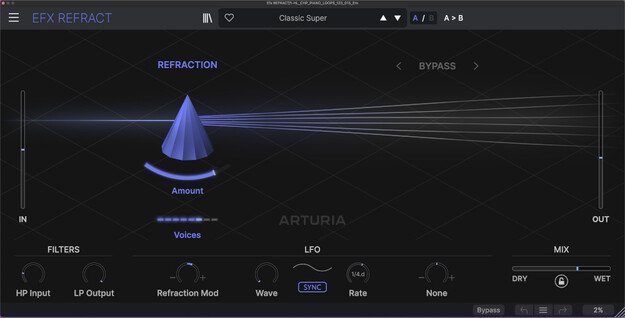
Its super-unison architecture duplicates the signal into up to eight stereo voices, thickening and widening a sound, and five Mode FX can add movement, distortion or harmony.
The interface uses real-time 3D graphics that change as voices, filters, Mode FX and the LFO are chosen, and the maker says it maps complex parameters to a simple control scheme.
It has 47 presets, from mix enhancements to dramatic changes, so it can be explored by auditioning.
Key features
Super unison, up to 8 voices
The signal is duplicated into up to eight stereo voices, which may help thicken stems or change character at key moments.
Five Mode FX
Bandpass, comb filter, bitcrusher, distortion and harmonizer each have dedicated controls for a range of textures.
Spread cutoffs
In bandpass mode each voice's cutoff is offset around the Cutoff control, giving a filtered widening effect.
4 distortions, 12 chords
There are four distortion algorithms and twelve harmonizer chords, which can turn the unison voices into pitched harmonies.
Filters and synced LFO
Input and output filters and a pre-configured LFO with synced rates are included for movement.
47 presets and A/B
With 47 presets and A/B comparison, settings can be auditioned side by side.
Specifications
| Item | Details |
|---|---|
| Type | Stereo multi-effect |
| Voices | Up to 8 (stereo) |
| Mode FX | Bandpass / Comb filter / Bitcrusher / Distortion / Harmonizer |
| Distortion | 4 algorithms |
| Harmonizer chords | 12 |
| Presets | 47 |
| Formats | VST, AAX, Audio Unit, NKS (64-bit DAWs) |
| Mac | macOS 11+, 4 GB RAM, 4-core 3.4 GHz or Apple Silicon, 1 GB free space, OpenGL 2.0 GPU |
| Windows | Windows 10+ (64-bit), 4 GB RAM, 4-core 3.4 GHz, 1 GB free space, OpenGL 2.0 GPU (ARM not supported) |
What is included and system requirements
- Efx REFRACT plugin
- 47 presets
- Supported systems: macOS 11+ / Windows 10+ (64-bit)
How to use it
- Register the serial in your Arturia account and download the installer.
- Install and restart the DAW.
- Insert Efx REFRACT on a track.
- Browse presets to find a direction.
- Change the number of voices to adjust the spread.
- Pick a Mode FX and move its dedicated controls.
- Add movement with the LFO rate and depth.
- Use the input and output filters to tidy the range.
Where it may come in handy
Widening synths and pads
Layering voices may add width to plain pads or synths.
Marking key moments
Moving a Mode FX before a chorus could change the character of a section.
Experimental sound design
Bitcrusher and distortion could transform source material heavily.
Who it may suit
- People who want to thicken and widen sounds
- Those who prefer few controls for big changes
- Users who like to start from presets
Good to know before you buy
- An OpenGL 2.0 compatible GPU is required.
- ARM processors are not supported on Windows.
- Detailed installation steps are on a separate Plugin Boutique page.
Price
Please check the official page for the price.
See Efx REFRACT on the product page
More of the same kind
Other introduction articles of the same kind.
- Leapwing Audio RootOne
- Eventide Eventide Rotary Mod
- Blue Cat Audio Blue Cat's StereoScope Pro
- TAL Software TAL-DAC
- Native Instruments Tape Wobble
- Waves OneKnob Brighter
We have introduced 45 other products from Arturia.
- Arturia Tape MELLO-FI
- Arturia Phaser BI-TRON
- Arturia Pre TridA
- Arturia Arturia Synthx V
- Arturia Synthi V
See the full list in Product database: Effects.
Sources: pluginboutique.com (checked 2026-10-27)










Comments