
Disclosure: This page may contain affiliate links. Prices were checked on the date shown and may change.
An introduction to Waves Scheps Parallel Particles, based on information from the maker and distributors: what it does, how to use it and who it may suit. It is not scored.
Now you can access his signature parallel processing chains for deeper low end, sweeter highs, fuller body, and high-energy intensity—all packed into 4 simple controls: Sub, Air, Thick, and Bite.
— Waves official site
What is Scheps Parallel Particles?
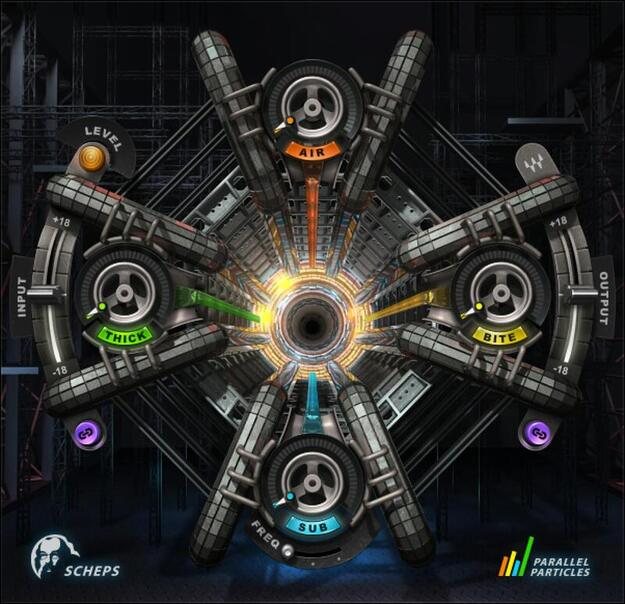
Scheps Parallel Particles is a multi-effect from Waves, made with mix engineer Andrew Scheps. It condenses the parallel processing chains he uses (blending a processed copy with the original signal) into four knobs: Sub, Air, Thick, and Bite.
Sub adds low-end depth, Air adds brightness and sparkle, Thick adds body, and Bite adds energy and forwardness. It is designed so you can steer the character of a sound quickly without building a chain yourself.
Waves describes it as suitable for individual tracks such as vocals, synth lines, pianos, guitars, kicks and snares, as well as buses and final masters. You do not need to know the theory of parallel processing; you can move the four knobs and judge by ear.
Formats are VST / AU / AAX on Mac and VST / AAX on Windows. Plugin Boutique lists it as a Waves multi-effect.
Key features
Four-knob control
Everything is handled by four knobs: Sub, Air, Thick and Bite. Parallel chains normally mean several plugins side by side; here they sit in one window, which may help when you want to spend less time on setup.
Sub for low end
Waves presents Sub as the control for deeper basslines and fuller kicks. You could blend in a little on a track that feels thin in the low end and listen to the result.
Air for brightness
Air is described as adding brightness, sheen and sparkle. You might raise it gradually on a vocal or synth that sounds dull.
Thick for body
Thick is described as adding full body to guitars, vocals, snares and more. It may suit parts that sound thin, letting you hear how much weight changes the part.
Bite for energy
Bite is described as adding energy to vocals, synth lines, pianos and guitars. Think of it as a way to push a part forward.
Tracks to masters
It is described as usable on individual tracks, buses and final masters. The same controls work at every level, so you can try different placements.
Specifications
| Item | Details |
|---|---|
| Maker | Waves |
| Type | Multi-effect |
| Controls | Sub / Air / Thick / Bite |
| Designed with | Andrew Scheps |
| Formats (Mac) | VST / AU / AAX |
| Formats (Windows) | VST / AAX |
What is included and system requirements
- Mac: macOS Monterey 12, Ventura 13, Sonoma 14, Sequoia 15 (VST / AU / AAX)
- Windows: Windows 10 or later (VST / AAX)
How to use it
- After purchase, install via Waves Central and activate the license.
- Load it as an insert on a vocal, synth or other track in your DAW.
- Start with all four knobs low and listen to the original sound.
- Raise the knob matching the quality you feel is missing, a little at a time.
- Toggle bypass to compare before and after at matched loudness.
- On a bus or master, begin with small amounts.
Where it may come in handy
Adding brightness and body to vocals
If a vocal sits too far back, blending in a little Air and Thick may change its outline.
Supporting kick and bass low end
On a track with a light low end, trying Sub may let you check how much weight to add quickly.
Adjusting energy on the mix bus
Inserting it gently on a bus and moving Bite may help you hear which direction the energy goes.
Who it may suit
- People who find building parallel chains themselves difficult
- People who want to try a direction for a track quickly
- People who want one tool for tracks, buses and masters
Good to know before you buy
- Waves plugins are licensed through Waves Central.
- Plugin Boutique showed a time-limited sale at the time of checking (until Nov 01).
How it differs from similar products
We do not pick a winner; the official figures are placed side by side.
Greg Wells MixCentric
Scheps Parallel Particles has four knobs (Sub, Air, Thick, Bite), while Greg Wells MixCentric packs a mix-bus chain into one knob. The difference is the number of controls and the aim, not quality.
Price
$129 (Plugin Boutique, checked 2026-10-27). Prices can vary by region and promotion, so check the official page before buying.
See Scheps Parallel Particles on the product page
More of the same kind
Other introduction articles of the same kind.
- Arturia Pre TridA
- NUGEN Audio NUGEN Audio Monofilter Elements
- Baby Audio Smooth Operator Pro
- NUGEN Audio NUGEN Audio Stereoplacer Elements
- MAAT LINSurround
- Kuassa Efektor Whammo
We have introduced 215 other products from Waves.
See the full list in Product database: Effects.
Sources: pluginboutique.com (checked 2026-10-27)










Comments