
Disclosure: This page may contain affiliate links. Prices were checked on the date shown and may change.
An introduction to Sound Particles inShaper, based on information from the maker and distributors: what it does, how to use it and who it may suit. It is not scored.
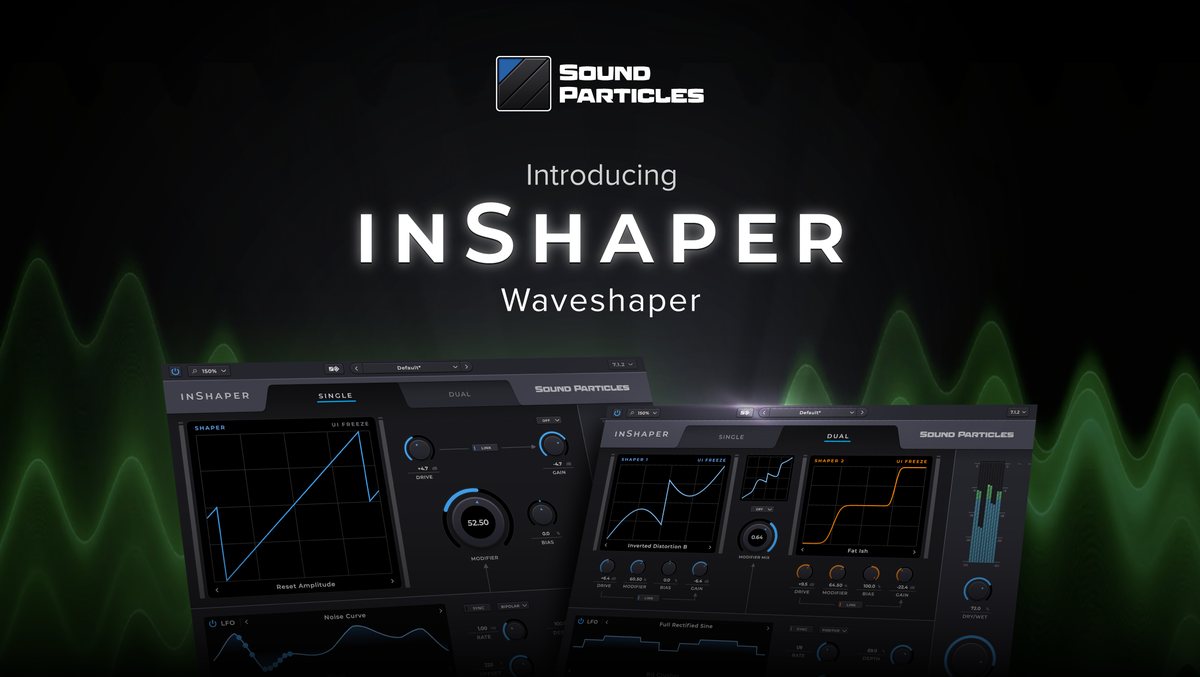
inShaper is a waveshaper plugin for creative distortions designed to give music and post-production professionals interesting results, in a very simple and straightforward way.
— Sound Particles official site
What is inShaper?
inShaper is a waveshaper distortion plugin from Sound Particles. It bends and folds waveforms to create creative distortion, from light saturation to heavy distortion. The maker has both music and post-production users in mind.
The core is the shaping curve. The maker says there are more than 60 curves, ranging from wave folding to classic waveshaping, so you can choose the character of the distortion. Single mode uses one curve and Dual mode blends two.
Drive, gain, modifier and bias are adjustable, and an LFO can modulate drive, bias, gain or the modifier. LFO offsets can differ per speaker, which the maker presents as a way to add spatial movement, and drive can be linked to gain to keep output level consistent.
There are more than 25 presets, and the official page shows before-and-after examples on bass, guitar, hi-hats, keys, vocal and effects. It supports mono and stereo as well as immersive formats such as Sony 360RA.
Key features
60+ shaping curves
More than 60 curves range from wave folding to classic waveshaping, each with a different distortion character. You may be able to try many textures on the same sound.
Single and Dual modes
One mode uses a single curve and the other blends two. Dual may help in aiming for a thicker texture.
Drive, gain, modifier and bias
These set the amount of distortion, output, curve variation and offset individually, and oversampling can also be set. It may help when fine-tuning how the distortion behaves.
LFO modulation
Several LFO waveforms can modulate drive, bias, gain or the modifier, and the LFO curve itself can be shaped. It could be tried when you want movement in distortion.
Per-channel offset
Different LFO offsets can be applied per speaker. It may be a candidate when creating spatial motion in stereo or immersive setups.
Drive linked to gain
This setting helps keep the output level consistent as drive changes, which may be convenient when auditioning distortion amounts.
Specifications
| Item | Details |
|---|---|
| Type | Waveshaper (distortion) |
| Formats | AAX, AU, VST3 (Plugin Boutique lists AAX Native, AU, AUv3, VST, VST3) |
| OS | macOS 10.15 or later (Intel / Apple Silicon), Windows 10 or later |
| Presets | 25+ |
| Curves | 60+ |
| Minimum | 2-core CPU or higher, 4 GB RAM or more, 600 MB disk space |
| Channel formats | Mono, stereo and immersive formats (such as Sony 360RA) |
What is included and system requirements
- inShaper plugin
- 25+ presets
- Formats: AAX, AU, VST3 (retailer also lists AUv3 and VST)
- OS: macOS 10.15 or later / Windows 10 or later
- A trial is available on the official site
How to use it
- After purchase, download the installer from your Sound Particles or Plugin Boutique account.
- Run the installer for your OS.
- Complete license activation.
- Open your DAW and insert inShaper on a track you want to distort, such as bass, drums or keys.
- Choose Single or Dual mode and select a shaping curve.
- Move Drive and Gain to set the amount of distortion.
- Use the LFO to move Drive or Bias for motion.
Where it may come in handy
Adding weight to bass
You could choose a saturation-leaning curve to add harmonics to bass. Linking drive to gain may keep the level from changing.
Processing drums and hi-hats
Stronger wave folding could give hi-hats or percussion a rougher texture.
Effects and sound design
You might move the distortion with the LFO to create unusual effects.
Flavor on vocals and guitar
Dual mode could blend two curves to add edge to a vocal or guitar.
Who it may suit
- People who want more kinds of saturation and distortion
- Sound designers who want to animate distortion with an LFO
- Anyone trying spatial distortion in stereo or immersive setups
- Those who want to add texture to bass or drums quickly
Good to know before you buy
- A trial is offered on the official site.
- The listed formats differ: the official page says AAX, AU and VST3, while Plugin Boutique also lists AUv3 and VST.
- The official page states that 25+ presets are included.
- The official page shows it as a one-time purchase.
How it differs from similar products
We do not pick a winner; the official figures are placed side by side.
Sound Particles Air
Both are Sound Particles plugins with different purposes. inShaper is a 69-dollar distortion effect, while Air is a 69-dollar effect that reproduces high-frequency loss over distance.
Price
$69 (Sound Particles official site, checked 2026-10-27). Prices can vary by region and promotion, so check the official page before buying.
See inShaper on the product page
More of the same kind
We have introduced 82 saturation and distortion effects. Here are some of the others.
- W. A. Production Heat by 22Bullets
- D16 Group Devastor 2
- Arturia Dist OPAMP-21
- AudioThing Valves
- Solid State Logic SSL Native X-Saturator
- iZotope Plasma
We have introduced 14 other products from Sound Particles.
- Sound Particles Space Controller Standard
- Sound Particles Doppler
- Sound Particles Beat Panner
- Sound Particles Doppler + Air Bundle
- Sound Particles Density
For a side-by-side comparison scored on the same criteria, see our comparison of saturation and distortion effects.
See the full list in Product database: Effects.
Sources: soundparticles.com pluginboutique.com (checked 2026-10-27)










Comments