
Disclosure: This page may contain affiliate links. Prices were checked on the date shown and may change.
An introduction to iZotope Plasma, based on information from the maker and distributors: what it does, how to use it and who it may suit. It is not scored.
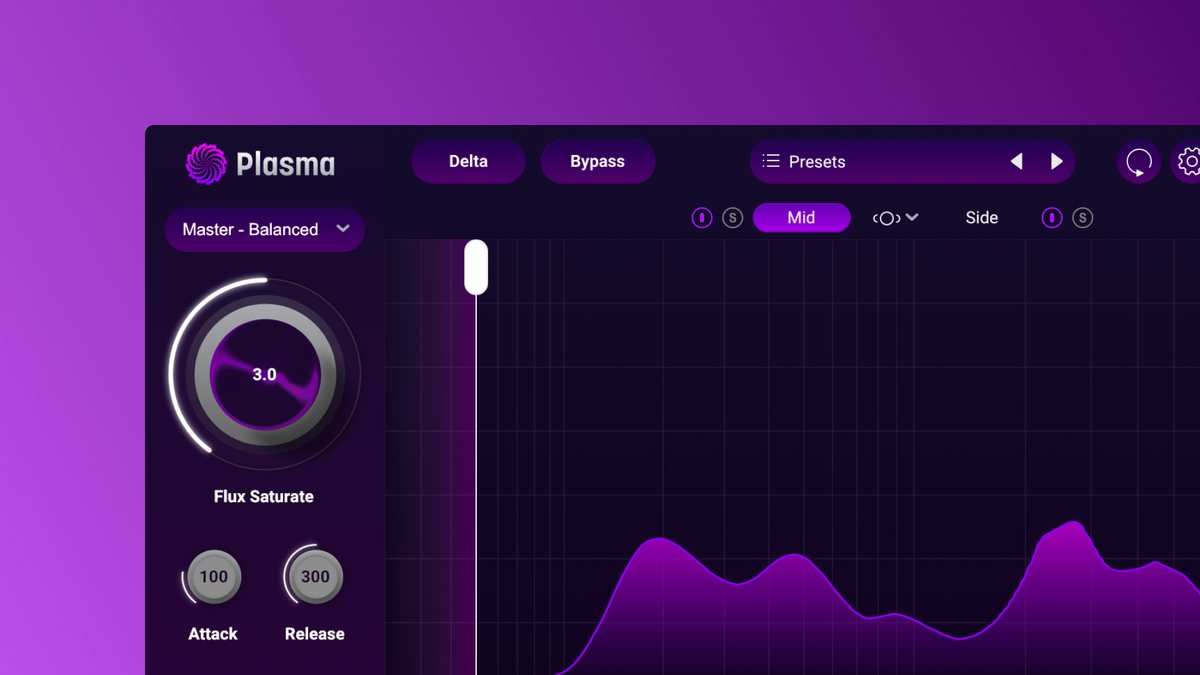
Plasma's groundbreaking Flux Saturation technology analyzes your sound and applies dynamic processing.
— iZotope official site
What is Plasma?
Plasma is a saturation plug-in in iZotope's Catalyst Series that uses Flux Saturation, which changes its processing based on analysis of your audio.
iZotope says that unlike a static saturator, Plasma analyzes the input and adds warmth, depth and character where and when needed.
It is positioned for everything from individual mix elements to the master. You choose one of 24 Target Profiles to guide it, then refine with Attack, Release and an Overdrive fader.
Channel Modes and Frequency Handles let you boost lows, mids and highs separately, process the mid or side signal, and target the attack or the sustain.
Key features
Flux Saturation
Analyzes the input and applies saturation to the ranges that need it. It may follow the material more closely than a static saturator.
24 Target Profiles
Profiles for sources such as drums, vocals and masters give you a starting direction when you are unsure where to begin.
Attack, Release and Overdrive
Attack and Release set how the effect engages and recovers, and the Overdrive fader adds intensity, from gentle warmth to heavy crunch.
Frequency Handles
Boost the lows, mids and highs separately to add texture where you want it.
Channel Modes
Strengthen the center, widen the stereo field, or shape the attack and tail of a sound.
49 presets
Presets cover individual elements through the master bus, in directions such as bright, deep, balanced and warm.
Specifications
| Item | Details |
|---|---|
| Type | Saturation (Catalyst Series) |
| Target Profiles | 24 |
| Presets | 49 |
| Formats | AAX, AU, VST3 (64-bit; VST2 is not supported) |
| Supported OS (Mac) | macOS Ventura 13.6.9 / Sonoma 14.6.1 or later (Intel / Apple silicon) |
| Supported OS (Windows) | Windows 10 (22H2), Windows 11 (23H2) |
| Trial | Free trial on the official site |
What is included and system requirements
- Plasma plug-in
- 49 presets
- Formats: AAX, AU, VST3
- Hosts listed by iZotope include Logic Pro 11, Pro Tools 2024, Ableton Live 12, Cubase 13, Studio One 6 and REAPER 7
How to use it
- After purchase, download the installer from your iZotope account.
- Run the installer and rescan plug-ins in your DAW.
- Insert Plasma on the target track or master bus.
- Choose the Target Profile closest to your source.
- Set how it engages with Attack and Release.
- Raise the bands you want with the Frequency Handles.
- If you need more, raise the Overdrive fader gradually.
Where it may come in handy
Adding presence to drums
Starting from a drum profile, you may be able to lift just the ranges that need it.
Vocal texture
A vocal profile may add warmth and sheen.
Final master touch
Master profiles for genres could help unify overall texture.
Thickening synths
Channel Modes may let you add weight while adjusting stereo feel and attack.
Who it may suit
- People who want saturation with few controls
- Those who like to start from a source-specific profile
- Users already working with the Catalyst Series
Good to know before you buy
- The VST2 format is not supported.
- Supported OS versions are macOS Ventura / Sonoma or later and Windows 10 and 11.
- A free trial is available on the official site.
Price
$49 (iZotope official site, checked 2026-10-27). Prices can vary by region and promotion, so check the official page before buying.
See Plasma on the product page
More of the same kind
We have introduced 82 saturation and distortion effects. Here are some of the others.
- AudioThing Reels
- Antelope Audio ZHEGA
- MeldaProduction MWaveFolderMB
- Native Instruments Kolor
- United Plugins Cyberdrive
- Freqport FreqTube FT1-EMU
We have introduced 15 other products from iZotope.
- iZotope Mix & Master Bundle Advanced
- iZotope Neutron 5 Elements
- iZotope RX Post Production Suite 9
- iZotope Ozone Imager
- iZotope Neoverb
For a side-by-side comparison scored on the same criteria, see our comparison of saturation and distortion effects.
See the full list in Product database: Effects.
Sources: izotope.com pluginboutique.com (checked 2026-10-27)










Comments