
Disclosure: This page may contain affiliate links. Prices were checked on the date shown and may change.
An introduction to MeldaProduction MVintageRotary, based on information from the maker and distributors: what it does, how to use it and who it may suit. It is not scored.
A rotary simulation based on the famous vintage cabinets!
— MeldaProduction official site
What is MVintageRotary?
MVintageRotary is a rotary speaker simulation plugin from MeldaProduction of the Czech Republic. According to the maker, it is based on the famous Leslie-style cabinets and was designed for organs, but it can also be used on keyboards, guitars and many other instruments.
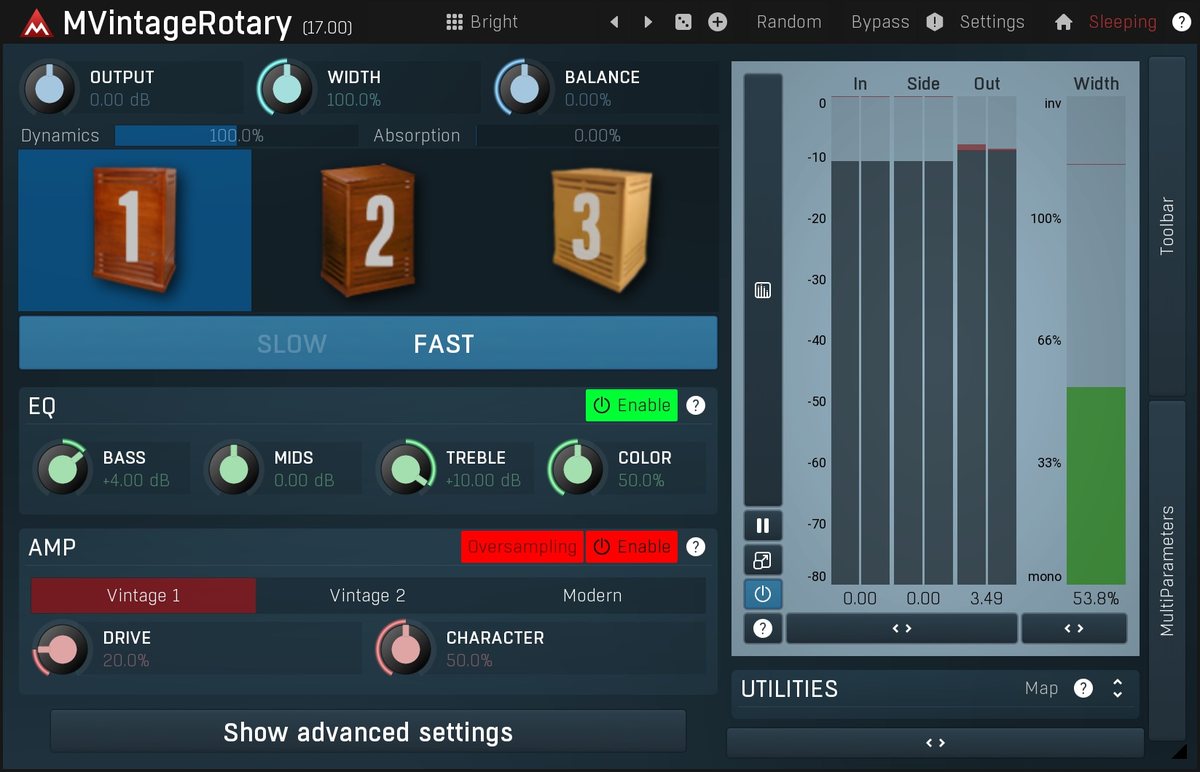
The rotary effect, produced by rotating low and high speaker elements, adds movement and width to the sound and has long been used on organs and electric guitars. This plugin has three algorithms, with controls for stereo width, the amount of dynamics, internal dampening and more.
The rotation speeds can be synchronised to the tempo of your project and the direction of rotation can be changed. The slow/fast switch can be operated with a MIDI sustain pedal or modulation wheel. There are also modulators that let you build combinations such as increasing distortion when you play louder.
It shares the interface common to MeldaProduction plugins, which is resizable and styleable, and supports VST, VST3, AU and AAX. A trial version is available on the official site.
Key features
Three algorithms
Three algorithms are provided for reproducing the rotary movement. You can switch between them to compare how they suit the mood of a song or a part.
Stereo width and dynamics controls
You can adjust the stereo width, the amount of dynamics and the internal dampening. This suits cases where you want to change the strength of the movement to fit your own song.
Tempo sync and rotation direction
The rotation speed can follow the tempo of the song, and the direction of rotation can be changed. It may be handy when you want the movement to line up with the rhythm.
Switching by MIDI
The slow/fast switch can be controlled with MIDI such as a sustain pedal or modulation wheel. This suits players who want to change the speed while playing an organ. MIDI learn is also available.
Analog-style and digital distortion
It emulates the analog-style distortion that is part of the typical organ sound, and you can also add stronger digital distortion. The maker says the available drive range is wider than on the original.
Modulators and utilities
Modulators let you build movements such as switching automatically between slow and fast, or adding more distortion when you play harder. It also has adjustable up-sampling (1x to 16x), a safety limiter and smart randomisation.
Specifications
| Item | Details |
|---|---|
| Type | Rotary speaker simulation |
| Algorithms | 3 |
| Plugin formats | VST, VST3, AU, AAX |
| Up-sampling | Adjustable 1x to 16x |
| Channel modes | M/S, single channel, up to 8-channel surround |
| Supported CPU | Intel / AMD (SSE2), native Apple Silicon |
| Maker | MeldaProduction |
What is included and system requirements
- Plugin (VST / VST3 / AU / AAX)
- Windows: Intel / AMD processor with SSE2
- macOS: Intel / AMD / M1 with SSE2, native Apple Silicon support
- Global preset management and online preset exchange
- Activation uses MPluginManager and a MeldaProduction account (enter the serial from Plugin Boutique if bought there)
How to use it
- Download the installer from the MeldaProduction site and install it.
- Sign in to your MeldaProduction account in MPluginManager and activate the trial or your purchased licence.
- Load MVintageRotary on an organ, keyboard or guitar track in your DAW.
- Switch between the three algorithms and compare them.
- Assign the slow/fast switch to your sustain pedal or modulation wheel.
- Adjust the stereo width and the amount of dynamics so the movement suits the song.
- If you use tempo sync, set the rotation speed to follow the project tempo.
- If the sound is too distorted, lower the drive or check the safety limiter.
Where it may come in handy
Adding movement to an organ instrument
You could run a programmed organ through it to add the sway and width of a rotary speaker. Switching speeds with a sustain pedal may let you add changes that follow your playing.
Adding spatial motion to guitar or electric piano
You may also use it lightly on guitar or electric piano to add movement. The maker says it can be used on instruments other than organs.
Using it as an effect on vocals or synths
With tempo sync you can try it as an effect that moves in time with the rhythm. Widening the stereo image may also be useful for sound design material.
Who it may suit
- People who want rotary movement on organ or electric piano sounds
- Players who want to switch the rotation speed with a pedal while playing
- Users who already use other MeldaProduction plugins
- Anyone who wants to try a trial version before buying
Good to know before you buy
- MeldaProduction plugins are activated and managed with MPluginManager and an account.
- If you buy at Plugin Boutique, enter the serial from your account page in MPluginManager.
- Prices on the official site can change for limited periods, so please check before buying.
Price
$54 (Plugin Boutique, checked 2026-10-27). Prices can vary by region and promotion, so check the official page before buying.
See MVintageRotary on the product page
More of the same kind
Other introduction articles of the same kind.
- Blue Cat Audio Blue Cat's StereoScope Pro
- Klevgrand Grand Finale
- Waves X-Click
- Solid State Logic SSL Fusion Vintage Drive
- Waves X-Hum
- sonible pure:level
We have introduced 32 other products from MeldaProduction.
- MeldaProduction MMatcher
- MeldaProduction MCompare
- MeldaProduction MMorph
- MeldaProduction MConvolutionMB
- MeldaProduction MTrackAlign
See the full list in Product database: Effects.
Sources: meldaproduction.com pluginboutique.com (checked 2026-10-27)










Comments