
Disclosure: This page may contain affiliate links. Prices were checked on the date shown and may change.
An introduction to Stagecraft Software Overdrive 5, based on information from the maker and distributors: what it does, how to use it and who it may suit. It is not scored.
Our Overdrive Plug gives you 5 high quality distortions.
— Stagecraft Software official site
What is Overdrive 5?
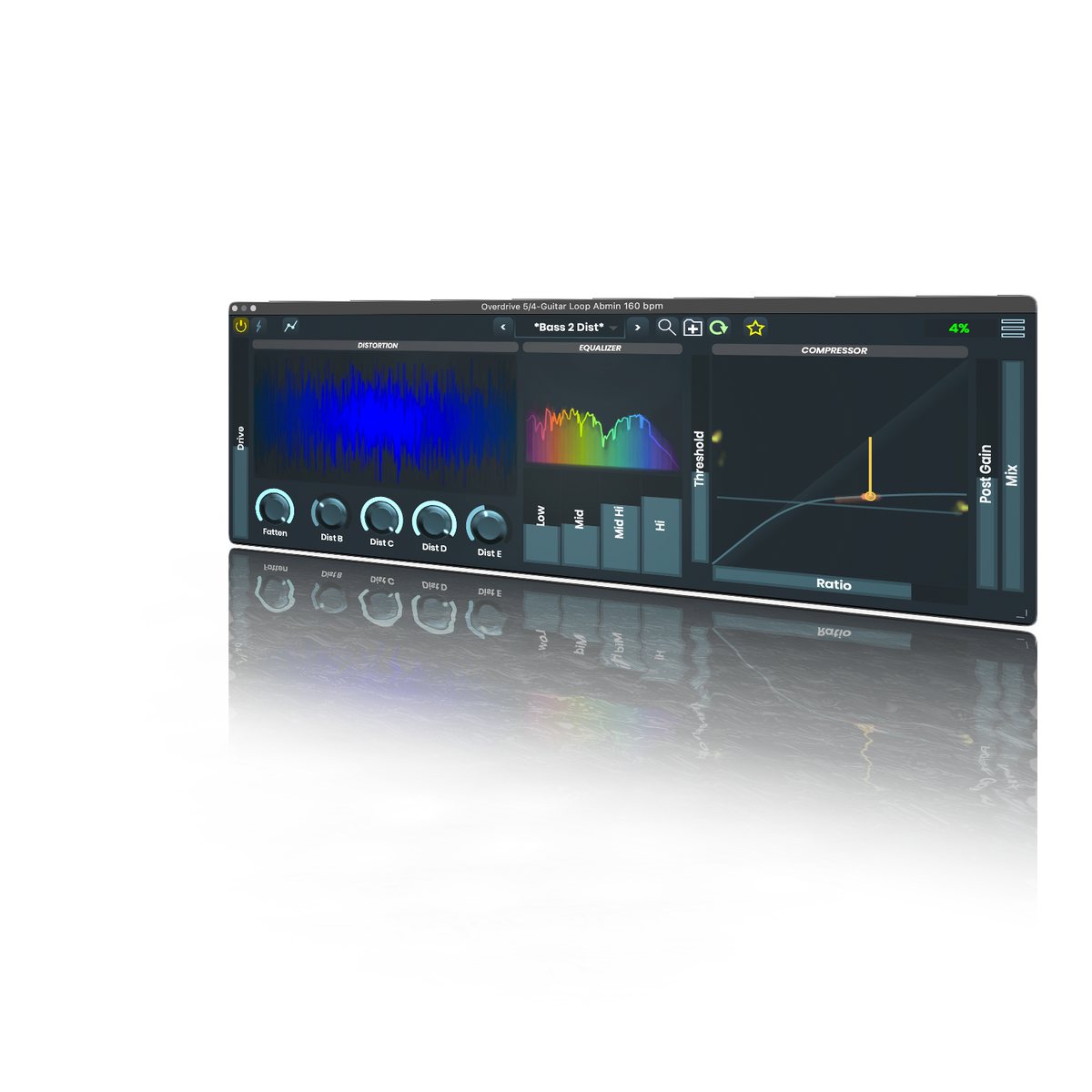
Overdrive 5 is a distortion effect plug-in from Stagecraft Software, based in Chicago. It offers five distortion types, followed by a four-band EQ and a compressor.
According to the maker, each distortion has a scaling control, so the range runs from light, sweet distortion to heavy, dark or gritty growling distortion.
Because the EQ and compressor sit after the distortion stage, you can shape the result by bringing out sharper high-frequency content or smoother, deeper tones. The maker also mentions driving the compressor hard to add another layer of overdrive.
All parameters can be automated, and presets can be saved and, if you wish, shared with other Stagecraft users online. Plugin Boutique lists it in its Distortion category.
Key features
Five distortion types
You can choose from five distortion types, each with a scaling control that changes how hard it is driven, from light to heavy and gritty settings. This may help when you want to swap the character of the distortion to suit the source.
Four-band EQ after the distortion
A four-band EQ follows the distortion stage, so you can bring out sharper high tones or smoother low tones after the signal has been driven. It may be handy for tidying up bands that become rough after distortion.
Compressor you can drive harder
A compressor sits after the EQ. The maker says that overdriving it adds another level of overdrive for an intense, thick sound. You may try it when you want to build the amount of distortion in two stages.
Full parameter automation
Every parameter can be automated in the DAW. This may let you write changes in distortion amount or EQ that follow the arrangement, which can be hard to do by hand alone.
Preset saving and sharing
Your settings can be saved as presets and, if you choose, shared with other Stagecraft users online. This may be convenient when you want to reuse a setting you like.
Major plug-in formats
Plugin Boutique lists AAX, AU and VST3 on Mac and AAX and VST3 on Windows, both 64-bit only. It is worth checking which format your DAW uses before buying.
Specifications
| Item | Details |
|---|---|
| Type | Distortion effect |
| Distortions | 5 types, each with scaling |
| Post stage | 4-band EQ and compressor |
| Formats (Mac) | AAX / AU / VST3 |
| Formats (Windows) | AAX / VST3 |
| OS (Mac) | macOS 10.13 or newer (Intel / Apple Silicon, 64-bit only) |
| OS (Windows) | Windows 7 or newer (64-bit only) |
| Automation | All parameters |
What is included and system requirements
- Overdrive 5 plug-in (Mac: AAX / AU / VST3; Windows: AAX / VST3)
- A 15-day full-version trial can be downloaded from the maker's site (registration required)
- Plugin Boutique points to a free trial download (log-in required)
How to use it
- Download the installer for your OS from the maker's product page.
- Create an account and activate the trial or a product key.
- Rescan plug-ins in your DAW and insert Overdrive 5 on a track.
- Choose one of the five distortion types that suits the source.
- Move the scaling control to set how hard the distortion is driven.
- Use the four-band EQ after the distortion to balance highs and lows.
- Drive the compressor if you want more thickness or density.
- Save the settings you like as a preset.
Where it may come in handy
Shaping guitar or bass distortion
It may be useful when you want to add distortion character without setting up an amp simulator. You can switch among the five types to look for one that suits the source.
Adding grit to drums or synths
You may try it on programmed drums or synths to add a gritty texture, then use the EQ after the distortion to tidy up bands that become rough.
Processing vocals or samples
It may help when you want to distort a voice or sample on purpose for a lo-fi or aggressive feel. Automation lets you move the amount along with the arrangement.
Who it may suit
- People who want one more distortion effect in their DAW
- People who want EQ and compression after the distortion in the same plug-in
- People who prefer to try a trial version before buying
Good to know before you buy
- The maker's store sells a product key, and the trial requires registration.
- Mac requires macOS 10.13 or newer and Windows requires Windows 7 or newer; both are 64-bit only.
- AU is available on Mac only; Windows offers AAX and VST3.
- The maker's product page contains some leftover text from another plug-in, so specifications were checked against the Plugin Boutique listing as well.
Price
$40 (Stagecraft Software official site, checked 2026-10-27). Prices can vary by region and promotion, so check the official page before buying.
See Overdrive 5 on the product page
More of the same kind
We have introduced 82 saturation and distortion effects. Here are some of the others.
- Signum Audio SKYE Clipper Surround
- IK Multimedia Tape Machine 80
- Slate Digital Virtual Tape Machines
- AIR Music Technology Tape Saturator
- W. A. Production Punchy Worm
- Three-Body Technology Tape Vibe
We have introduced 5 other products from Stagecraft Software.
- Stagecraft Software Picante
- Stagecraft Software Universal Plug
- Stagecraft Software Cenere
- Stagecraft Software Parity EQ
- Stagecraft Software Theremin
For a side-by-side comparison scored on the same criteria, see our comparison of saturation and distortion effects.
See the full list in Product database: Effects.
Sources: stagecraftsoftware.com pluginboutique.com (checked 2026-10-27)










Comments