
Disclosure: This page may contain affiliate links. Prices were checked on the date shown and may change.
An introduction to Harrison FasTrack, based on information from the maker and distributors: what it does, how to use it and who it may suit. It is not scored.
FasTrack improves the sound quality of live vocals or spoken word whether you're recording a podcast, live streaming, in the studio, on stage, or broadcasting.
— Harrison official site
What is FasTrack?
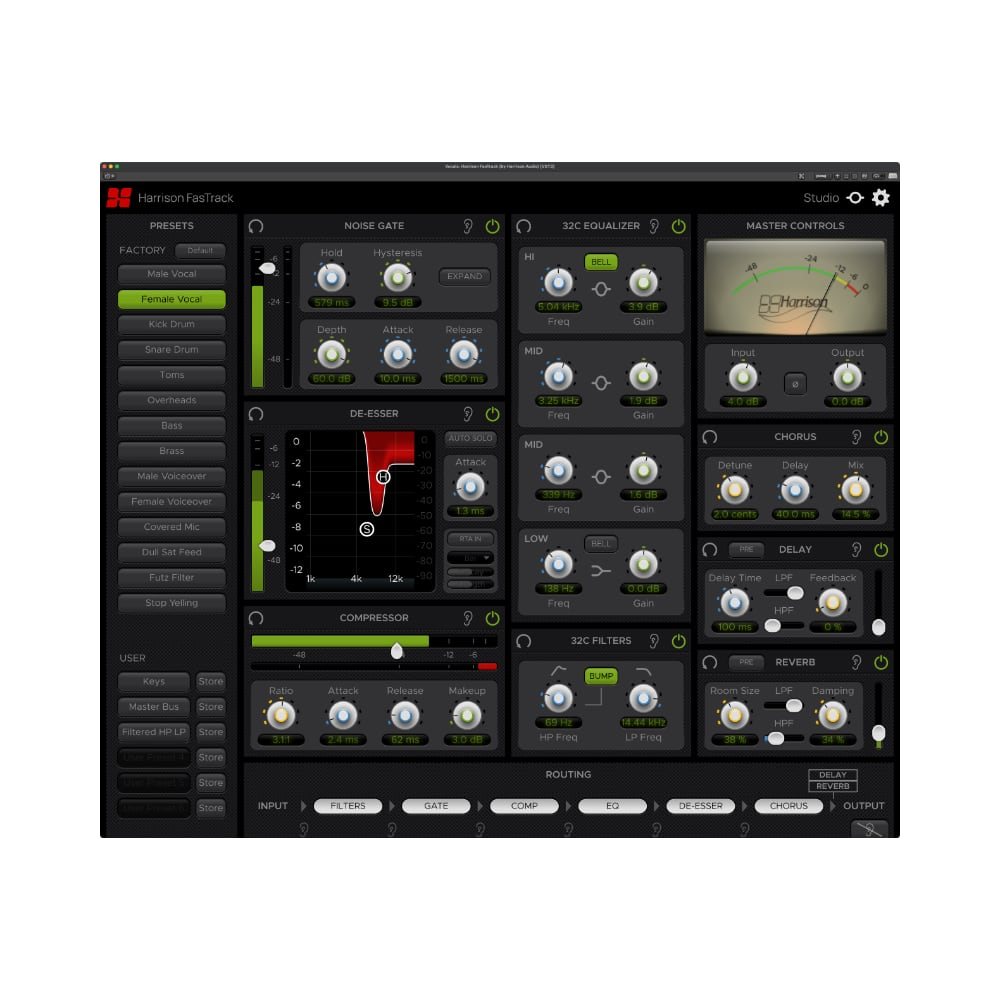
FasTrack is a vocal- and voice-oriented channel-strip plug-in from Harrison, the Nashville console maker. It brings gate, de-esser, compressor, EQ, filters and chorus, delay and reverb into one screen, built for quick sound shaping.
The official description assumes situations where audio must be set quickly, such as podcasts, live streaming, studio recording, stage and broadcast. It contains the EQ of the company's 32C large-format console and is presented to people who want the immediacy of a live console workflow inside a DAW.
Processing is designed for ultra-low latency, with 14 factory presets and 6 user slots. The presets line up on the left of the interface so they can be switched without menus, a layout intended for live use such as streaming.
Of the 11 processing components, 6 processing elements can be reordered freely. It supports AU, VST2, VST3 and AAX Native on Mac and VST2, VST3 and AAX Native on Windows, and a free iLok account is required for authorization.
Key features
4-band EQ based on the 32C
Four bands (HI, LOW and two MID) based on the Harrison 32C console EQ. HI and LOW are shelves by default and can switch to bell. It may be used to shape the vocal range.
High-pass and low-pass filters
The 32C high-pass filter and a low-pass filter have adjustable corner frequencies. A BUMP button adds a boost at the high-pass corner.
Gate, de-esser and compressor
A noise gate with an expander option, a de-esser for sibilance and a general compressor are included, so background noise and sibilance can be handled on one screen.
Chorus, delay and reverb
Delay and reverb are processed in parallel with the main path and blended like send/return effects. Chorus is intended to add width and depth to voices.
Presets and user slots
There are 14 factory presets and 6 user preset slots. The maker assumes beginners can start from presets and later save their own.
Reorderable routing
In the routing module at the bottom, the order of the six processing elements can be changed by dragging, while input and output controls stay fixed at both ends.
Specifications
| Item | Details |
|---|---|
| Type | Vocal / voice channel strip |
| Processing components | 11 |
| Presets | 14 factory / 6 user |
| EQ | 4-band (32C based) |
| macOS | macOS 11 Big Sur to 13 Ventura (Apple M1 supported) |
| Windows | Windows 10-11 (64-bit) |
| Formats (Mac) | AU, VST2, VST3, AAX Native |
| Formats (Windows) | VST2, VST3, AAX Native |
| Authorization | Free iLok account |
What is included and system requirements
- FasTrack plug-in
- 14 factory presets
- Mac (per Plugin Boutique): Intel dual-core 2.4 GHz or higher, or M1; 4 GB RAM minimum (8 GB recommended)
- Windows (per Plugin Boutique): Core 2 or comparable at 2.4 GHz or higher; 4 GB RAM minimum (8 GB recommended)
- A free iLok account is required for authorization
How to use it
- Buy from Harrison's official store or Plugin Boutique.
- Create a free iLok account and authorize the license.
- Download and run the installer for Windows or Mac.
- Insert FasTrack on a vocal track or on a streaming input in the DAW.
- Choose a close preset on the left side.
- Adjust gate, de-esser, compressor and EQ as needed.
- Reorder the processing in the routing module if required.
- Blend chorus, delay and reverb with their return levels.
Where it may come in handy
Recording and monitoring vocals
Its low-latency design may be used to hear the shaped sound while singing.
Podcasts and narration
Gate, de-esser and EQ in one place could be used to shape a voice quickly.
Live streaming
The presets can be switched without menus, so it may be used for quick adjustments during a stream.
Karaoke vocal sound
The maker mentions karaoke work, so it may be tried with chorus and reverb added to the voice.
Who it may suit
- People who want vocal processing in one plug-in
- People who want to set sound quickly for podcasts and streams
- People who want to try 32C-style EQ
- Beginners who want to start from presets
Good to know before you buy
- A free iLok account is required for authorization.
- Plugin Boutique lists macOS 11 to 13 as supported. If using a newer macOS, check Harrison's information before buying.
- Harrison's store sells FasTrack at $99, while individual AVA products are sold at $49 and similar prices.
- Delay and reverb are processed in parallel.
How it differs from similar products
We do not pick a winner; the official figures are placed side by side.
Harrison DeEsser
FasTrack combines gate, de-esser, compressor, EQ, filters and effects and costs $99. Harrison DeEsser provides the de-esser function alone and costs $49, both on Harrison's official store.
Price
$99 (Harrison official site, checked 2026-10-27). Prices can vary by region and promotion, so check the official page before buying.
See FasTrack on the product page
More of the same kind
We have introduced 51 channel strips. Here are some of the others.
- Waves Kramer HLS Channel
- Solid State Logic SSL 4K G
- Softube Chandler Limited Zener-Bender for Console 1
- Solid State Logic Solid State Logic SSL 4K B
- Softube Empirical Labs Trak Pak for Console 1
- Antelope Audio DRM-60
We have introduced 5 other products from Harrison.
- Harrison Tremolo Panner
- Harrison Mastering EQ
- Harrison MPC Spectral Compressor
- Harrison Multi-Band Compressor
- Harrison Legacy EQ
See the full list in Product database: Effects.
Sources: store.harrisonaudio.com pluginboutique.com (checked 2026-10-27)










Comments