
Disclosure: This page may contain affiliate links. Prices were checked on the date shown and may change.
An introduction to NUGEN Audio Halo Downmix with 3D Immersive Extension, based on information from the maker and distributors: what it does, how to use it and who it may suit. It is not scored.
Produce better downmixes and enhance the downmix compatibility of your surround mixes, with an interface perfectly designed for the task in hand.
— NUGEN Audio official site
What is Halo Downmix with 3D Immersive Extension?
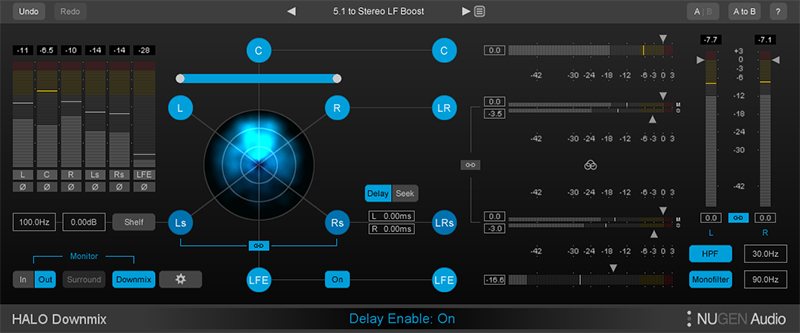
Halo Downmix is a NUGEN Audio plug-in for downmixing surround (5.1/7.1) to stereo and for rebalancing surround mixes. This version includes the 3D Immersive Extension, which adds downmixing from 7.1.2 and 7.1.4 immersive material.
NUGEN explains that standard downmix coefficients can sometimes lead to unsatisfactory results, particularly when legacy upmixing practices were used. Halo Downmix aims at a more coherent stereo mix by controlling excess diffuse sound from artificial reverb and removing delay artefacts from the rear channels.
Existing 5.1 or 7.1 mixes can also be adjusted in surround-to-surround mode. Individual channel levels and the balance of direct versus diffuse sound can be changed when the original mix is not accessible.
Combined with the included Receive plug-in, a parallel surround/stereo workflow is possible, allowing quick A/B checks between the full surround mix and the stereo downmix.
Key features
Surround-to-stereo downmix
5.1 and 7.1 can be downmixed to stereo. Relative levels, timing and the direct/ambient balance are adjusted with visual controls, allowing finer results than standard coefficients.
3D Immersive Extension
The extension adds downmixing from 7.1.2 and 7.1.4 material. It can be used to fold Atmos beds down to 7.1, 5.1 and stereo.
Control of lows, dialog and ambience
Listed uses include regulating low-frequency content, maintaining dialog clarity, controlling excess ambient energy and removing rear-delay artefacts.
Surround-to-surround rebalancing
Existing 5.1 or 7.1 mixes can be adjusted by channel level and direct/diffuse balance, which helps when the original mix cannot be reached.
Parallel workflow with Receive
The included Receive plug-in supports a parallel surround/stereo workflow with quick A/B comparison.
Advanced and compact views
Advanced and compact modes are available, with in-place monitoring of stereo and surround and linked solo and mute at every stage. They can be chosen to suit screen space.
Specifications
| Item | Details |
|---|---|
| Formats | AAX, VST3, AU, AudioSuite (64-bit) |
| Minimum system | Mac OS X 10.9 / Windows 7, 512 MB RAM |
| 3D extension | Downmix from 7.1.2 and 7.1.4 |
| Included | Receive plug-in |
| Host | Surround-compatible (5.1/7.1) host required |
What is included and system requirements
- Halo Downmix plug-in
- 3D Immersive Extension
- NUGEN Receive plug-in
- AAX, VST3, AU, AudioSuite (64-bit)
How to use it
- Open a session in a host that supports surround (5.1/7.1 or higher).
- Insert Halo Downmix on the surround bus.
- Choose the 5.1 or 7.1 mode and the advanced or compact view.
- Compare stereo and surround with in-place monitoring.
- Adjust channel levels, timing and the direct/ambient balance.
- Check low-frequency content and dialog clarity as needed.
- Use the Receive plug-in to compare surround and stereo in parallel.
- When using the 3D extension, follow the same steps in a 7.1.2 or 7.1.4 session.
Where it may come in handy
Stereo delivery for video work
It may be useful when a stereo downmix is made from a finished surround mix.
Folding down Atmos beds
With the 3D extension, it may suit folding a 7.1.2 bed to 7.1, 5.1 or stereo.
Reviewing upmixed material
It may suit material where rear delays or excess diffuse sound are a concern.
Who it may suit
- People who deliver surround or immersive work in stereo as well
- Post-production mixers
- People who want to rebalance existing surround mixes
Good to know before you buy
- A host that supports surround (5.1/7.1) is required; Pro Tools HD is given as an example.
- A DSP option is offered separately.
- The Plugin Boutique listing includes the 3D Immersive Extension. Officially, Halo Downmix alone is $299 and the version with 3D is $399.
Price
$399 (NUGEN Audio official site, checked 2026-10-27). Prices can vary by region and promotion, so check the official page before buying.
See Halo Downmix with 3D Immersive Extension on the product page
More of the same kind
Other introduction articles of the same kind.
- Waves Waves CLA Nx
- Waves Feedback Hunter
- Positive Grid BIAS X
- Apogee FX Complete Bundle
- UJAM Finisher FLUXX
- IK Multimedia AmpliTube Metal
We have introduced 30 other products from NUGEN Audio.
- NUGEN Audio NUGEN Audio SEQ-S
- NUGEN Audio SigMod
- NUGEN Audio Halo Vision
- NUGEN Audio Visualizer
- NUGEN Audio LM-Correct
See the full list in Product database: Effects.
Sources: nugenaudio.com pluginboutique.com (checked 2026-10-27)










Comments