
Disclosure: This page may contain affiliate links. Prices were checked on the date shown and may change.
An introduction to PSP Audioware PSP BinAmp, based on information from the maker and distributors: what it does, how to use it and who it may suit. It is not scored.
PSP BinAmp is a Class A triode preamp emulation. The specific preamp's implementation is based on that of the legendary Binson Echorec 2 delay.
— PSP Audioware official site
What is PSP BinAmp?
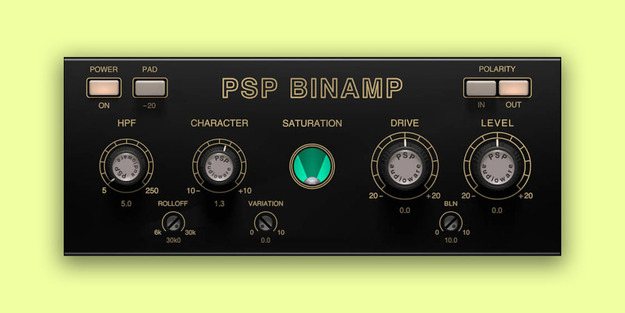
PSP BinAmp is a saturation plugin that emulates a Class A triode tube preamp. Its design is based on the preamp built into Binson's Echorec 2 magnetic-drum delay.
The Echorec 2 was released in 1960, and BinAmp takes its inspiration from that unit's preamp circuit and tone rather than from the delay section. By adjusting the drive amount, you can control the degree of saturation, from subtle warmth to heavier distortion.
Added features include a high-pass filter, a high-frequency rolloff, a -20 dB pad with output gain compensation, polarity switches at input and output, a blend control for saturated and unsaturated signal, and a Variation setting that adjusts the behavior of multiple instances across a DAW session.
Formats are VST / VST 3 / AAX on Windows and VST / VST 3 / AAX / AU on Mac. Licensing is handled through iLok. It is a plugin with a small set of controls, aimed at people who want to add color to drums, vocals, electric pianos, synths and similar sources.
Key features
Triode preamp saturation
Class A circuits are described as building up even-order harmonics. You can raise or lower the drive to set how much color is added.
Blend control
You can mix saturated and unsaturated signal. Even with heavy drive, you may be able to keep some of the original signal and tune how present the effect is.
High-pass and high-frequency rolloff
A high-pass filter tidies the low end, and a rolloff control softens the highs. They may help when distortion makes the lows too heavy or the highs too sharp.
-20 dB pad and polarity
A -20 dB input pad handles hot signals, and separate polarity buttons are provided at input and output. They can also help with phase when stacking with other tracks.
Variation setting
When you use several instances, the behavior of each instance or channel can be shifted slightly. It may be useful when you want to avoid identical behavior across a mix.
Sample-rate support
Internally it uses quad sampling and supports sample rates up to 384 kHz. Latency is stated as 13 samples regardless of sample rate.
Specifications
| Item | Details |
|---|---|
| Maker | PSP Audioware |
| Type | Tube preamp emulation |
| Windows formats | VST / VST 3 / AAX |
| Mac formats | VST / VST 3 / AAX / AU (Apple Silicon supported) |
| Sample rates | Up to 384 kHz |
| Latency | 13 samples |
| Licensing | iLok |
What is included and system requirements
- PSP BinAmp plugin
- Supported OS: Windows 7 to Windows 11, macOS 10.12 to macOS 13 Ventura (Apple Silicon supported)
- Latest iLok License Manager required
How to use it
- Install the latest iLok License Manager.
- Register the license you receive after purchase to your iLok account.
- Install the plugin with the PSP installer.
- Open your DAW and insert BinAmp on a track such as drums or vocals.
- Raise the drive a little and judge the amount of saturation by ear.
- Use the blend control to set the ratio with the original signal.
- Adjust the high-pass filter and high-frequency rolloff if the lows or highs stand out.
- If you use it on several tracks, try the Variation setting as well.
Where it may come in handy
Drums
You might try it for light coloration on kick, snare or drum loops.
Vocals
To add a little warmth to a vocal, one approach is to keep the blend control low.
Keys and synths
You may want to add a more analog-leaning feel to electric pianos, clavinets or digital synths.
Reamped guitar and bass
It may also be used to add coloration to reamped guitar and bass tracks.
Who it may suit
- People who want a saturation plugin with simple controls
- People interested in the tone of a preamp from a vintage delay
- People who want slightly different coloration across several tracks
Good to know before you buy
- The iLok License Manager is required.
- Supported systems are listed as macOS 10.12 to 13 Ventura and Windows 7 to 11.
- The names Binson and Echorec are trademarks of their respective owners and are mentioned for reference.
Price
Please check the official page for the price.
See PSP BinAmp on the product page
More of the same kind
We have introduced 82 saturation and distortion effects. Here are some of the others.
- Three-Body Technology Nylon
- D16 Group Redoptor 2
- Stagecraft Software Picante
- Waves MDMX Distortion Modules
- Three-Body Technology Transformer X
- Waves Kramer Master Tape
We have introduced 12 other products from PSP Audioware.
- PSP Audioware PSP 285
- PSP Audioware PSP HertzRider2
- PSP Audioware Lexicon PSP 42
- PSP Audioware PSP stompFilter
- PSP Audioware PSP Datamix A567
For a side-by-side comparison scored on the same criteria, see our comparison of saturation and distortion effects.
See the full list in Product database: Effects.
Sources: pluginboutique.com (checked 2026-10-27)










Comments