
Disclosure: This page may contain affiliate links. Prices were checked on the date shown and may change.
An introduction to Waves Kramer Master Tape, based on information from the maker and distributors: what it does, how to use it and who it may suit. It is not scored.
Developed with studio legend Eddie Kramer (Zeppelin, Hendrix)
— Waves official site
What is Kramer Master Tape?
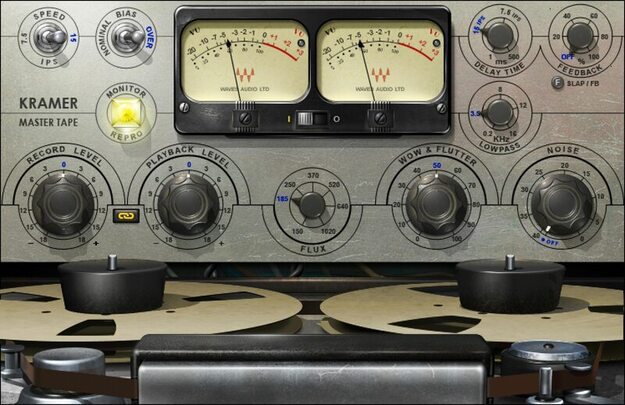
Kramer Master Tape is a tape emulation from Waves developed with engineer Eddie Kramer. It models an American tube recorder used at Olympic Studios.
The sound can be adjusted with speed, bias and flux controls.
It also has a tape delay of up to 500 ms with time, feedback and filter controls.
Wow, flutter and hiss can be added, and tube saturation is listed for warming up harsh-sounding instruments.
Key features
Speed, bias, flux
Three controls related to tape behavior let you adjust the sound.
Tape delay
A tape delay of up to 500 ms with time, feedback and filter controls.
Wow, flutter and hiss
Elements that add analog authenticity can be included.
Tube saturation
The maker lists warming up harsh-sounding instruments.
Tracks and masters
Described as usable on individual tracks and on masters.
Specifications
| Item | Details |
|---|---|
| macOS | Monterey 12, Ventura 13, Sonoma 14, Sequoia 15 |
| Windows | Windows 10 or later |
| Formats | Mac: VST / AU / AAX; Windows: VST / AAX |
What is included and system requirements
- Kramer Master Tape (single plug-in)
How to use it
- Create a Waves account, or log in to an existing one.
- Register the serial number shown in your Plugin Boutique user account under 'Register New Products' in your Waves account.
- Download and install the Waves Central app.
- Log in to Waves Central and choose the products to install on the 'Install Products' tab.
- Click 'Install & Activate' to install and authorize them.
- Open your DAW and load the Waves plugin from an effect slot.
- Step through the presets and adjust the input level to start working.
Where it may come in handy
Drum bus texture
It may be tried on a drum bus for a tape-style compression feel.
Delay on vocals
The tape delay could add space to a vocal.
Tape feel on the master
A light touch on the master may adjust overall texture.
Who it may suit
- People looking for a single tape emulation
- People who also want a tape delay
Good to know before you buy
- A Waves account and serial registration are required.
- Also included in the Tape, Tubes & Transistors bundle.
How it differs from similar products
We do not pick a winner; the official figures are placed side by side.
Tape, Tubes & Transistors
Kramer Master Tape is a single tape emulation, while Tape, Tubes & Transistors is a three-plug-in bundle that adds Kramer HLS Channel and Kramer PIE Compressor.
Price
Please check the official page for the price.
See Kramer Master Tape on the product page
More of the same kind
We have introduced 82 saturation and distortion effects. Here are some of the others.
- Arturia Dist OPAMP-21
- Sound Particles inShaper
- MeldaProduction MDistortionMB
- Audified U78 Saturator
- Native Instruments Driver
- Solid State Logic SSL Native X-Saturator
We have introduced 215 other products from Waves.
- Waves Berzerk Distortion
- Waves Abbey Road Saturator
- Waves MDMX Distortion Modules
- Waves Manny Marroquin Distortion
- Waves J37 Tape
For a side-by-side comparison scored on the same criteria, see our comparison of saturation and distortion effects.
See the full list in Product database: Effects.
Sources: pluginboutique.com (checked 2026-10-27)










Comments