
Disclosure: This page may contain affiliate links. Prices were checked on the date shown and may change.
An introduction to Sound Particles Brightness Panner 2, based on information from the maker and distributors: what it does, how to use it and who it may suit. It is not scored.
Brightness Panner 2 turns the frequency content of your sound into movement.
— Sound Particles official site
What is Brightness Panner 2?
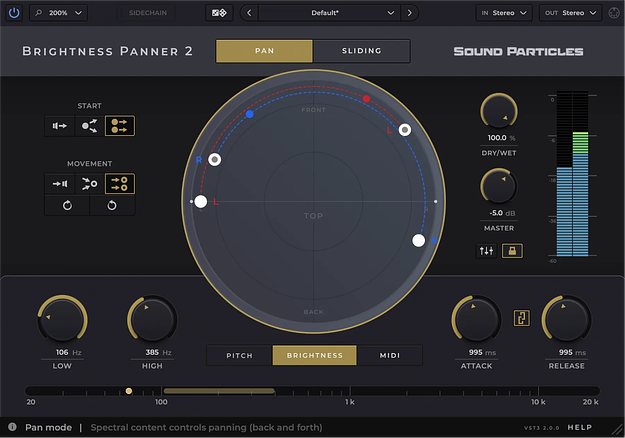
Brightness Panner 2 is a panning plug-in from Sound Particles. It turns the brightness (frequency content) of a sound, its pitch, or incoming MIDI notes into pan movement. The input name 'Brightness Panner' is treated here as the current Brightness Panner 2.
Instead of hand-drawn automation, the movement comes from the sound's own character. A synth melody, a vocal's changing timbre or a MIDI performance can trigger it. It works from stereo up to surround and immersive formats.
You can choose Pan mode, a ping-pong-style effect, or Sliding mode, continuous movement along a defined path. Movement toward a single point, along a custom path, or in a circle can be selected.
A sidechain input lets another track, such as a lead vocal, drive the panning of a saxophone, for example. It supports AAX, AU, AUv3 and VST3 on Mac, and also Windows.
Key features
Driven by brightness, pitch or MIDI
You choose whether brightness, pitch or MIDI notes trigger the movement, depending on the track.
Pan and Sliding modes
Choose a ping-pong-style effect or continuous movement along a path.
Movement direction
Movement can go toward a single point, follow a custom path or rotate in a circle.
Three views
Circular, Polygon and the new Room View show the movement of the sound in real time.
Sidechain input
Another track's signal can drive the panning, such as making an instrument react to a vocal's brightness.
Multichannel support
Mono, stereo, surround and immersive are supported, and custom formats can define channel count, azimuth, elevation and LFE position.
Mixer and Virtual Center
A built-in mixer balances each output channel. Virtual Center reserves the center channel for a lead vocal.
Specifications
| Item | Details |
|---|---|
| Type | Panner driven by brightness, pitch or MIDI |
| Formats | AAX Native / AUv2 / AUv3 / VST3 |
| Supported OS | Mac OS X 10.15 or higher (Intel / Apple Silicon), Windows 10 or higher |
| RAM | 4 GB or higher |
| Disk space | 600 MB |
| I/O | Mono, stereo, surround, immersive |
What is included and system requirements
- Brightness Panner 2 plug-in (AAX / AU / VST3)
- Preset generator for random settings
- Built-in mixer
How to use it
- After purchase, create an account with Sound Particles.
- Use Claim Voucher to register the voucher code from your store account.
- Click Download, get the installer and choose the formats to install.
- Insert the plug-in on the track whose panning you want to move.
- Choose what triggers movement: brightness, pitch or MIDI.
- Pick Pan mode or Sliding mode.
- Set the direction and range of the movement.
- If needed, feed another track into the sidechain.
Where it may come in handy
Movement for synth melodies
The sound may move left and right following the pitch of the melody.
Reacting to a vocal
Driving another instrument's panning from a vocal's brightness may create a call-and-response feel.
Linking to MIDI
Setting the pan from MIDI notes may keep the performance and movement aligned.
Immersive work
In surround or immersive setups, it may help create sound movement.
Who it may suit
- People who want panning movement without drawing automation
- People working in surround or immersive formats
- People who want sounds to react to each other through sidechain
Good to know before you buy
- The manufacturer's product page could not be read automatically, so the content is based on Plugin Boutique's description (the official home page lists Brightness Panner 2).
- The input name was Brightness Panner; the current version is Brightness Panner 2.
Price
Please check the official page for the price.
See Brightness Panner 2 on the product page
More of the same kind
Other introduction articles of the same kind.
- Mellowmuse CS1V Console Channel
- Klevgrand Parrot
- United Plugins BassRift
- NUGEN Audio Halo Upmix
- Audified RZ062 Equalizer
- FKFX Audio Noise Bleach
We have introduced 14 other products from Sound Particles.
- Sound Particles Doppler
- Sound Particles Density
- Sound Particles Beat Panner
- Sound Particles Air
- Sound Particles AudioMatrix
See the full list in Product database: Effects.
Sources: pluginboutique.com soundparticles.com (checked 2026-10-27)










Comments