
Disclosure: This page may contain affiliate links. Prices were checked on the date shown and may change.
An introduction to Blue Cat Audio Plug'n Script, based on information from the maker and distributors: what it does, how to use it and who it may suit. It is not scored.
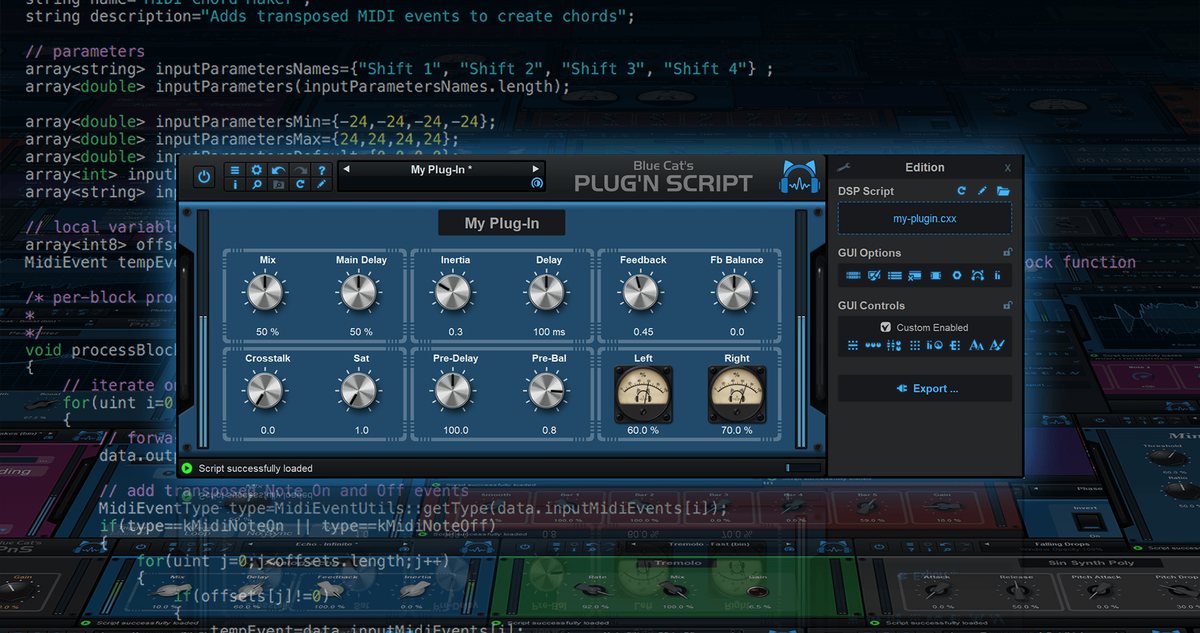
Blue Cat's Plug'n Script is an audio and MIDI scripting plug-in and application that can be programmed to build custom effects or virtual instruments, without quitting your favorite DAW software.
— Blue Cat Audio official site
What is Plug'n Script?
Blue Cat's Plug'n Script is an audio and MIDI scripting plug-in from Blue Cat Audio. By writing scripts you can build your own effects or virtual instruments without leaving your DAW. It runs as a plug-in and as a standalone application.
Without programming knowledge, it can be used as a regular multi-effect with existing scripts. For developers it is a development environment for audio plug-ins: algorithms can be prototyped quickly, a GUI can be generated without code, and the result can be exported as a VST, VST3, AAX or Audio Unit plug-in or a standalone application.
Scripts can be loaded as source code or as pre-compiled binaries. Source scripts use the AngelScript language, originally developed for video games, with a JIT compiler. From version 2 the plug-in also loads native code built from C, C++ or other languages that can export C functions.
It includes 59 scripts with source code and 273 presets covering compressors, gates, tremolo, filters, a looper, synthesizers, MIDI effects, file playback and recording. They can be used as they are or as examples for writing your own.
Key features
Audio and MIDI scripting
Scripts can process both audio and MIDI, so you can build MIDI tools and virtual instruments as well as effects.
Export
Creations can be exported as VST, VST3, Audio Unit or AAX plug-ins or as a standalone application.
AngelScript and native code
Besides AngelScript, whose syntax is close to Java, C#, C++ or JavaScript, compiled C or C++ code can be loaded through the same interface.
Automatic GUI
The interface adapts to scripts automatically, and Blue Cat's KUIML language can be used to design your own. Up to 48 input parameters and 32 outputs are supported, with more possible via a config file.
Included scripts and presets
59 scripts and 273 presets are included. They can be used directly or studied as examples, and free scripts from the scripts repository can also be used.
Sidechain and surround
Sidechain input and auxiliary outputs are supported, as is surround processing for up to eight channels.
Common features
Blue Cat Audio standards such as MIDI learn and automation, no CPU load on silence, smooth bypass, undo/redo and a preset manager are included.
Specifications
| Item | Details |
|---|---|
| Type | Audio/MIDI scripting plug-in and standalone |
| Script languages | AngelScript (JIT), native C/C++ |
| Included | 59 scripts, 273 presets |
| Parameters | 48 inputs / 32 outputs (expandable via config file) |
| Surround | Up to 8 channels |
| Sample rates | Any |
| Export formats | VST, VST3, AAX, Audio Unit, standalone |
What is included and system requirements
- Plug'n Script (Mac/Windows, plug-in formats and standalone)
- 59 scripts with source code
- 273 presets
How to use it
- After installation, load Plug'n Script in your DAW.
- Pick a similar script from the included list and load it.
- Move the parameters to see how the script behaves.
- Open the script source in your preferred editor and modify it.
- Save, then reload it in the plug-in.
- Add input parameters and GUI elements as needed.
- When finished, export it as a plug-in or standalone application.
- To chain several scripts, a host such as PatchWork can be considered.
Where it may come in handy
Making your own effect
Processing that no commercial plug-in offers may be prototyped with a short script.
Handy MIDI tools
Small MIDI conversion or processing tools can be built to save time in production.
Learning DSP
The included scripts may be read to learn how filters and compressors work.
Prototyping before development
The manufacturer describes trying algorithms inside a DAW before developing a full plug-in.
Who it may suit
- People who want to build their own effects or MIDI tools
- Developers who want to prototype algorithms quickly
- People who want to learn DSP or programming within a production workflow
Good to know before you buy
- Knowledge of AngelScript or C/C++ is helpful for writing scripts.
- Programming is not required if you only use existing scripts.
- For chaining several scripts, the manufacturer points to a separate product, PatchWork.
Price
$99 (Blue Cat Audio official site, checked 2026-10-27). Prices can vary by region and promotion, so check the official page before buying.
See Plug'n Script on the product page
More of the same kind
Other introduction articles of the same kind.
- Klevgrand DAW LP
- Waves NS1 Noise Suppressor
- Klevgrand Walls
- Audified MixChecker Pro
- Waves Submarine
- Sound Particles AudioMatrix
We have introduced 21 other products from Blue Cat Audio.
- Blue Cat Audio Blue Cat's Re-Guitar
- Blue Cat Audio Blue Cat's Miaow Wah
- Blue Cat Audio Re-Head
- Blue Cat Audio Blue Cat's Connector
- Blue Cat Audio Blue Cat's Chorus
See the full list in Product database: Effects.
Sources: bluecataudio.com pluginboutique.com (checked 2026-10-27)










Comments