
Disclosure: This page may contain affiliate links. Prices were checked on the date shown and may change.
An introduction to Digital Brain Instruments Digital Brain Instruments Batch Pro 2, based on information from the maker and distributors: what it does, how to use it and who it may suit. It is not scored.
Batch Pro 2 is a standalone software developed for processing a large number of files in one click.
— Digital Brain Instruments official site
What is Digital Brain Instruments Batch Pro 2?
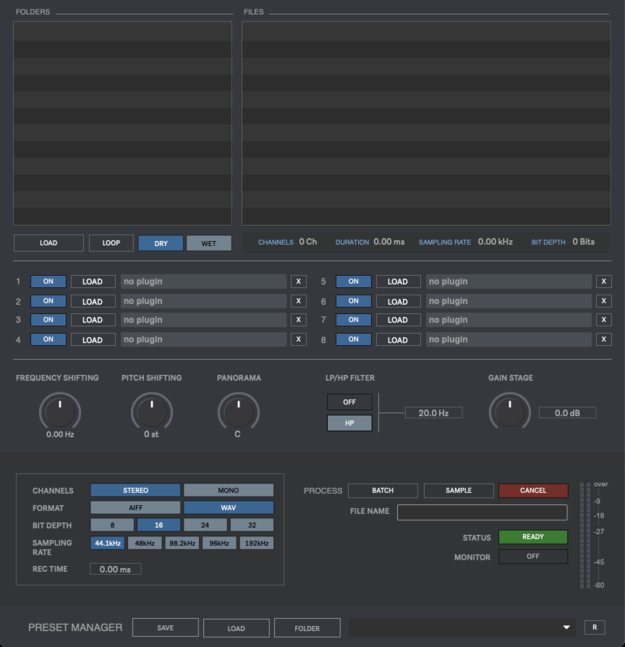
Batch Pro 2 is standalone software for processing many audio files at once. It runs as its own application, not as a DAW plugin.
It can change file format, sample rate, bit depth, pan, stereo/mono, pitch shift, frequency shift, filtering and volume in one pass, and can also run files through up to eight VST/AU plugins.
Processing happens in real time. Files can be previewed before and after processing, with a dry/wet preview, and a preset manager stores and recalls settings.
It reads WAV, AIFF and MP3 files and exports WAV and AIFF. It is meant to shorten work with many files, such as organizing sample material or unifying delivery formats.
Key features
Batch processing
The page says many files can be processed in one operation, which may reduce manual work when one setting applies to many files.
Format, sample rate and bit depth
Export as stereo or mono WAV or AIFF at 44.1, 48, 88.2, 96 or 192 kHz and 8, 16, 24 or 32 bit.
Pitch and frequency shifting
Pitch can change from -24 to +24 semitones and frequency shifting is +/-1000 Hz.
Filters and gain
Files can be passed through high-pass or low-pass filters, and gain can change from -40 dB to +40 dB.
Up to eight plugins
Up to eight VST/AU plugins can be used, for example applying a familiar EQ or compressor to many files at once.
Preview and presets
Files can be auditioned before and after processing with a dry/wet comparison, and settings can be saved as presets.
Specifications
| Item | Details |
|---|---|
| Type | Batch processing software (standalone) |
| Input | WAV, AIFF, MP3 |
| Output | WAV, AIFF (stereo/mono) |
| Sample rates | 44.1 / 48 / 88.2 / 96 / 192 kHz |
| Bit depth | 8 / 16 / 24 / 32 |
| Plugins | Up to 8 VST/AU |
| Mac | macOS 10.11.6 or later (Intel / M1, 64-bit), 2 GB RAM minimum |
| Windows | Windows 8 or later (64-bit), 2 GB RAM minimum |
What is included and system requirements
- Batch Pro 2 standalone application
- Supported OS: macOS 10.11.6 or later, Windows 8 or later (64-bit only)
- Minimum 2 GB RAM
- A free trial is listed on the store page
How to use it
- Install and launch Batch Pro 2.
- Load the files you want to process.
- Choose the output format, sample rate and bit depth.
- Set pitch, filters and gain if needed.
- Insert up to eight VST/AU plugins you want to use.
- Audition, then run the batch and export.
Where it may come in handy
Organizing sample material
It may help when you want to unify the format of sound effects or sample libraries.
Unifying delivery formats
It may suit converting many files to a specified sample rate and bit depth.
Applying one treatment to many files
It could apply the same EQ or gain to many files together.
Who it may suit
- People with many files who want to cut conversion work
- Those who create or organize sample material
- Anyone who wants to apply plugins to many files together
Good to know before you buy
- It is a standalone app and does not work as a plugin inside a DAW.
- Processing runs in real time.
- Export is limited to WAV and AIFF.
Price
Please check the official page for the price.
See Digital Brain Instruments Batch Pro 2 on the product page
More of the same kind
Other introduction articles of the same kind.
- MAAT DROffline MkII
- Stagecraft Software Universal Plug
- AHSAH-Software VOICEPEAK
- Waves Waves SuperRack SoundGrid
- Adobe Adobe Audition
- Voice.ai Voice.ai
We have introduced 8 other products from Digital Brain Instruments.
- Digital Brain Instruments Voxpat Pro
- Digital Brain Instruments Digital Brain Instruments cMixer
- Digital Brain Instruments Podcaster
- Digital Brain Instruments Oscar
- Digital Brain Instruments Multiplex Vocoder 3
See the full list in Product database: Streaming and recording software and others.
Sources: pluginboutique.com (checked 2026-10-27)










Comments