
Disclosure: This page may contain affiliate links. Prices were checked on the date shown and may change.
An introduction to Waves Abbey Road Saturator, based on information from the maker and distributors: what it does, how to use it and who it may suit. It is not scored.
Classic Tube & Solid-State Console Saturation: Subtle to Extreme
— Waves official site
What is Abbey Road Saturator?
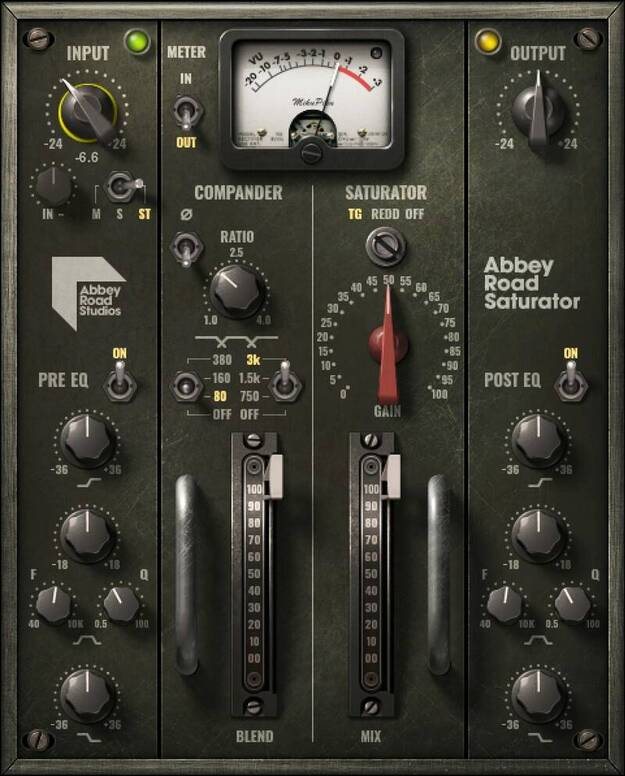
Abbey Road Saturator is a saturation plug-in from Waves, designed and calibrated together with Abbey Road Studios. It lets you choose between tube and solid-state console characters.
The product page says it covers light saturation on vocals or synths, firmer weight on bass and drums, and heavy distortion.
The tube character is based on the REDD console and the solid-state character on the TG12345. You can also pass the signal through the EMI TG12321 compander, described as a rare piece of equipment.
Pre- and post-saturation EQ, a Phase control, M/S processing and a Mix/Dry blend are available. Artist presets by Joe Barresi, Dave Pensado and Lu Diaz are included.
Key features
Two console characters
Choose between REDD tube and TG12345 solid-state tones, and compare them on the same source.
TG12321 compander
Passes the signal through a compander described as rare, which may suit trying a texture different from ordinary saturation.
Pre- and post-saturation EQ
EQ before and after the saturation lets you decide which bands get driven.
Phase control
Described as dramatically altering the distortion sound.
M/S processing
Mid and side can be processed separately, for example keeping the center intact while adding texture to the sides.
Mix/Dry and presets
Blend with the dry signal to set the amount, and use presets from three mixers.
Specifications
| Item | Details |
|---|---|
| Formats (Mac) | VST / AU / AAX |
| Formats (Windows) | VST / AAX |
| Mac OS | macOS 12 Monterey to 15 Sequoia |
| Windows | Windows 10 or newer |
What is included and system requirements
- Abbey Road Saturator plug-in
- Artist presets by Joe Barresi, Dave Pensado and Lu Diaz
How to use it
- Create a Waves account and register the product.
- Install Waves Central.
- Install and activate the product in Waves Central.
- Open the plug-in in your DAW.
- Choose the tube or solid-state character.
- Set the amount and shape bands with the EQ.
- Blend with the dry signal using Mix/Dry.
- Compare the presets.
Where it may come in handy
Vocal color
It may be used to add texture to vocals with light saturation.
Bass and drums
It may suit adjusting the weight of bass and drums with heavier saturation.
Creative distortion
With strong settings it may be used as a sound-design distortion.
Who it may suit
- People who want console-style saturation
- People who want M/S control over saturation
- Existing Waves users
Good to know before you buy
- Activation through Waves Central is required.
- Prices vary during promotions, so check the current price before buying.
Price
Please check the official page for the price.
See Abbey Road Saturator on the product page
More of the same kind
We have introduced 82 saturation and distortion effects. Here are some of the others.
- Three-Body Technology Tape Vibe
- Kuassa Efektor Bass Smasher Distortion
- Arturia Filter MS-20
- Solid State Logic SSL Native X-Saturator
- AudioThing Valves
- Kuassa Efektor Moon Muffin
We have introduced 215 other products from Waves.
- Waves MDMX Distortion Modules
- Waves Kramer Master Tape
- Waves Manny Marroquin Distortion
- Waves OneKnob Driver
- Waves Berzerk Distortion
For a side-by-side comparison scored on the same criteria, see our comparison of saturation and distortion effects.
See the full list in Product database: Effects.
Sources: pluginboutique.com (checked 2026-10-27)










Comments