
Disclosure: This page may contain affiliate links. Prices were checked on the date shown and may change.
An introduction to Zynaptiq TIME FACTORY II, based on information from the maker and distributors: what it does, how to use it and who it may suit. It is not scored.
TIME FACTORY II for macOS is a professional application for high quality audio time stretching and pitch shifting.
— Zynaptiq official site
What is TIME FACTORY II?
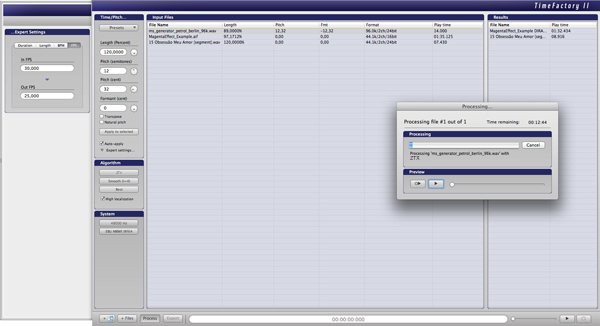
TIME FACTORY II is a standalone macOS application from Zynaptiq for changing the duration and the pitch of audio files independently of each other. It is not a DAW plug-in; it works as a batch tool that reads files and writes processed copies. The official page says it is a former Prosoniq product that Zynaptiq now offers.
According to the official page, it includes five processing algorithms: MPEX 2, MPEX 3, ZTX Pro, quickStretch and ClearScale. You can pick one depending on the material and the result you want. It is described as handling mono, stereo, 5.1, 6.1, 7.1 and other multichannel files with the channels kept phase-synced.
It supports sample rates up to 384 kHz and bit depths up to 32 bit, and reads formats such as AIFF, WAV, BWF, CAF, WAVE64 and MBWF/RF64. Metadata is preserved for BWF files. No Japanese distributor page was found, so this summary relies on the Zynaptiq site and the Plugin Boutique product page.
The intended uses listed include length adjustment for film frame-rate conversion, changing the tempo or key of music tracks, preparing material for remixes, making slowed-down files for transcribing music, and sound design. The workflow is to drop files into the app, enter the amount of change, and run the process.
Key features
Five stretching algorithms
You can choose from MPEX 2, MPEX 3, ZTX Pro, quickStretch and ClearScale. The official page says each has its own strengths and parameters, which may be handy when you want to export the same source with different methods and compare.
Duration and pitch are independent
Time stretching and pitch change are set separately. The official page says a wide range of stretch ratios is covered, with formant shifting and correction as well. This suits jobs such as changing the key while keeping the tempo.
Several ways to enter the amount
You can enter a target duration in hours, minutes and seconds, a percentage change in length, source and target BPM or FPS, the equivalent transposition amount, or a length in sample frames. Music work can use BPM and picture work can use FPS directly.
Multichannel and high-resolution files
Mono, stereo, 5.1, 6.1, 7.1 and N.1 layouts are processed phase-synced, and files up to 384 kHz (DXD) and 32 bit are supported. The specification is aimed at frame-rate conversion of film and broadcast material.
Batch processing and presets
Dropping several files for one run is a core feature, and settings can be saved as user presets. This may make repeated jobs, where many files share the same settings, less laborious.
Settings tuned to the material
Algorithm parameters let you optimise processing for speech, complex material, monophonic or polyphonic music and more. This is meant for cases where narration and music need different settings.
Transposing like a sample-rate change
There is also an option to transpose files, which the official page equates with sample rate conversion. It may be used to make material that behaves like a tape speed change.
Specifications
| Item | Details |
|---|---|
| Type | Standalone macOS application (not a plug-in) |
| Algorithms | MPEX 2 / MPEX 3 / ZTX Pro / quickStretch / ClearScale |
| Channels | Mono, stereo, 5.1, 6.1, 7.1, N.1 (phase-synced) |
| Sample rate | Up to 384 kHz |
| Bit depth | Up to 32 bit |
| File formats | AIFF, WAV, BWF (metadata kept), CAF, WAVE64, MBWF/RF64, SoundDesigner II |
| System requirements (as stated officially) | Mac OS X 10.6.8 or newer, Intel CPU, 2 GB RAM (more recommended) |
| Trial | Yes (free trial on the official site) |
What is included and system requirements
- The standalone macOS application
- Supported formats: AIFF, WAV, BWF, CAF, WAVE64, MBWF/RF64, SoundDesigner II (the official page also says MP3 and AAC can be imported from iTunes)
- System requirements as stated officially: Mac OS X 10.6.8 or newer, Intel CPU, 2 GB RAM
How to use it
- Try the free trial from the Zynaptiq site with your own material first.
- After purchase, install the application on macOS and launch it.
- Drag the audio files you want to process onto the app window.
- Enter the stretch amount as a target duration, percentage, BPM, FPS or number of sample frames.
- If you want to change pitch, set the transposition amount and choose how formants are handled.
- Pick the algorithm and its settings to suit speech or music material.
- Save the settings as a user preset if you will reuse them.
- Run the process and check the exported files in your DAW or editor.
Where it may come in handy
Frame-rate conversion of picture audio
It may help when audio needs to match a new picture frame rate. The phase-synced multichannel processing seems suited to this kind of job.
Changing tempo or key of music
It could suit work such as matching a track to a target BPM or shifting its key, for example when preparing stems for a remix.
Slowed-down files for transcribing
Exporting a fast passage as a slower file at the same pitch could be useful for ear practice.
Sound design
Trying extreme stretch ratios or transposition may turn a source into material with a different texture.
Who it may suit
- People who often change duration or pitch file by file in batches
- Those doing frame-rate conversion for picture or broadcast audio
- Anyone who needs tempo- or key-changed material for remixing or transcribing
- Users who want to compare several stretching algorithms
Good to know before you buy
- It is a macOS-only standalone app, not a DAW plug-in.
- The official requirements read Mac OS X 10.6.8 or newer with an Intel CPU. The free trial is the safest way to check behaviour on your own Mac.
- It works by processing files and writing results, not as a real-time effect during playback.
- A free trial is offered on the official site.
Price
Please check the official page for the price.
See TIME FACTORY II on the product page
More of the same kind
Other introduction articles of the same kind.
- VB-Audio VB-CABLE
- OBS Project OBS Studio
- Krisp Krisp
- Auphonic Auphonic
- Sonarworks SoundID Reference for Multichannel
- Tracktion StageBox
We have introduced 10 other products from Zynaptiq.
- Zynaptiq WIDE
- Zynaptiq BALANCE
- Zynaptiq MORPH 3 PRO
- Zynaptiq Mac Audio Apps Bundle 2
- Zynaptiq ORANGE VOCODER NANO
See the full list in Product database: Streaming and recording software and others.
Sources: zynaptiq.com pluginboutique.com (checked 2026-10-27)










Comments