
Disclosure: This page may contain affiliate links. Prices were checked on the date shown and may change.
An introduction to Waves X-Click, based on information from the maker and distributors: what it does, how to use it and who it may suit. It is not scored.
Minimize strong clicks in digital or vinyl media
— Waves official site
What is X-Click?
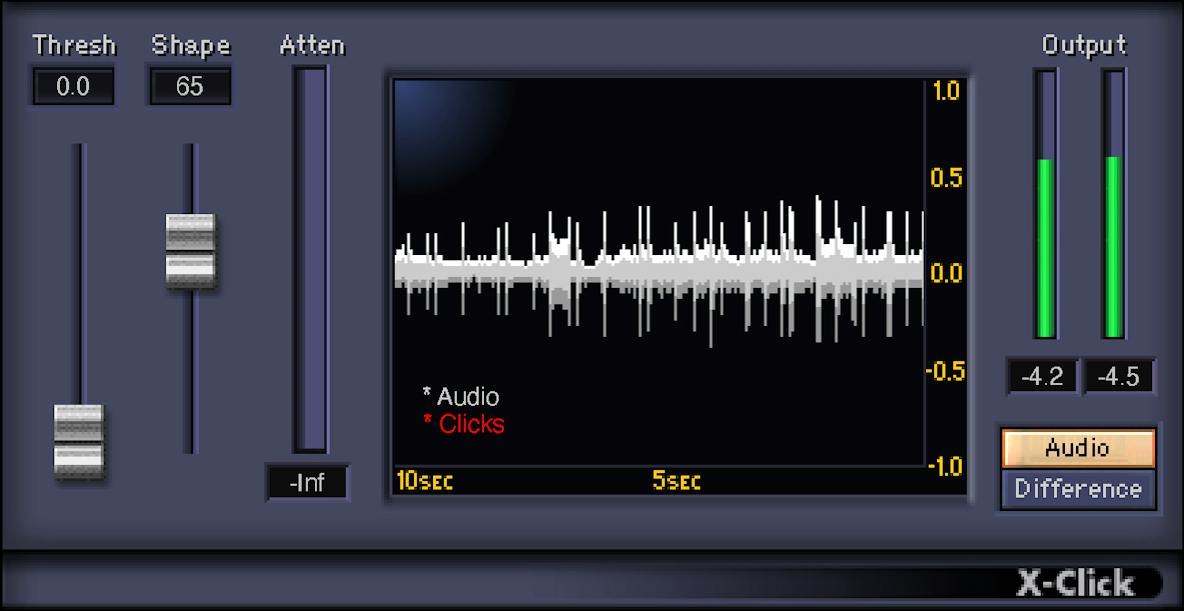
Waves X-Click is a plug-in that reduces strong, short clicks in recordings. The maker says it isolates, displays and reduces clicks from analogue sources such as switching noise and old vinyl records, and also minimises clicks and pops from digital issues such as clocking errors and sample rate mismatches.
Once set up properly, it leaves virtually no audible artifacts, which are unnatural sounds from processing. A large display shows the last 10 seconds of processing with clicks in red, so you can see the result of each adjustment.
You can monitor only the clicks to fine-tune parameters. The click shape can be set from sharp digital to wide analogue transients, and you can use automatic click removal or process individual clicks manually.
For more reduction, the maker's page describes recording a parallel track of only the clicks and flipping its phase.
Key features
Click detection and display
Clicks are detected and shown on screen over the last 10 seconds, in red.
Click-only monitoring
Listen to only the clicks to fine-tune parameters.
Click shape
Choose from sharp digital to wide analogue transients.
Automatic and manual
Use automatic removal or process individual clicks by hand.
Attenuation meter
A meter shows how much click reduction is applied.
Extra reduction with phase flip
Recording a parallel clicks-only track and flipping its phase gives more reduction.
Specifications
| Item | Details |
|---|---|
| Type | Click removal plug-in |
| Targets | Short clicks and pops from vinyl, switching noise, clocking errors and similar |
| Display | Last 10 seconds of processing (clicks in red) |
| Monitoring | Click-only monitoring |
What is included and system requirements
- X-Click
- Check Waves' page for formats and system requirements
How to use it
- Insert X-Click on the track with clicks.
- Choose the click shape to match digital or analogue clicks.
- Monitor only the clicks and adjust the detection.
- Check the reduction amount on the attenuation meter.
- Handle any remaining clicks by hand.
Where it may come in handy
Vinyl click removal
Reducing clicks from old records is described.
Digital clicks and pops
It is also described as useful for clicks from clocking errors and sample rate mismatches.
Switching noise
Reducing short noises from analogue switching.
Who it may suit
- People who want to reduce clicks in vinyl transfers or recordings
- People tidying short pops in digital recordings
Good to know before you buy
- It is suited to strong, short clicks; longer noise needs other tools.
- This article is based on the maker's product pages. Check the maker or retailer pages for the latest specifications and prices.
Price
Please check the official page for the price.
See X-Click on the product page
More of the same kind
Other introduction articles of the same kind.
- W. A. Production KickShaper
- Harrison Consoles Drum Flow
- Hush Hush Pro
- Lese Frahm
- Fiedler Audio Dolby Atmos Composer
- Klevgrand Klevgrand Gaffel
We have introduced 215 other products from Waves.
- Waves Eddie Kramer Bass Channel
- Waves InPhase
- Waves eMo Generator
- Waves Scheps Parallel Particles
- Waves SoundShifter
See the full list in Product database: Effects.
Sources: waves.com (checked 2026-11-09)









Comments