
Disclosure: This page may contain affiliate links. Prices were checked on the date shown and may change.
An introduction to AIR Music Technology Loom II, based on information from the maker and distributors: what it does, how to use it and who it may suit. It is not scored.
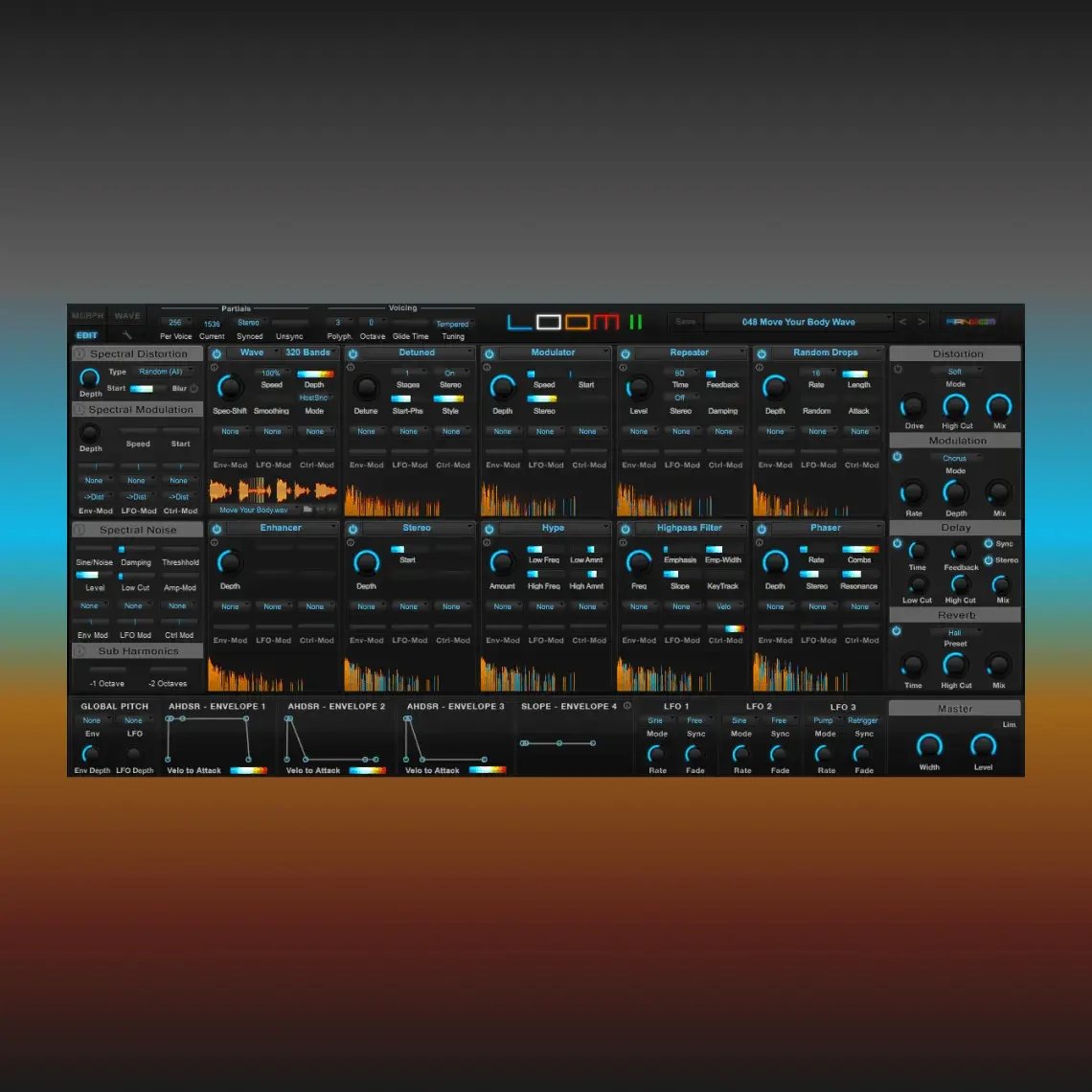
Loom II is an award-winning modular additive synthesizer with a shape-shifting Morph Pad that makes it easy to create rich, swirling and captivating sounds.
— AIR Music Technology official site
What is Loom II?
Loom II is a modular additive synthesizer from AIR Music Technology. Additive synthesis builds complex timbres by stacking many simple waves such as sine waves, and Loom II lets you assemble that process from modules.
You choose from 34 editable modules and combine up to 10 of them in cells to make one patch. Each patch can use up to 512 harmonic partials, and every module has a spectrum window so you can see how it changes the harmonics.
The Morph Pad is the centre of its movement. You create up to four variations of a patch, assign them to the corners, and draw a path across the pad to morph between them in real time, optionally synced to the tempo.
Compared with the original Loom, it has 8 voices, a Spectral Noise section, four new modules and an expanded Morph Pad. AIR describes it as suitable for all skill levels.
Economy mode lowers CPU load, and two extra subharmonic partials can be added below the normal spectrum.
Additional preset packs are available free and paid from third parties.
Key features
34 modules to combine
Task-specific modules such as Octaver, Second Tone, Moving Filter, Noise, Linear Lowpass and Modulator can be combined, up to 10 at a time. You think about the harmonics piece by piece, which suits wobbles, organs, pads and ambient textures.
Motion with the Morph Pad
Store up to four variations of a patch in the pad's corners and draw a path to morph between them, freely or synced to a musical unit. The X-axis mode behaves like an envelope for rhythmic morphing.
Spectral Noise section
A secondary oscillator can replace or enrich the sine-based additive spectrum with a noise spectrum, adding breath or grain to otherwise clean additive tones.
850+ patches
Patches by Richard Devine and Mark Ovenden cover wobbles, pads, bass and soundscapes: 500 new ones plus 350 from the original Loom, re-mastered. Use them as they are or edit them.
Smart Sound Randomizer
It generates new parameters, or a new mix of modules, to start a sound-design session. All parameters can be mapped for MIDI control.
Modulation and effects
Each patch has editable Spectral Distortion and Spectral Modulation, three tempo-syncable LFOs and four velocity-sensitive envelopes. On-board effects are drive/distortion, chorus, phaser and reverb.
Specifications
| Item | Details |
|---|---|
| Synthesis | Modular additive |
| Voices | 8 |
| Modules | 34 (up to 10 per patch) |
| Partials | Up to 512 per patch |
| Patches | 850+ (500 new + 350 re-mastered) |
| LFOs / Envelopes | 3 LFOs / 4 envelopes |
| Effects | Drive/distortion, chorus, phaser, reverb |
| Formats | VST2, VST3, AU |
| OS | Windows 10/11, macOS 14 to 26 |
| Minimum | Dual-core 2.5 GHz, 4 GB RAM (8 GB recommended) |
What is included and system requirements
- Loom II instrument
- 850+ factory patches
- Formats: VST2, VST3, AU (64-bit)
- Windows 10/11 and macOS 14 to 26
- Installation uses an inMusic Software Center account and licence registration
How to use it
- Download from your Plugin Boutique library and open the inMusic Software Center.
- Log in with your inMusic account and paste the licence with Add Product.
- Download and install Loom II from My Software.
- Create an instrument track in your DAW and load Loom II.
- Pick a factory patch and move the knobs while watching each module's spectrum.
- Store variations in the Morph Pad corners and draw across the pad.
- Try the Smart Sound Randomizer for new combinations and save what you like.
Where it may come in handy
Ambient and pads
Fine control over harmonics may suit slowly evolving pads and ambient beds.
Texture for picture and games
Spectral Noise and the Discrete Adder may help build percussive or textured sounds.
Rhythmic motion
The X-axis Morph Pad synced to tempo may help create timbres that move with the beat.
Who it may suit
- People curious about additive synthesis
- Those looking for evolving timbres
- People who prefer starting from presets and learning gradually
Good to know before you buy
- Internet connection is required for authorisation.
- Licences are managed through the inMusic Software Center.
- Minimum 4 GB RAM (8 GB recommended).
- Plugin Boutique's review summary mentions a non-resizable window and a basic preset browser.
How it differs from similar products
We do not pick a winner; the official figures are placed side by side.
Loom
The original Loom had 350 patches; Loom II has 850+, 8 voices, four new modules and Spectral Noise.
Price
$99 (Plugin Boutique, checked 2026-10-27). Prices can vary by region and promotion, so check the official page before buying.
See Loom II on the product page
More of the same kind
We have introduced 178 synthesizers. Here are some of the others.
- Arturia Jup-8 V
- AudioThing RES-09
- Robotic Bean Portatron
- Applied Acoustics Systems Ultra Analog VA-3
- Arturia ARP 2600 V
- Cherry Audio SH-MAX
We have introduced 21 other products from AIR Music Technology.
- AIR Music Technology Hybrid 3
- AIR Music Technology Fabric Vintage Andromeda
- AIR Music Technology Fabric Vintage Matrix
- AIR Music Technology Vacuum Vintage
- AIR Music Technology Odyssey
For a side-by-side comparison scored on the same criteria, see our comparison of synthesizers.
See the full list in Product database: Instruments.
Sources: airmusictech.com pluginboutique.com (checked 2026-10-27)










Comments