
Disclosure: This page may contain affiliate links. Prices were checked on the date shown and may change.
An introduction to Waves OneKnob Filter, based on information from the maker and distributors: what it does, how to use it and who it may suit. It is not scored.
OneKnob Filter transitions so smoothly from low to high frequencies that it sounds like the analog circuits of vintage synthesizers.
— Waves official site
What is OneKnob Filter?
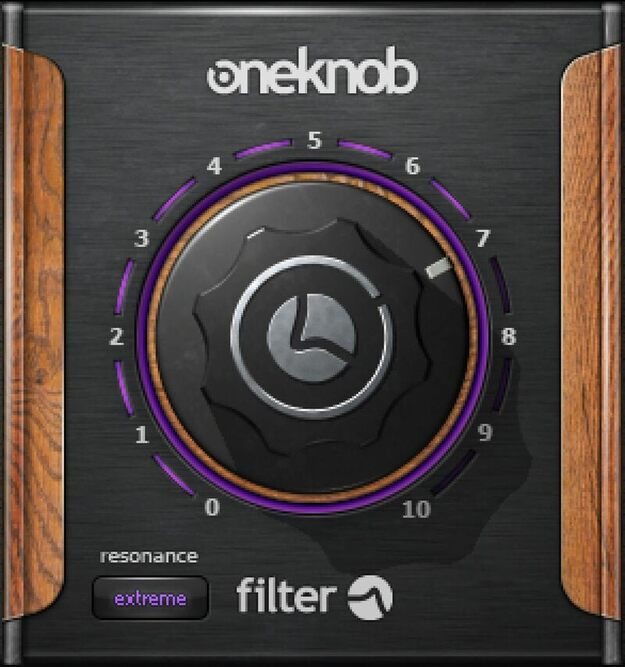
OneKnob Filter is a single-knob filter plug-in from Waves. It is a low-pass filter, so turning the knob changes how bright the sound is.
The cutoff, the frequency where the filter starts to act, ranges from below 20 Hz to above 20 kHz. At the low end the audio is muted, and at the high end the full frequency range passes through.
Waves describes the sweep as smooth, without quantized stair-stepping, aiming at the feel of the analog circuits found in vintage synthesizers.
The resonance button, which emphasizes the area around the cutoff, steps through four settings. Besides tone shaping in the studio, Waves also points to dance production and DJ-style use.
Key features
One-knob control
The main control is a single cutoff knob. With so few parameters, it may be easy to use without breaking the flow of a mix.
12 dB/octave low-pass
A 12 dB/octave low-pass gradually reduces the highs. Lowering the cutoff moves from a dull tone toward near silence.
Cutoff from under 20 Hz to over 20 kHz
The cutoff covers below 20 Hz to above 20 kHz, so one knob spans fully open to fully muted.
Sweep without stair-stepping
Waves says the cutoff moves without quantized steps. The smoothness may help when you automate slow sweeps.
Four resonance settings
Each press of the resonance button steps through four settings from none to extreme, adding some filter character when wanted.
Dance and DJ-style use
It is intended for fast breakdowns and builds, and Waves says the control feels familiar from DJ club mixers.
Specifications
| Item | Details |
|---|---|
| Type | Low-pass filter (12 dB/oct) |
| Cutoff | Below 20 Hz to above 20 kHz |
| Resonance | 4 settings (none to extreme) |
| Formats (Mac) | VST / AU / AAX |
| Formats (Windows) | VST / AAX |
| macOS | Monterey 12 through Sequoia 15 |
| Windows | Windows 10 or later |
What is included and system requirements
- OneKnob Filter plug-in
- Mac: VST / AU / AAX; Windows: VST / AAX
How to use it
- Buy with a Waves account and install through Waves Central.
- Select the track you want to filter in your DAW.
- Insert OneKnob Filter on the track.
- While playing, lower the cutoff knob and listen to how the brightness changes.
- Step through the four resonance settings and compare how much character each adds.
- Draw automation for the knob to create a sweep.
- Try moving it around song transitions such as before and after a breakdown.
Where it may come in handy
Tone shaping in a mix
It may suit pulling a track back by lowering its highs. With only one knob, trying it out is quick.
Builds and breakdowns
Opening the cutoff gradually with automation could create a rising effect.
Live-style filtering
Waves mentions DJ use. It may fit when you want to change a part by turning a knob in a hardware-like way.
Who it may suit
- People who want to make filter sweeps quickly
- Producers building risers and breakdowns in dance or electronic tracks
- Anyone looking for a filter with very few settings
Good to know before you buy
- It is a low-pass filter only; high-pass or band-pass modes are not part of the description.
- Waves products are licensed through Waves Central.
- Specs here were confirmed on the Plugin Boutique page.
Price
$49 (Plugin Boutique, checked 2026-10-27). Prices can vary by region and promotion, so check the official page before buying.
See OneKnob Filter on the product page
More of the same kind
We have introduced 34 filters. Here are some of the others.
- Arturia Filter SEM
- TAL Software TAL-Filter-2
- Arturia Filter MINI
- PSP Audioware PSP stompFilter
- Sugar Bytes WOW2
- Slate Digital Custom Series Bundle
We have introduced 215 other products from Waves.
See the full list in Product database: Effects.
Sources: pluginboutique.com (checked 2026-10-27)










Comments