
W.A. Production’s MIDI-making plug-in InstaComposer 3 is 66% off at Plugin Boutique: $39.90 instead of $119 (USD). The product page says the offer runs until October 31.
Disclosure: This article contains affiliate links. If you buy through them, SoundBounty may earn a commission at no extra cost to you. Prices are as of the date we checked them and can change.
The deal
| Product | Regular price | Sale price | Discount | Ends |
|---|---|---|---|---|
| InstaComposer 3 | $119 | $39.90 | 66% off | Oct 31 |
Prices are in US dollars as shown on Plugin Boutique, checked on October 24, 2026. The discount and end date come from the Plugin Boutique product page. Taxes, fees and availability can vary by country, so check the checkout page.
Where to buy
- InstaComposer 3: View at Plugin Boutique
What is InstaComposer 3?
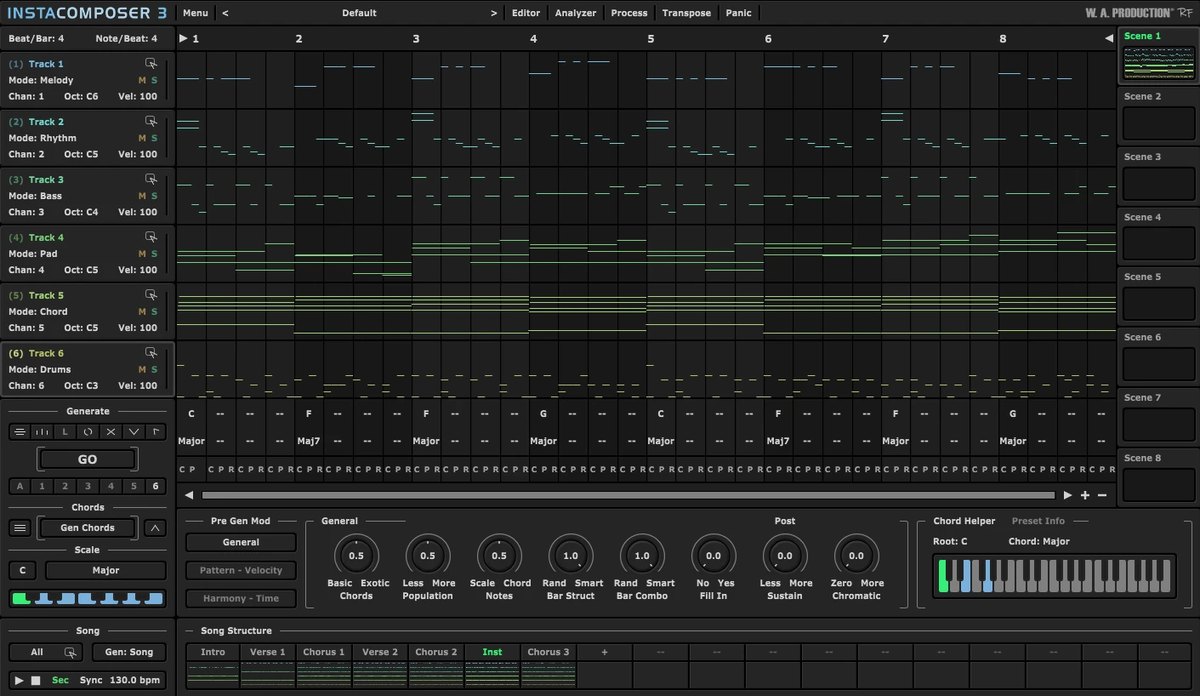
InstaComposer 3 is a plug-in from W.A. Production that makes MIDI. It helps you come up with ideas for melodies, chords and more, and the manufacturer describes it as “a co-pilot, not an AI that replaces composing” (per the manufacturer).
Features
A rule-based MIDI generator for songs, chords, riffs and rhythms
InstaComposer 3 generates MIDI automatically. Because it works by transparent “procedural generation” based on music rules you can set, you can control the output in detail, according to the manufacturer. The manufacturer also says it was not trained on copyrighted works.
New: generate a song structure with one click
With one click you can make a song structure from a blank state: intro, verse, pre-chorus, chorus, post-chorus, bridge, breakdown and outro (per the manufacturer).
New: sections, and sync with the DAW
You can organize a song into several parts, and each section has its own scene and tracks. It can also sync across several sections to the playhead of your DAW (per the manufacturer).
Chord and scale detection, and slash chords
From generated, hand-entered or imported MIDI, it detects chords, chord progressions, scales and the key center. It now supports slash chords (a bass note other than the root, such as G/B or A/C#), and the chord editor is easier to use with dragging and resizing (per the manufacturer).
Import and blend MIDI
You can drag and drop external MIDI files into the plug-in to develop an existing idea or blend it with what you generated (per the manufacturer).
After you buy: installation and activation
This is the general flow for products bought at Plugin Boutique. Activation differs by product (serial number, a manufacturer account, iLok and so on), so check the instructions in your library after purchase.
- Log in to your Plugin Boutique account and find the product in “Library”.
- Download the installer (you can switch between the Windows and Mac versions). Depending on the product, you also get a serial number, an unlock code or a key file.
- Product-specific steps are under “…” → “Installation Instructions” next to the product in your library, and also near the bottom of the product page.
Before you buy
- The end date is the one shown on Plugin Boutique. Offers can change, so confirm on the product page before you buy.
- Check the supported operating systems, plug-in formats (VST3, AU, AAX and so on) and the licensing method on the product page before buying.
Where to buy
- InstaComposer 3: View at Plugin Boutique









Comments