
This sale ended on October 20, 2026. The prices, discounts and end dates below are the information we checked before it ended. Check the store page for the current price.
See also our latest deals.
Soundtoys’ analog saturation plug-in Decapitator is 70% off at Plugin Boutique: $59 instead of $199 (USD). The product page says the offer runs until October 20.
Disclosure: This article contains affiliate links. If you buy through them, SoundBounty may earn a commission at no extra cost to you. Prices are as of the date we checked them and can change.
The deal
| Product | Regular price | Sale price | Discount | Ends |
|---|---|---|---|---|
| Decapitator | $199 | $59 | 70% off | Oct 20 |
Prices are in US dollars as shown on Plugin Boutique, checked on October 14, 2026. The discount and end date come from the Plugin Boutique product page. Taxes, fees and availability can vary by country, so check the checkout page.
Where to buy
- Decapitator: View at Plugin Boutique
What is Decapitator?
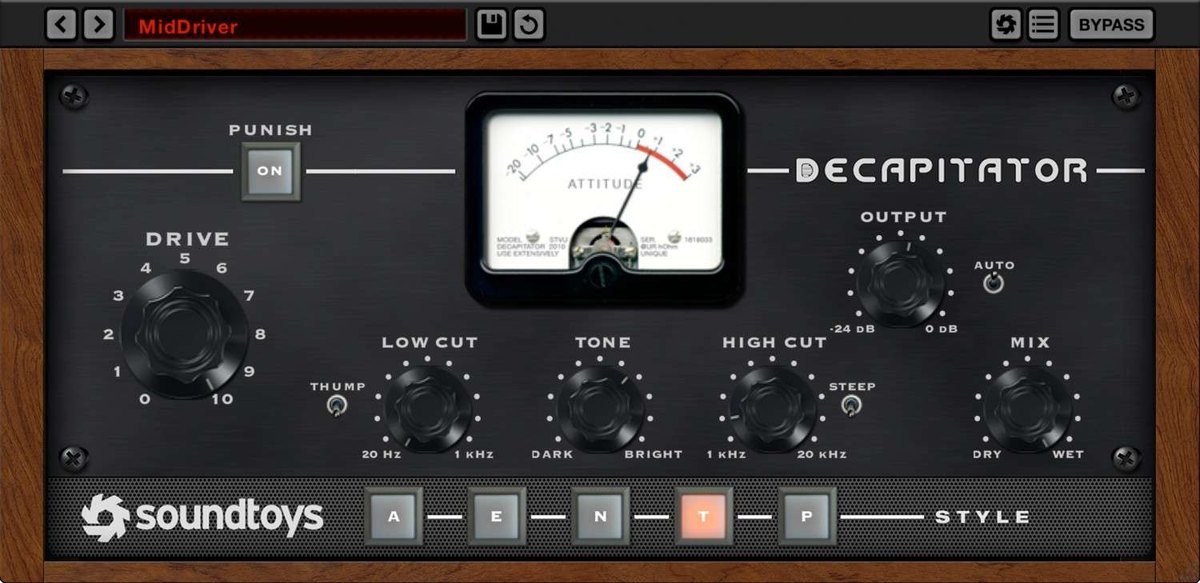
Decapitator is an analog saturation plug-in from Soundtoys (the distortion and warmth you get from pushing tubes and transistors). You choose from five models of analog gear, and the manufacturer explains that it can go from a very light coloring to heavy distortion (per the manufacturer).
It runs on macOS 10.15 or later and Windows 10 or later (64-bit), in AAX Native, AAX AudioSuite, VST2, VST3 and AU formats. Apple silicon is supported; Windows on ARM is not. Authorization needs an internet connection (per the manufacturer).
A detailed comparison is in Decapitator: features and rating. To see how it sits among other saturation plug-ins, read the saturation plug-in comparison, and for how to use saturation on vocals, see our vocal saturation guide.
Video: “Soundtoys Decapitator: A Quick-Start Guide” (official soundtoys YouTube channel; narration in English) Watch on YouTube
Features
Five models that capture how real gear reacts
The manufacturer says the models do not just imitate the sound; they follow how tubes, wiring and transistors change their response, so the distortion shifts slightly with the strength of the track. The gear studied includes consoles, preamps, input channels, EQs, compressors and studio distortion units (per the manufacturer).
Punish button: push one step further
The Punish button adds extra gain and makes the distortion one step stronger. The manufacturer describes it as the “screaming” distortion of hard-driven gear, a different character from the rough sound of cheap stomp boxes. It is suggested for sounds that are too polite, such as vocals, drums, guitars and synths (per the manufacturer).
Tone and mix knobs
A tone knob shapes the outline of the distortion, and a mix knob blends in the original sound, so you can do parallel processing without building routing (per the manufacturer).
Hosts and sample rates
Sample rates from 44.1 kHz to 192 kHz are supported. The manufacturer lists hosts such as Pro Tools, Live, Cubase, Nuendo, Logic, Studio One, Reaper and Bitwig.
After you buy: installation and activation
This is the general flow for products bought at Plugin Boutique. Activation differs by product (serial number, a manufacturer account, iLok and so on), so check the instructions in your library after purchase.
- Log in to your Plugin Boutique account and find the product in “Library”.
- Download the installer (you can switch between the Windows and Mac versions). Depending on the product, you also get a serial number, an unlock code or a key file.
- Product-specific steps are under “…” → “Installation Instructions” next to the product in your library, and also near the bottom of the product page.
Before you buy
- The end date is the one shown on Plugin Boutique. Offers can change, so confirm on the product page before you buy.
- Check the supported operating systems, plug-in formats (VST3, AU, AAX and so on) and the licensing method on the product page before buying.
Where to buy
- Decapitator: View at Plugin Boutique









Comments