
AudioThing’s formant filter The Orb is 61% off at Plugin Boutique: $19 instead of $49 (USD). The product page says the offer runs until October 31.
Disclosure: This article contains affiliate links. If you buy through them, SoundBounty may earn a commission at no extra cost to you. Prices are as of the date we checked them and can change.
The deal
| Product | Regular price | Sale price | Discount | Ends |
|---|---|---|---|---|
| The Orb | $49 | $19 | 61% off | Oct 31 |
Prices are in US dollars as shown on Plugin Boutique, checked on October 24, 2026. The discount and end date come from the Plugin Boutique product page. Taxes, fees and availability can vary by country, so check the checkout page.
Where to buy
- The Orb: View at Plugin Boutique
What is The Orb?
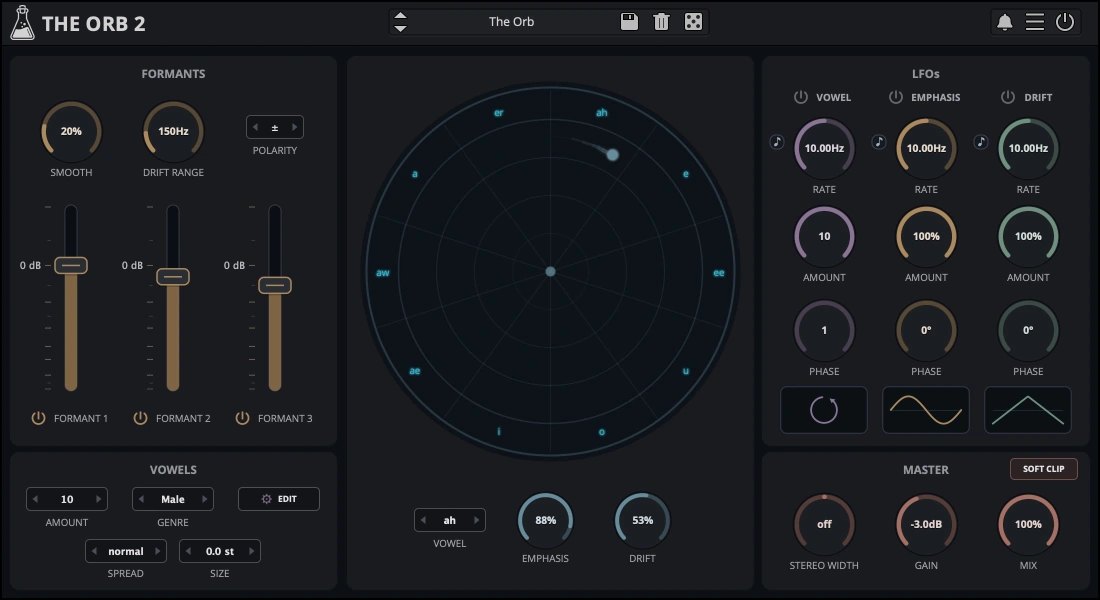
The Orb is a formant filter from AudioThing. It is a filter that imitates the resonances of vowel sounds in the human voice, such as “ah”, “ee” and “oo”, and it can turn any sound into something that sounds like it is talking. It is built by combining three filters (per the manufacturer).
Features
A formant filter that recreates the character of the human voice (vowels)
The Orb is a formant filter plug-in that imitates the character of the human voice. With three band-pass filters, it can turn any sound into a vowel-like sound (per the manufacturer).
Control vowel, emphasis and drift on a round display
Each section of the circle on screen represents a vowel. The distance from the center of the circle to the point is “Emphasis” (resonance), and the angle of the section is “Drift” (a shift in frequency). It is designed so you can work intuitively just by dragging.
Three LFOs move it
Three LFOs can change the vowel, the emphasis and the drift separately, so you can make sounds that move as if they were speaking.
Make your own vowel sets
You can change the vowel names and the frequencies of the three formants yourself. The vowel sets you make can be saved in a preset (or in the DAW session).
Demo version and iOS version
The demo version goes silent for 3 seconds every 45 seconds and cannot save. There is also an AUv3 version (and a standalone version) for iPhone and iPad (per the manufacturer).
Specifications and system requirements
- macOS 10.13 or later: AU, VST2, VST3, AAX, CLAP (64-bit only)
- Windows 7 or later: VST2, VST3, AAX, CLAP (64-bit only)
- Linux (Ubuntu 20.04 or later): VST2, VST3, CLAP (64-bit only)
After you buy: installation and activation
This is the flow for AudioThing products bought at Plugin Boutique (you register a redeem code in your AudioThing account). Steps and screen names can change when the manufacturer updates its software.
- Create an AudioThing account with the same email address you used for the order.
- On the “Redeem Code” page, enter the redeem code to add the plug-in to your account.
- Run the installer to install it (on Mac, the .pkg inside the .dmg; on Windows, the .exe from the unzipped file).
- When you open the plug-in, an activation screen appears. Log in with your AudioThing account to activate (if you are offline, you can download a license file from your account and load it).
Before you buy
- The end date is the one shown on Plugin Boutique. Offers can change, so confirm on the product page before you buy.
- Check the supported operating systems, plug-in formats (VST3, AU, AAX and so on) and the licensing method on the product page before buying.
Where to buy
- The Orb: View at Plugin Boutique









Comments