
When you start cover songs, the first thing you wonder about is how to connect the microphone. A USB microphone that connects straight to the computer, or an XLR microphone combined with an audio interface? This article explains the difference between the two and how to choose, based on manufacturers’ official information.
Disclosure: This article contains affiliate links. If you buy through them, SoundBounty may earn a commission at no extra cost to you. Prices can change, so check each store’s display before you buy.
Key points
- A USB microphone connects to the computer with just the one microphone. It is the easiest.
- An XLR microphone needs an audio interface. In exchange, it is easier to change gear later.
- If you use a condenser microphone, you need equipment that supports phantom power (48 V).
- If you want to start as soon as possible, USB suits; if you intend to keep going for a long time, XLR plus an interface suits.
The difference between the two ways of connecting
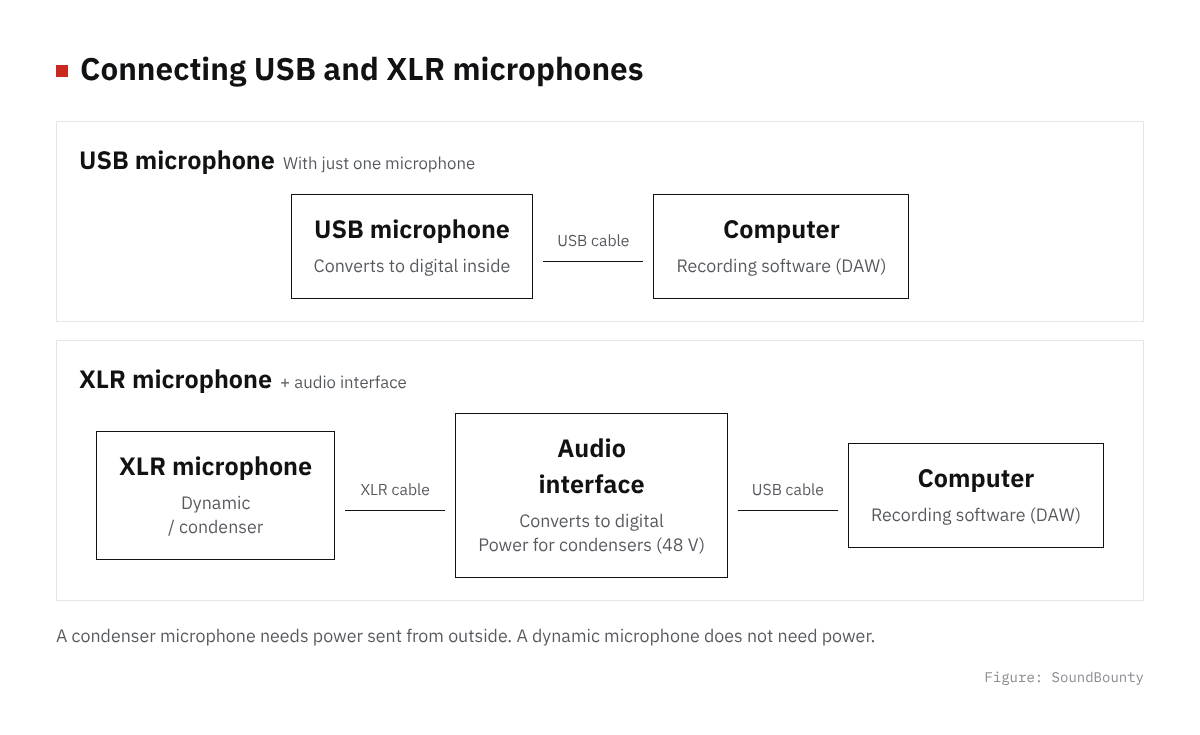
Figure: SoundBounty
USB microphones
A USB microphone has A/D conversion (a circuit that turns sound into digital) inside the microphone. Shure explains that a USB microphone has the conversion built in and in many cases works without a driver. You can start recording just by connecting it to the computer with a USB cable.
Some models, like Audio-Technica’s AT2020USB-X, let you hear sound without delay through a headphone jack on the microphone itself.
XLR microphone plus audio interface
An XLR microphone sends the microphone’s sound to the audio interface by cable. The interface converts it to digital and connects to the computer. Shure explains that this combination is more flexible than a USB microphone.
Sources: Shure official, Audio-Technica official
Comparing them
| USB microphone | XLR microphone + interface | |
|---|---|---|
| What you need | A microphone and a USB cable | A microphone, an interface and an XLR cable |
| Ease of starting | High | Takes a little more effort |
| Changing the microphone | Replace the whole microphone | You can change only the microphone |
| Connecting several pieces of gear | One microphone is the basis | You can connect as many as there are inputs |
The table is our own summary based on the official information above.
What to watch with XLR: phantom power
Audio-Technica explains that condenser microphones are highly sensitive but need power sent from outside. Before you buy, check whether the interface or mixer you use can send it. This power is called “phantom power”. For example, Focusrite’s Scarlett 2i2 4th Gen has a 48 V (phantom power) button for condenser microphones.
A dynamic microphone does not need power. Audio-Technica introduces dynamic microphones as a type that is easy for beginners to handle.
Sources: Audio-Technica official, Focusrite official
What to check before you connect
It is reassuring to check these points before you buy.
- Whether the shape of the computer’s USB port (Type-A or Type-C) matches the cable of the microphone or interface.
- Whether the microphone or interface works with your DAW (recording software). See the maker’s compatibility information.
- For an XLR microphone, the number of input jacks on the interface and whether it has phantom power.
- How you will hear your own voice while singing (the position of the headphone jack and the monitoring mechanism).
This check is a guide so that, with either way of connecting, you are not in trouble after you buy.
Which to choose?
- I want to try it first and not add gear: a USB microphone suits.
- I want to keep going for a long time and improve the sound later: an XLR microphone plus an interface suits.
- I want to use a condenser microphone: choose an interface with phantom power.
With either type, you are affected by computer noise and room echo. See Causes and fixes for noise in a cover-song recording for details.
Who each suits
Who a USB microphone suits
It suits people who want to try cover songs first. If you have a microphone and a USB cable, you can connect to the computer. You do not need to put down an interface, so it is easy to start even with a narrow desk.
Many models need no driver and can be used right after connecting. Being less likely to leave you confused about settings is also reassuring for a first-timer.
Who an XLR microphone plus interface suits
It suits people who want to keep recording and improve the sound little by little, because you can replace only the microphone or only the interface separately.
For example, there is also a way to start with a dynamic microphone and add a condenser microphone later. If you choose an interface with phantom power, you can use it as it is.
What to prepare before you start recording
- Pop filter: softens the breath sounds (plosives) of “p” and similar sounds.
- Shock mount: reduces vibration from the desk or floor reaching the microphone.
- Headphones: used to hear your own voice and the backing track while recording.
In its pointers for choosing a microphone for singers, Audio-Technica also introduces shock mounts and pop filters.
Source: Audio-Technica official
Comparison pages on this site
We have comparison pages scored from official information.
- USB microphone comparison
- Audio interface comparison
- Microphone comparison
- Dynamic microphone comparison
- Dynamic vs condenser microphones
As examples, here is one USB microphone and one interface.
Score 2.8 / 5 (average of the 11 models compared: 3.0)→ See all
- Specs last checked
- 2026/10/20
- Type
- Condenser
- Pickup pattern
- Cardioid
- Recording
- 24bit/96kHz
- Connection
- USB
- Price (store, date)
- Not disclosed
Score 3.2 / 5 (average of the 23 models compared: 3.4)→ See all
- Specs last checked
- 2026/10/19
- Inputs
- 2ch
- Hi-Z inputs
- 2
- Loopback
- ●
- EIN
- -127dBu
- Price (store, date)
- Not disclosed
Frequently asked questions
Q. Can I move to XLR after a USB microphone?
Yes. But a USB microphone cannot connect to an interface as it is. You will need to prepare a new microphone and interface.
Q. Is an interface required?
Not with a USB microphone. It is required if you use an XLR microphone.
Q. Which microphone shape suits singing?
Audio-Technica recommends a unidirectional microphone (one that easily picks up sound from the front) for singers. Using a pop filter and a shock mount as well makes the recording steadier.
Source: Audio-Technica official
Read next
- Basic steps for recording vocals at home
- Causes and fixes for noise in a cover-song recording
- How to choose an audio interface


Comments