
The first thing people who are about to start home recording or DTM wonder about is choosing an audio interface. In this article we sorted standard models into three levels: entry, standard and advanced. We also explain how to read a spec sheet and how to decide how many inputs and outputs you need.
Disclosure: This article contains affiliate links. If you buy through them, SoundBounty may earn a commission at no extra cost to you. Information is as of the date we checked it and can change. We do not give prices here; check the current price at the store you buy from.
Five points for choosing an audio interface
1. Decide by how many sounds you want to record at once = number of inputs
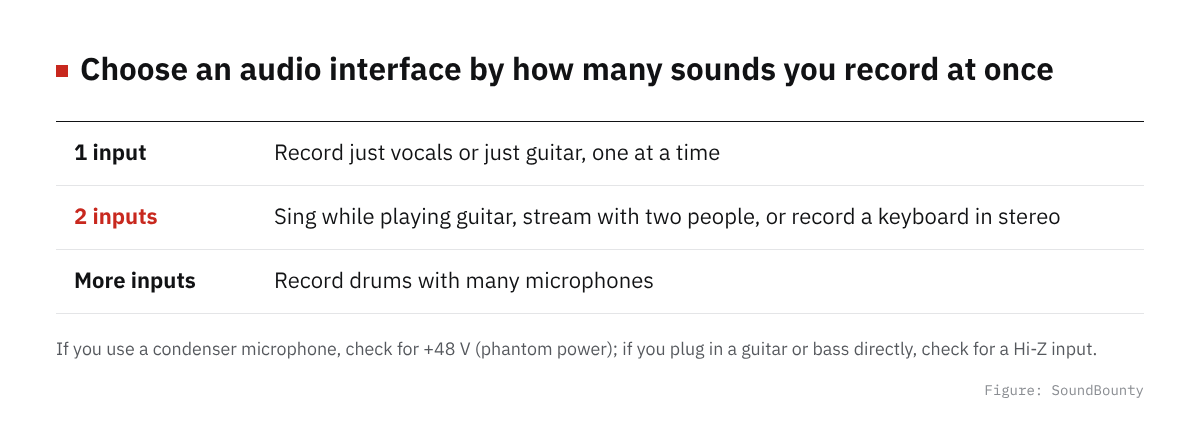
Figure: SoundBounty
What you should decide first is “how many sounds you will record at once”. If you record just vocals or just guitar, one at a time, a model with one microphone input is enough. If you sing while playing guitar, stream with two people or record a keyboard in stereo, choose a model with two inputs. If you record drums with several microphones, you will need a higher-end unit with even more inputs.
The mainstream input jack is an “XLR / phone combo jack”. If you use a condenser microphone, check for +48 V phantom power, and if you plug in an electric guitar or bass directly, check for a Hi-Z (instrument) input. All the models introduced here support both.
2. Do not judge sound quality only by bit depth and sample rate
Almost all recent entry models support high numbers such as 24-bit/192 kHz, so this number alone makes little difference. If you compare, the dynamic range (dB) the maker publishes, and the microphone preamp’s gain range and noise (EIN), are more useful. For a quiet vocalist or a low-sensitivity dynamic microphone, a model with gain to spare is said to be easier to handle.
3. If you also stream, “loopback”
Loopback is a function that mixes the sound playing on the computer (BGM and game sound) with the microphone’s voice and sends it to streaming software. You also use it for cover-song streams, podcasts and online lessons. The eight models here are centered on ones whose official information states loopback support. See What is loopback on an audio interface? for details.
4. The DAW and bundled software
Many models come with a lite version of a DAW. Yamaha’s (UR12MK3 and URX22C) come with Cubase AI and Focusrite’s with Ableton Live Lite and so on, and the bundled DAW becomes your first production environment as it is. If you have already decided on the DAW you want to use, the value of bundled software drops, so you can choose by the features of the unit itself.
5. Connection and OS support
Current models are mainly USB Type-C connected and USB bus-powered. If you want to use it with an iPhone or iPad, check whether the official information states iOS/iPadOS support, or whether you need a separate powered hub. Some models, like the Apollo Solo USB described below, are Windows only, so always check OS support.
A comparison of eight models
| Model | Features | Who it suits |
|---|---|---|
| Yamaha UR12MK3 | One microphone input plus one Hi-Z input, 24-bit/192 kHz, loopback, Cubase AI included. Also supports iPhone and iPad | Beginners who want to start as cheaply as possible, for singing with guitar and streaming |
| Focusrite Scarlett Solo 4th Gen | One microphone input plus one instrument input. Two Air modes that add a console-like sound | People who record vocals or guitar one at a time |
| Audient EVO 4 | Two microphone preamps, Smartgain that sets the gain automatically, loopback | Beginners who are not confident about level adjustment, and two-person streams |
| Focusrite Scarlett 2i2 4th Gen | Two microphone preamps, Auto Gain / Clip Safe, Air modes, dynamic range of 120 dB (published) | People who want to record singing with guitar using two microphones |
| Yamaha URX22C | Built-in DSP lets you monitor with effects applied, 32-bit/192 kHz, Cubase AI included | Cubase users, and people who want to record through effects |
| MOTU M4 / MOTU M2 | ESS Sabre32 Ultra DAC, color LCD input and output meters, MIDI in and out, loopback | People who value playback sound quality and easy-to-read meters |
| Solid State Logic SSL 2 MKII | Two SSL-designed microphone preamps, a 4K button, 32-bit/192 kHz, two headphone outputs | People who want to record with the SSL texture, and people who monitor with two |
| Universal Audio Apollo Solo USB Heritage Edition | Built-in DSP (SOLO core) and two Unison preamps let you record through vintage-gear emulations. Windows 10/11 only | Intermediate users on Windows who want serious recording through effects |
On this site we also compare models by official specifications. See our audio interface comparison; reviews we have are PreSonus Studio 24c, RME Babyface Pro FS and MOTU M4.
How to choose by level
Entry: one or two inputs are enough to start
The Yamaha UR12MK3, the most affordable of the eight models, can handle one microphone and one guitar at once, and comes with loopback and Cubase AI. It was released in October 2025 and supports iPhone and iPad as well as Windows and macOS. The Scarlett Solo 4th Gen has a similar input setup, and choosing by the difference in bundled software (such as Ableton Live Lite) is one way.
If you can go up a little, the Audient EVO 4 has two microphone preamps and features Smartgain, which sets the input level automatically with a button press. It suits beginners who are unsure about adjusting the recording level.
Standard: choose by two microphone preamps and “extra features”
The main models of each company are concentrated in this class, and all have two microphone preamps and loopback support. The difference is in the “extras”.
- You want automatic level adjustment: Scarlett 2i2 4th Gen (Auto Gain / Clip Safe)
- Recording through effects, and Cubase integration: Yamaha URX22C (built-in DSP effects)
- Easy-to-read meters and playback sound quality: MOTU M2 (color LCD, ESS Sabre32 DAC)
- Two people monitoring at once, and sound character: SSL 2 MKII (two headphone outputs, a 4K button)
If you need more inputs, the Audient iD14 MKII, which has two microphone preamps and can expand with an optical digital input, is also a candidate.
Advanced: DSP and preamp emulation
At the advanced level, models that carry a DSP in the interface itself and let you apply compressor, EQ and effects that recreate vintage preamps at the recording stage enter the choices. The Apollo Solo USB Heritage Edition has a UAD-2 SOLO core and two Unison-compatible preamps, and comes with plug-ins such as the 1176, LA-2A and Pultec. But the USB version is Windows 10/11 only and does not support macOS. Mac users should consider the Thunderbolt version of the Apollo Solo.
The RME Babyface Pro FS, well regarded for mobile use, is also in this class and goes beyond many budgets.
Frequently asked questions
Q. Can’t the computer’s earphone jack or a USB microphone substitute?
For streaming speech alone, a USB microphone can be enough. But for recording guitar or keyboards, using an XLR microphone, or monitoring with little latency (delay in sound), an audio interface suits.
Q. Is the sound bad if it does not support 32 bits or 192 kHz?
In ordinary home recording and streaming, recording at 24-bit/48 kHz is common, and a bigger number does not directly mean better sound. As noted above, we recommend choosing with priority on dynamic range, the performance of the microphone preamp and ease of use.
Q. Can I use it with an iPhone or iPad?
The UR12MK3 and URX22C officially state iPad/iPhone support. The MOTU M2 is said to need a powered hub when used with iOS. The conditions differ by model, so check the maker’s compatibility table before you buy.
Q. What about old stock of Steinberg-branded older models (such as the UR22C)?
Old stock of older models is sometimes sold cheaply. The inputs and outputs, bundled software and supported OS can differ from the new Yamaha-branded models (UR12MK3, URX22C and others), so compare them on the maker’s specification pages before you choose.
Summary
The way least likely to fail is first to decide one or two inputs by “how many you record at once”, and then narrow down by “extras” such as loopback, automatic level adjustment and DSP. For a beginner, the UR12MK3 or EVO 4; for long use, choose from the Scarlett 2i2 4th Gen, URX22C, MOTU M2 and SSL 2 MKII to suit your use. Prices change, so check the latest price at each store before you buy.
Read next
- Audio interface comparison
- What is loopback on an audio interface?
- What is a microphone preamp?
- How to set the recording input level


Comments