
When you listen back to a cover-song vocal, you may find that only the “s” and “t” sounds hurt the ear. A de-esser is what reduces that harshness. This article explains how a de-esser works and the basics of using one, based on FabFilter’s official materials.
Disclosure: This article contains affiliate links. If you buy through them, SoundBounty may earn a commission at no extra cost to you. Prices are as of the date we checked them and can change.
Key points
- A de-esser is a tool that reduces the sound only when harsh “s” sounds (sibilance) appear.
- Sibilance tends to get stronger after you apply a compressor or saturation.
- A de-esser is generally put after the compressor.
- You decide three things: the detection range, the threshold and the range.
- Compare on and off so you do not overdo it.
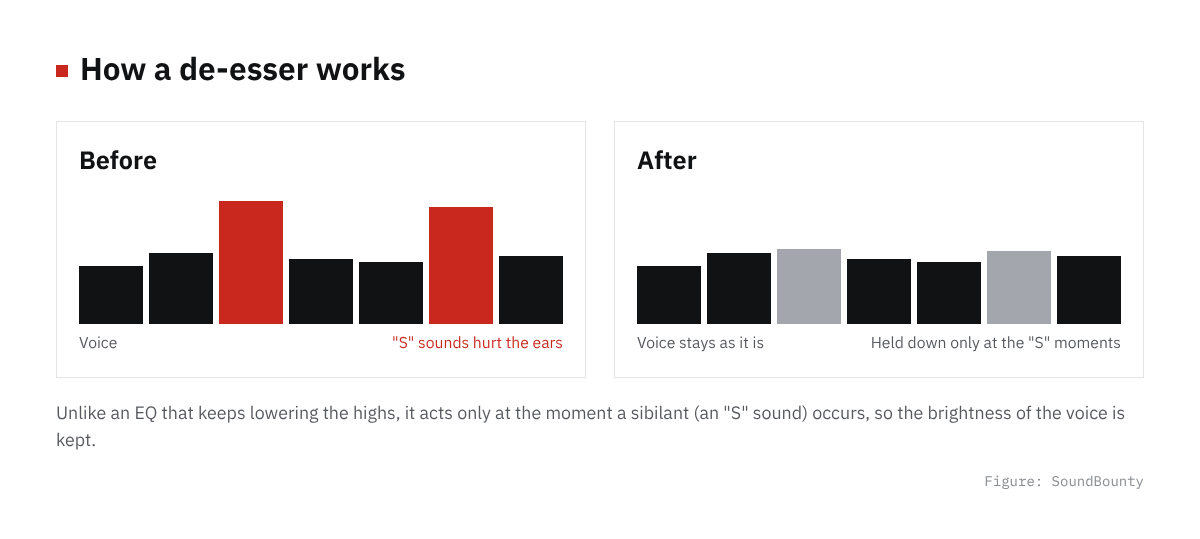
Figure: SoundBounty
What sibilance is
Sibilance is the high, hissing sound that comes out when you sing “s” and “t” sounds, where the breath rubs. It is also called the “s” and “t” sounds.
FabFilter describes sibilance as sound in a band around 6 to 9 kHz. It is needed for clarity, but too strong and it hurts the ear. It is also explained that this band tends to get stronger when you record with the microphone close to your mouth.
FabFilter’s Pro-DS help also says that the “s” sound of an ordinary voice is roughly around 8 to 10 kHz. The wording differs slightly between materials, so treat the band as a guide when searching.
Sources: FabFilter Learn, FabFilter Pro-DS help
Why sibilance gets strong
Sibilance can get strong even when you record with good gear. FabFilter explains that after processing such as compression, saturation and limiting, “s” and “t” sounds can stand out too much.
A compressor lifts quiet sounds to even out the voice. When it does, the sibilance that was quiet gets lifted too and stands out more. That is why a de-esser is often put after the compressor. The whole order is explained in The order of plug-ins for a cover-song mix.
Source: FabFilter Pro-DS help
How it differs from cutting with an EQ
If you cut the highs with an EQ, the highs also drop when no sibilance is present. The downside is that the voice tends to get dark.
A de-esser reduces the sound only when sibilance appears. FabFilter introduces Pro-DS as a tool that naturally reduces sibilance in singing. For how to use an EQ, see How to EQ vocals.
The three basic settings
The names and number of knobs differ by product. Here we summarize the basic idea using the manual of FabFilter Pro-DS as an example.
1. Decide the detection range
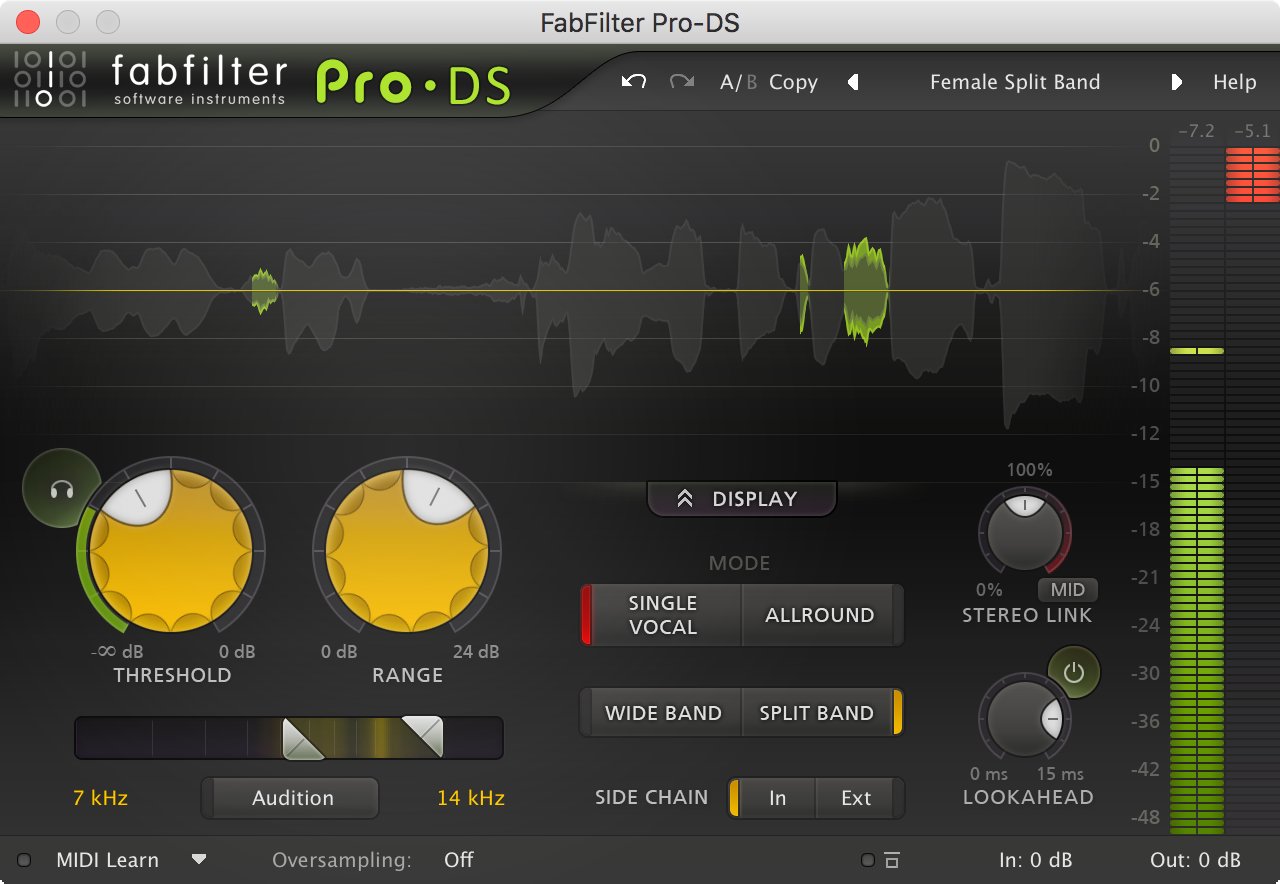
A de-esser watches the level of high sound in a range you decide, and starts working. In Pro-DS, you decide the detection range with high-pass and low-pass sliders. You can choose the range between 2 kHz and 20 kHz.
If the range is wrong, it also reacts to sounds other than sibilance. There is a button called “Audition Sidechain” that lets you listen only to the sound used for detection, which is handy when searching.
2. Decide the threshold
The threshold is the knob that decides from what level it starts working. If you set it too low, it reacts to things other than sibilance.
Pro-DS has an “Audition Triggering” button that lets you hear where it is working. Decide by listening so that it reacts only to the sibilance you need.
3. Decide the range
The range is the knob that decides the upper limit of how much it reduces. In Pro-DS, it keeps the amount reduced, which is decided by the movement, within the range you want. Start with a small amount and increase it if it is not enough.
Source: FabFilter Pro-DS help
Modes for voice, and lookahead
Pro-DS has a mode for one singing voice, “Single Vocal”. A mechanism that tells sibilance from other sounds works in it. There is a separate mode for the whole mix. For one cover-song vocal, the single-voice mode suits.
For how it processes, there are “Wide Band”, which lowers the overall volume, and “Split Band”, which lowers only the highs. It is explained that for one vocal, Wide Band often sounds natural too.
“Lookahead” is a function that starts reducing a little before the sibilance begins. For singing, around 10 milliseconds is often good. FabFilter’s help says that leaving a little of the start of the sibilance keeps the natural “s” sound.
Source: FabFilter Pro-DS help
Video: “Introduction to FabFilter Pro-DS Intelligent De-esser” (official FabFilter YouTube channel; narration in English) Watch on YouTube
Tips to avoid overdoing it
- Compare on and off: check that the lyrics are easier to hear with it on.
- Listen with the backing track: listening to the vocal alone makes the harshness seem stronger and you tend to overdo it.
- Leave a little of the start of the sibilance: decide the lookahead value while comparing.
- There are no fixed numbers: they change with the voice and the microphone, so decide by listening.
Paid de-essers (from the lowest regular price)
We summarize a comparison with scores based on official information in our de-esser comparison. Here we list the products you can buy at Plugin Boutique from the lowest regular price. The prices are regular prices in US dollars shown on Plugin Boutique on October 10, 2026. For products on sale, we give the regular price, not the sale price.
Video: “Smoothen the Top End of Vocals with Waves R-DeEsser” (official Waves YouTube channel; narration in English) Watch on YouTube
- pure:deess (rank A, regular price $39): View at Plugin Boutique
- Renaissance DeEsser (rank B, regular price $99): View at Plugin Boutique
- smart:deess (rank S, regular price $129): View at Plugin Boutique
- Pro-DS (rank A, regular price $199): View at Plugin Boutique
- Oxford SuprEsser (rank A, regular price $244): View at Plugin Boutique
FabFilter Pro-DS, the example in this article, is below.
Score 3.8 / 5 (average of the 12 products compared: 3.8)→ See all
- Specs last checked
- 2026/09/25
- Natural reduction
- Split band
- Speed
- Vocal mode
- Breadth of uses
- M/S, other material
- Price (store, date)
- $199 [PB, checked Oct 26]
Image: from the FabFilter official press kit
When a de-esser is on sale, you can find it in our latest sales. How to install and authorize a plug-in is explained in How to install plug-ins you bought in a sale or got as a free giveaway.
Frequently asked questions
Q. Do I always need a de-esser?
No. If sibilance does not bother you, you do not need to apply one. The basic approach is to use it when harshness bothers you.
Q. Can I reduce sibilance with an EQ alone?
An EQ can reduce it too, but the highs also drop when no sibilance is present. If you want to reduce only sibilance, a de-esser suits you.
Q. Is there a free de-esser?
Among the products we compared on this site, there is no free de-esser. Plug-ins you can try for free are summarized in Free plug-ins for a cover-song mix.
Q. Are there fixed settings in numbers?
They change with the voice, the microphone and the song, so we do not give fixed values. Decide while listening with the audition buttons.


Comments