

You can start mixing a cover vocal without paid plug-ins. Several of the basic plug-ins for vocals, such as EQ, compressor, pitch correction and reverb, are given away free by their makers. In this article we introduce, by role, the plug-ins we could confirm to be free on the official pages.
Disclosure: This article contains affiliate links. Whether each plug-in is free was checked on the makers’ official pages on October 2, 2026; the feature descriptions are based on the same official pages as checked on September 25. A free offer can change at the maker’s discretion.
Key points
- The basic processing for a cover vocal (EQ, compressor, pitch correction, reverb, delay) can be covered with free plug-ins.
- If you are unsure, start with three: “MEqualizer” for EQ, “DC1A” for compression and “RAUM” for reverb.
- Before installing, check that your OS and DAW are supported. The table below sums it up.
- Saturation Knob needs two accounts, Softube and iLok.
- We could not confirm a free noise-reduction tool or de-esser.
A free vocal chain
For a cover vocal, a common flow is “shape with EQ, even out with a compressor, correct pitch if needed, and add space last”. The reasons for the order are summarized in the order of plug-ins for a cover mix.
| Role | Free plug-ins | Where to get it (official) |
|---|---|---|
| EQ | MEqualizer / TDR Nova | MeldaProduction / Tokyo Dawn Records |
| Compressor | DC1A / Supercharger / MCompressor | Klanghelm / Native Instruments / MeldaProduction |
| Pitch correction | MAutoPitch | MeldaProduction |
| Reverb | RAUM | Native Instruments |
| Delay | MDelay / REPLIKA | MeldaProduction / Native Instruments |
| Saturation (flavor) | IVGI / Saturation Knob | Klanghelm / Softube |
Supported OS and plug-in formats
Before installing, check the formats your DAW supports. This sums up what the makers’ official pages and manuals say.
| Plug-in | Windows | Mac |
|---|---|---|
| MEqualizer / MCompressor / MAutoPitch / MDelay (MeldaProduction) | Windows 10 and 11 (64-bit): VST, VST3, AAX | macOS 10.14 or later: VST, VST3, AU, AAX (Apple Silicon supported) |
| TDR Nova (Tokyo Dawn Records) | Windows 7 or later: VST2, VST3, AAX (64-bit) | Mac OS X 10.9 or later: VST2, VST3, AU, AAX |
| DC1A (Klanghelm) | VST, VST3, AAX | AU, VST, VST3, AAX |
| IVGI (Klanghelm) | VST, AAX | AU, VST, AAX |
| RAUM / REPLIKA / Supercharger (Native Instruments) | Windows 10 and 11 (64-bit): VST, VST3, AAX | macOS 13 to 15: VST, VST3, AU, AAX (Apple Silicon native, or Rosetta 2) |
| Saturation Knob (Softube) | Windows 10 and 11 (64-bit): DAWs supporting AU, VST, VST3 or AAX | macOS 14, 15 and 26: AU, VST, VST3, AAX |
For IVGI, the formats listed in the official manual (IVGI 2) are VST, AU and AAX. It may not work in a DAW that supports only VST3. The two Klanghelm products have no system-requirements table on their official pages, so we summed up what the manuals say.
EQ
MEqualizer (MeldaProduction)
A free six-band EQ. Each band offers seven filter types, and tube saturation is built in. MeldaProduction lists it as one of the free effects in its “MFreeFXBundle”. It suits people who want to try an EQ with an analyzer (a display that shows how the sound is distributed) for free first. How to use it is explained in how to EQ vocals. See the official site
TDR Nova (Tokyo Dawn Records)
A parallel dynamic EQ with dynamics processing in each band. Dynamics processing changes how strongly it acts depending on the volume. It can also be used as a multiband compressor or a wideband compressor, and a spectrum analyzer is included. It suits people who want to try a dynamic EQ for free. The higher-end “GE” version is paid. See the official site
Compressor
DC1A (Klanghelm)
A freeware compressor you can use with just two knobs, input and output. It is based on the settings of the DC8C. It has switches for parallel compression (mixing with the original), switching between peak and RMS (average level) detection, and compressing left and right separately. It suits people who want to try a compressor first without difficult settings. The idea behind compression is explained in how to use a compressor on vocals. See the official site
Supercharger (Native Instruments)
A free compressor based on a tube compressor, usable with nearly one knob. It has a Punch button (emphasizes the attack) and a Dirt button (adds distortion). It suits people who want to try the coloring of a compressor with a single knob. See the official site
MCompressor (MeldaProduction)
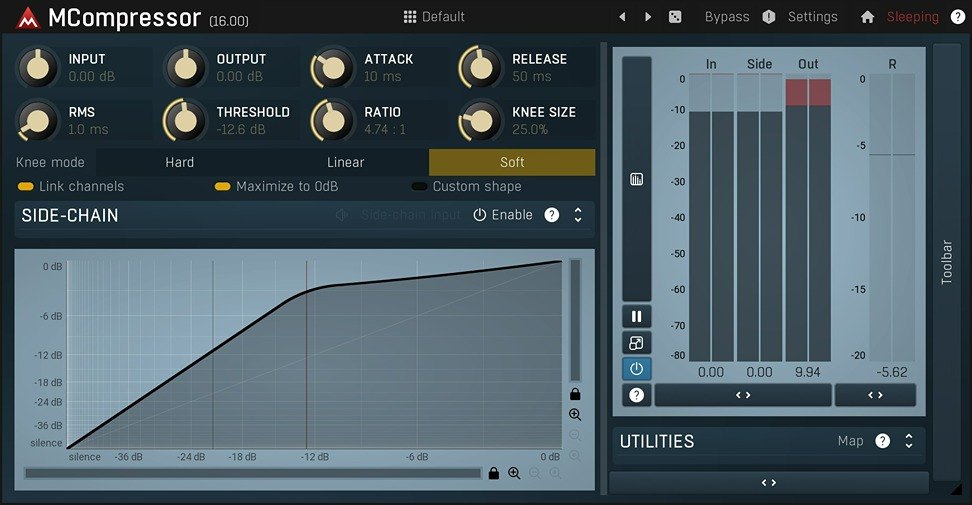
A free compressor in which you can draw the compression curve freely. It also has an upsampling setting, which processes more finely inside to reduce distortion. With its high degree of freedom, it suits people who want to learn how it works while adjusting in detail. See the official site
Pitch correction
MAutoPitch (MeldaProduction)
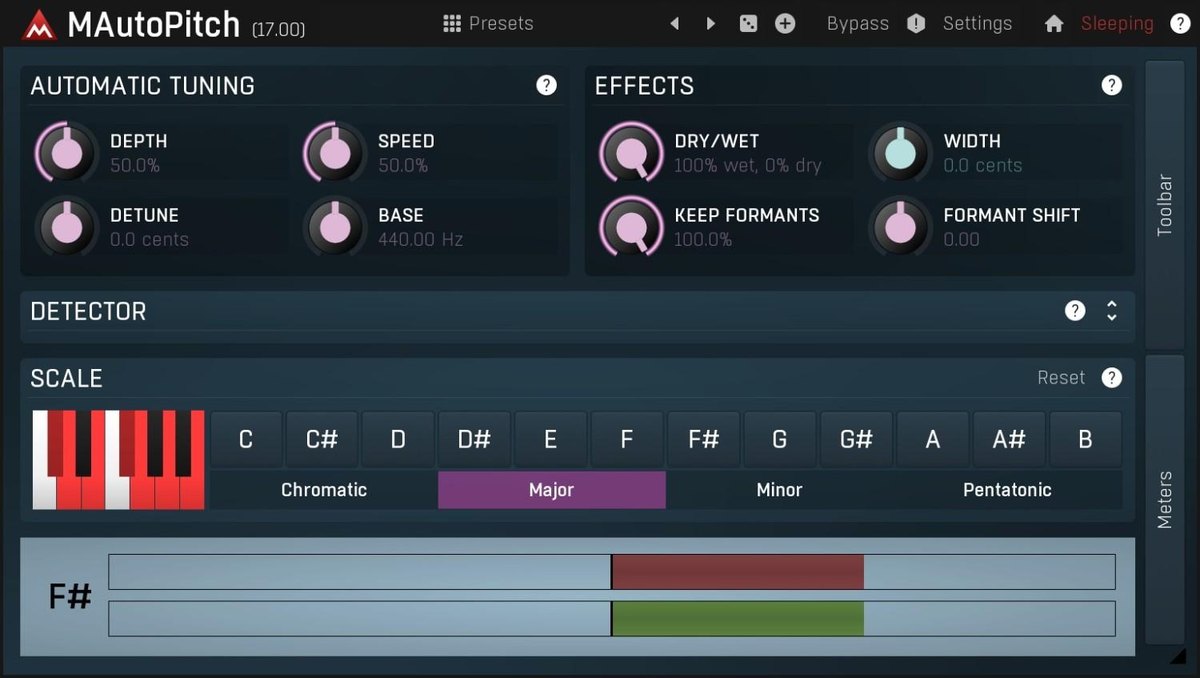
A free plug-in that automatically corrects singing and single-note instruments. It also includes a formant shift (changes the thickness of the voice) and a stereo widening function. MeldaProduction presents it as “free automatic vocal tuning”. Unlike the type that you fix note by note after recording, it corrects automatically. It suits people who want to try it easily. The difference from paid tools is compared in pitch correction plug-ins compared. See the official site
Reverb and delay
RAUM (Native Instruments)
A free reverb with three modes: room type (GROUNDED), hall type (AIRY) and special-effect type (COSMIC). It also has a Freeze mode that holds the sound on and on, plus pre-delay and modulation sections. It suits people who want to try everything from ordinary space to special effects. How to apply it is explained in how to use reverb and delay on vocals. See the official site
MDelay (MeldaProduction)
A free delay with three modes: tape, modern and ping-pong. The two taps (repeat outputs) can be adjusted individually, and saturation and filters are included. It suits people who want to try both tape-style and clean delays. See the official site
REPLIKA (Native Instruments)
A free delay with modes such as modern (digital) and vintage digital. It also has a diffusion algorithm that blurs the sound, and a resonant filter and phaser that can move in time with the tempo of the song. It suits people who want to switch between a clean delay and a blurred effect. See the official site
Saturation (flavor)
IVGI (Klanghelm)
A freeware saturation based on the DESK mode of the SDRR. It can make anything from a faint coloring to heavy distortion, and the RESPONSE knob changes the tilt of the band that distorts. On vocals, using just a little to add warmth suits it. See the official site
Saturation Knob (Softube)
A free plug-in that adds distortion with one knob. You can choose from three modes with different kinds of distortion. Softube explains that it suits thickening drums and bass or adding harmonics to vocals. To get it, you create a Softube account and use Softube Central. The system requirements also say an iLok account is needed. See the official site
When free feels limiting: paid picks (in order of regular price, lowest first)
Free plug-ins cover the basics, but as you get used to them you may start to care about having more features and working faster. As a guide for that moment, from this site’s comparisons (scored from the makers’ official information only), we lined up paid plug-ins of rank B or higher by role, in order of regular price. For each role, products with a particularly high score on this site are included too.
Prices are the regular prices shown in US dollars on Plugin Boutique, checked on October 10, 2026. They can drop during sales and they change, so check the price shown on Plugin Boutique before you buy. The rank is counted from the top of the four levels S, A, B and C by this site’s score.
EQ
From the EQ plug-ins of rank B or higher, in order of regular price, lowest first. Scores and features are compared in detail in EQ plug-ins compared.
- smart:EQ 4 (Rank A, regular price $129): View at Plugin Boutique
- SplitEQ (Rank A, regular price $149): View at Plugin Boutique
- Infinity EQ 2 (Rank A, regular price $149): View at Plugin Boutique
- Pro-Q 4 (Rank S, regular price $199): View at Plugin Boutique
Compressor
From the compressor plug-ins of rank B or higher, in order of regular price, lowest first. Scores and features are compared in detail in compressor plug-ins compared.
- smart:comp 3 (Rank S, regular price $129): View at Plugin Boutique
- LA-2A Leveler Collection (Rank B, regular price $149): View at Plugin Boutique
- CLA-76 (Rank B, regular price $149): View at Plugin Boutique
- Pro-C 3 (Rank S, regular price $199): View at Plugin Boutique
Pitch correction
From the pitch correction plug-ins of rank B or higher, in order of regular price, lowest first. Scores and features are compared in detail in pitch correction plug-ins compared.
- Melodyne 5 essential (Rank B, regular price $99): View at Plugin Boutique
- Melodyne 5 assistant (Rank A, regular price $249): View at Plugin Boutique
- Melodyne 5 editor (Rank A, regular price $399): View at Plugin Boutique
- Melodyne 5 studio (Rank S, regular price $699): View at Plugin Boutique
Reverb
From the reverb plug-ins of rank B or higher, in order of regular price, lowest first. Scores and features are compared in detail in reverb plug-ins compared.
- MReverb (Rank A, regular price $43): View at Plugin Boutique
- SP2016 Reverb (Rank S, regular price $99): View at Plugin Boutique
- smart:reverb 2 (Rank S, regular price $129): View at Plugin Boutique
Delay
From the delay plug-ins of rank B or higher, in order of regular price, lowest first. Scores and features are compared in detail in delay plug-ins compared.
- UltraTap (Rank B, regular price $99): View at Plugin Boutique
- Timeless 3 (Rank S, regular price $149): View at Plugin Boutique
- EchoBoy (Rank S, regular price $199): View at Plugin Boutique
Saturation
From the saturation plug-ins of rank B or higher, in order of regular price, lowest first. Scores and features are compared in detail in saturation plug-ins compared.
- Saturn 2 (Rank S, regular price $149): View at Plugin Boutique
- Thermal (Rank A, regular price $149): View at Plugin Boutique
- Decapitator (Rank B, regular price $199): View at Plugin Boutique
Other products on sale now can be checked in the roundup of current sales and freebies.
Cautions when using free plug-ins
- Get them from the maker’s official site: download by following the official page. Files distributed on other sites may differ in content, so avoid them.
- An account or a dedicated app may be needed: Softube, for example, needs an account and Softube Central. The steps differ by maker.
- Check the supported OS and format: use the table above to confirm it matches your DAW’s format.
- Free terms can change: this article reflects checks made on October 2, 2026.
- Higher-end versions can be paid: for TDR Nova, the higher-end GE is paid. Judge whether the free version is enough as you use it.
What free does not cover
This article covers EQ, compressor, pitch correction, reverb, delay and saturation. Among the comparisons on this site, we could not yet confirm a free noise-reduction tool or de-esser. Noise is more effective to reduce at the recording stage. How is explained in causes of noise in cover recordings and how to fix it.
Frequently asked questions
Q. Can I mix a cover song with only free plug-ins?
The basic processing is possible. EQ, compressor, pitch correction, reverb and delay are all available free. Paid plug-ins may speed up your work because they have more features or make automatic suggestions. Starting free and replacing only the parts you struggle with is one way to go.
Q. Is there a free DAW?
Yes. The article Free DAWs you can use compares them.
Q. Which paid ones do you recommend?
We summarize comparisons scored from official information, with ranks, by role. See the comparisons of EQ plug-ins, compressor plug-ins, reverb plug-ins, delay plug-ins and saturation plug-ins.
Q. Are any plug-ins on sale now?
Current sales and freebies are in the roundup of current sales and freebies.


Comments