
iZotope has released “Tonal Balance Control 3”, software for checking how a mix turns out. It compares your mix with the target of a reference song or genre to check how far the tonal balance is off. Based on the manufacturer’s official information, this article summarizes what is new and where it could fit in a cover-song mix.
Disclosure: This article contains affiliate links. The content reflects the date we checked the maker’s official page (October 3, 2026).
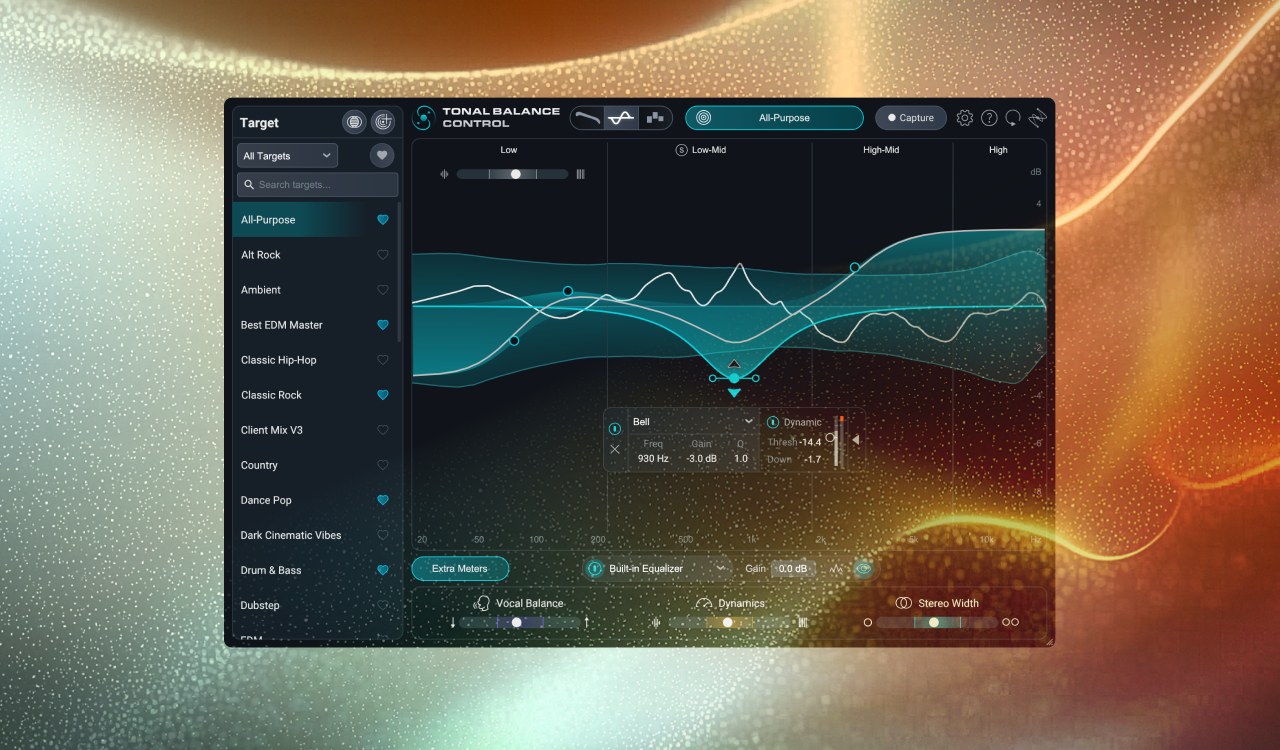
Image: from the iZotope official press kit
Key points
- Tonal Balance Control is software that compares the balance of a reference sound with your own mix.
- The third generation has four meters (Tonal Balance, Vocal Balance, Dynamics and Stereo Width).
- You can make your own target (the shape you aim for) from a reference song. There are both a standalone computer app and a plug-in for use in a DAW.
- It is not only for looking: you can fix the balance on the spot with the built-in EQ.
What kind of software is it?
When mixing, doubts come up: “Does my mix have too much low end compared with a commercial song I know well?” or “Aren’t the highs lacking?” Tonal Balance Control is software for checking that doubt on screen. It draws the balance of a reference sound (a genre target, or a song you imported yourself) in a graph, and overlays how far your mix departs from it.
According to the official description, the flow is as follows. First choose the reference to compare with. Next see how your mix looks on the meters. Finally, narrow the difference from the reference with the built-in EQ.
What is new in the third generation
There are now four meters
The official page introduces the following four meters.
- Tonal Balance: the familiar meter that shows the balance by frequency band. A new “Leveled View” makes the departure from the reference easier to see.
- Vocal Balance: a meter that shows whether the loudness of the vocal sits in a good position.
- Dynamics: a meter that shows the energy and impact of the sound (the range of loud and soft).
- Stereo Width: a meter that shows the spread of the sound (the feeling of being enveloped).
You can make targets from a reference song
Besides choosing from the targets included in the software, you can make your own.
- Target library: includes targets for more than 30 genres and subgenres. It has been revisited (the official description says “redesigned”).
- Capture: inside the DAW, you can capture the sound that is playing and make it a new target. You can capture a whole song or only some of the sounds in a mix.
- Standalone app: in the new standalone computer app, you can capture targets from any source you like, such as Spotify or YouTube.
- Target Blender: you can mix two targets in the library to make your own.
Fix it on the spot with the built-in EQ
A new “Hybrid EQ” has been added. It can do both fixed adjustment and adjustment that moves with the sound (dynamic). Without opening another EQ, you can narrow the difference from the reference inside the Tonal Balance Control screen. You can also link it with the EQs inside iZotope’s Ozone, Neutron and Nectar for finer correction. There is also a way to load a target into each of their assistant functions.
Both a plug-in and a standalone app
According to the official page, Tonal Balance Control 3 can be used as both a plug-in and a standalone app. The intended split is to make a target from a source in the standalone app, and to bring the mix closer to the target with the plug-in inside the DAW.
Where it could fit in a cover-song mix
From here on, these are examples of use based on the official description of the features.
- When you are unsure about the balance between vocal and backing track: “Vocal Balance” is a meter that shows the position of the vocal. It may serve as a guide to how the vocal level you set by ear compares with the reference. The thinking about the balance of vocal and backing track is explained in how to balance vocals and backing track in a cover.
- When you want to get close to the original song: if you capture a song you like as a reference, you could compare the amount of lows and highs with that song. But the reference is only a guide. Because each song has different singing and arrangement, you do not have to match it completely.
- A final check before export: using it to check after the mix whether the overall balance is off also seems good. For checking loudness, see also loudness standards for cover songs.
What to check before you buy
- Check supported DAWs, plug-in formats and the computer’s system requirements on the official page.
- Price, whether a sale is running, and how to buy change with the time. Check the official page for the latest information.
- The official page has a button to try it for free. You can check before buying that it works in your own environment.
Official page: iZotope “Tonal Balance Control 3”

Comments