
Arturia’s reverb “Rev OCEAN” went on sale on June 25, 2026 (the date of the official press release). The official page calls it a “Tidal reverb”, a type of reverb whose space keeps moving. Based on official information, this article introduces its features and where it could fit on vocals.
Disclosure: This article contains affiliate links. The content reflects the date we checked the maker’s official page (October 5, 2026).
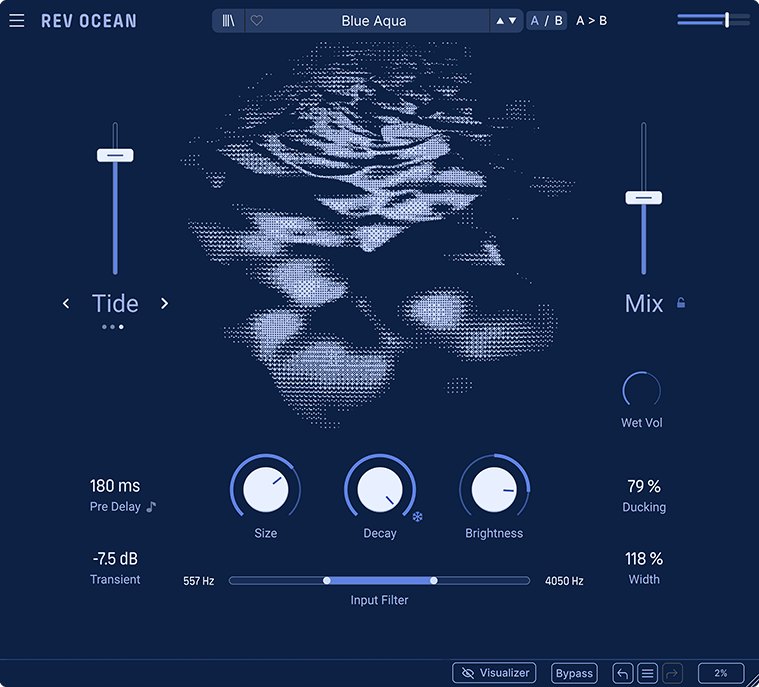
Image: from the Arturia official press material
Key points
- Rev OCEAN is a reverb that makes long, smooth spaces. The official page explains that it was made with people producing downtempo (slow-tempo music) in mind.
- It has three modes that change the character of the space: “Abyss”, “Tide” and “Foam”.
- You can set the space with few controls, centered on Size, Decay and Brightness.
- The official page lists examples such as a distant vocal wash and a hazy singing voice.
- The official page has a free demo.
What kind of software is it?
According to the official page, Rev OCEAN is a reverb that combines a calculation method called “FDN”, “diffusion” that blurs the reverberation in many stages, and deep modulation (processing that makes the reverberation sway). Its feature is explained as constant movement within a long, smooth space.
The official page lists downtempo production, ambient (environmental-music-like songs), spreading guitar reverb, the space of vocals and electronic sounds as uses.
The three modes
The center of Rev OCEAN is the three modes that decide how the space moves.
- Abyss: adds several layers of reverberation that sound like reversed playback. It is explained as a harmonically rich space in which the pitch moves slightly. The official page says it can add cinematic depth to vocals, synths, transitions and ambient sounds.
- Tide: applies separate left and right filters to the output of the reverberation, making wave-like movement and changing stereo depth. Using it to add subtle movement to pads (sustained sounds), keys, guitars and melodies is introduced.
- Foam: lengthens and blurs the start of the reverberation to make a swelling space. It softens the start of sounds (transients). It is introduced as suiting guitar arpeggios, plucked synths, vocals and the texture of shoegaze (rock in which sounds pile up thickly).
The slider on the left of the screen (Macro) adjusts how strongly the chosen mode acts.
How it works
In its “Closer look”, the official page explains the screen in five parts (Mode, Macro, Reverb, Utilities and Output).
- Reverb: Size (the size of the space), Decay (the length of the reverberation) and Brightness. Setting Decay to the maximum, or pressing the snowflake icon, holds the reverberation and lets it continue as a “freeze”.
- Utilities (around the input): Pre Delay (the gap before the reverberation starts), Transients (softens sharp attacks), the HPF/LPF Input Filter (cuts the high or low side of the sound entering the reverb), Ducking (lowers the reverberation so the original sound stays clear) and Width (stereo spread).
- Output: Mix (the blend of original sound and reverberation), Wet Vol (the volume of the reverberation) and Mix Lock (fixes the position of Mix). Presets are also chosen here.
Where it could fit in a cover recording
From here on, these are examples of use based on the official description.
- When you want to place the vocal far away and wrap it hazily: the official page lists uses such as “a distant vocal wash” and “a floating voice”. Abyss or Foam might suit.
- When you want to avoid the vocal blurring in the reverb: Ducking is explained as a knob for keeping the original sound clear. Cutting the low sounds entering the reverb with the Input Filter is also conceivable. The official release material has a hint that, on a voice, cutting the lows and raising the brightness lets you add highs without muddying the mix.
- When you want to hold the reverb and add change: the official release material introduces an example using freeze (holding and extending the reverberation) and a way to automate Mix to put in freezes like a rhythm.
The basic thinking about reverb on vocals is summarized in how to use reverb and delay on vocals.
What to check before you buy
- System requirements: the official download page says “Mac OS 11.0 or later” for Mac and “Windows 10 or later” for Windows. The plug-in formats listed are VST and Audio Unit. Check on the official page that it loads in the DAW you use.
- Try before you decide: the official product page has a “Get Free Demo” link.
- Differences from other reverbs: the official release material explains that it uses the same calculation method (FDN) as Arturia’s other effect, efx AMBIENT, and that Rev OCEAN has finer adjustment and a more focused screen. Reverbs overall are sorted out in reverb plug-ins compared.
Official page: Arturia “Rev OCEAN”







Comments