
Disclosure: This page may contain affiliate links. Prices were checked on the date shown and may change.
An introduction to Waves Butch Vig Vocals, based on information from the maker and distributors: what it does, how to use it and who it may suit. It is not scored.
Let Butch Vig’s production mastery realize your vocals’ potential.
— Waves official site
What is Butch Vig Vocals?
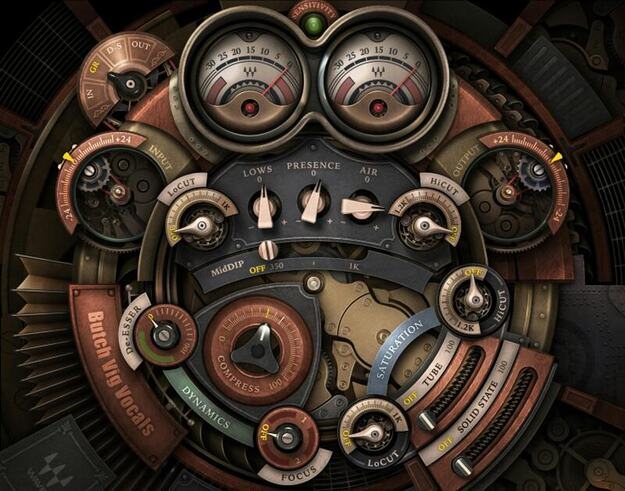
Butch Vig Vocals is a vocal multi-effect from Waves, created in collaboration with producer Butch Vig. It combines dynamics, EQ, filters and harmonic saturation.
The store description covers a range of uses, from subtle enhancement that brings out a singer's personality to heavy distortion and lo-fi. It puts the approach of a producer known for alternative rock into plug-in form.
Saturation can be tube or solid-state in character and is intended to add edge to vocals. The saturation is layered in parallel with the original vocal.
Compression can smooth a vocal or add aggression. It includes 81 presets made by Butch Vig, Chris Lord-Alge and Ross Hogarth.
Key features
Multi-effect for vocals
Dynamics, EQ, filters and saturation are combined, which may help build a vocal sound without many separate plug-ins.
Tube or solid-state saturation
Two saturation flavors are available to add edge to a vocal.
Parallel layering
Saturation is layered with the original vocal, so a vocal can gain grit while keeping its outline.
Flexible compression
Compression can smooth a vocal or add aggression.
Lo-fi treatment
Filters and distortion can be combined for a rough, distinctive vocal texture.
81 presets
Eighty-one presets from Butch Vig and others offer starting points.
Specifications
| Item | Details |
|---|---|
| Maker | Waves |
| Designer | Butch Vig |
| Category | Vocal processing (multi-effect) |
| Sections | Dynamics, EQ, filters, saturation |
| Presets | 81 |
| Formats (Mac) | VST / AU / AAX |
| Formats (Windows) | VST / AAX |
| OS | macOS Monterey 12 to Sequoia 15, Windows 10 or later |
What is included and system requirements
- Mac: macOS Monterey 12, Ventura 13, Sonoma 14, Sequoia 15 (VST / AU / AAX)
- Windows: Windows 10 or later (VST / AAX)
- The license is registered to a Waves account and installed with the Waves Central app
How to use it
- After buying at Plugin Boutique, the serial number appears in your user account.
- Create a Waves account (or log in) and open the confirmation link sent by email.
- In the Waves account choose Register New Products and enter the serial number.
- Download and install the Waves Central app and log in with the Waves account.
- On the Install Products tab tick this product and press Install & Activate.
- Open the DAW, pick the plug-in from the list and insert it on a track.
- Step through the presets first to learn what each control does, then fine-tune.
Where it may come in handy
Adding edge to rock vocals
When a vocal sounds too gentle, saturation could add definition.
Lo-fi vocal effects
It might be used on a chorus or break where a deliberately rough texture is wanted.
Starting point for a vocal chain
Presets can be loaded and adjusted to a particular voice.
Who it may suit
- People recording rock or alternative vocals
- Users who want to shape a vocal in one plug-in
- Home producers who learn from presets
Good to know before you buy
- A Waves account is required to register the license.
- Information is based on the Plugin Boutique product page.
Price
Please check the official page for the price.
See Butch Vig Vocals on the product page
More of the same kind
We have introduced 35 vocal processors. Here are some of the others.
- W. A. Production VocalShaper
- Techivation T-De-Breather
- BLEASS BLEASS Voices
- Synchro Arts VocAlign 7
- Resonant Cavity Voloco Producer
- Leapwing Audio UltraVox 2
We have introduced 215 other products from Waves.
- Waves Greg Wells VoiceCentric
- Waves Manny Marroquin Triple D
- Waves Renaissance Vox
- Waves OVox Vocal ReSynthesis
- Waves Sync Vx
For a side-by-side comparison scored on the same criteria, see our comparison of vocal processors.
See the full list in Product database: Effects.
Sources: pluginboutique.com (checked 2026-10-27)










Comments