
Disclosure: This page may contain affiliate links. Prices were checked on the date shown and may change.
An introduction to Waves Waves CLA Nx, based on information from the maker and distributors: what it does, how to use it and who it may suit. It is not scored.
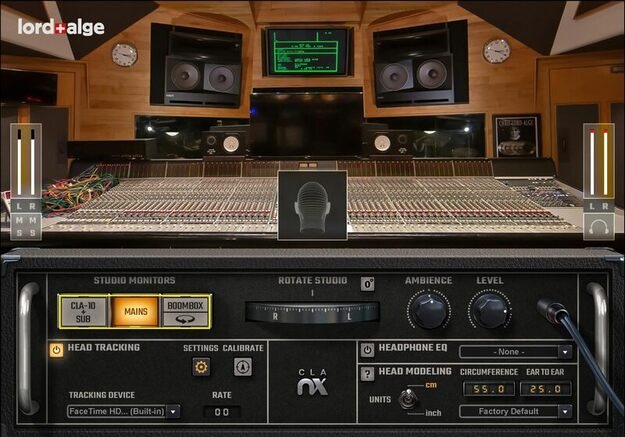
CLA Nx recreates the acoustics of Chris Lord-Alge's Mix LA studio, in your headphones, using Waves Nx spatial imaging technology.
— Waves official site
What is Waves CLA Nx?
CLA Nx is a monitoring plugin for mixing on headphones. The product page says it recreates the acoustics of Chris Lord-Alge's Mix LA studio in your headphones using Waves Nx spatial imaging technology.
You insert it on the output to create a three-dimensional soundfield and correct the unnatural stereo image of headphones. The aim is to make it easier to judge depth, balance, stereo imaging and reverb.
It includes EQ correction curves for over 270 headphone models. You can check a mix on monitors modeled on NS10s and on custom Ocean Way studio monitors, and a CLA Boombox test checks how a mix translates to small-speaker devices.
Personalized head anatomy calibration is included, and optional head tracking works with a webcam or the separately sold Nx Head Tracker.
Key features
Mix LA studio acoustics
Recreates the acoustics of Chris Lord-Alge's mix room in headphones, which may help when no speaker setup is available.
EQ correction for over 270 headphones
Correction curves for more than 270 headphone models are included, giving a starting point for compensating your headphones.
Multiple monitor options
Mixes can be checked on NS10-modeled monitors and custom Ocean Way studio monitors to compare how they come across.
CLA Boombox test
Checks how a mix translates to small-speaker devices, which may be useful when thinking about phone-style playback.
Stereo correction and ambience control
Corrects the unrealistic stereo imaging of headphones and lets you adjust the amount of studio ambience.
Personal calibration and head tracking
Head anatomy calibration is available, and head tracking works with a webcam or the separately sold Nx Head Tracker.
Specifications
| Item | Details |
|---|---|
| macOS | Monterey 12 / Ventura 13 / Sonoma 14 / Sequoia 15 |
| Windows | Windows 10 or later |
| Formats (Mac) | VST / AU / AAX |
| Formats (Windows) | VST / AAX |
| Activation and installation | Waves account and Waves Central (enter the Plugin Boutique serial number) |
What is included and system requirements
- Nx processing recreating the Mix LA studio acoustics
- EQ correction curves for over 270 headphones
- NS10-modeled and custom Ocean Way monitors
- CLA Boombox test
- Head tracking support (webcam, or the separately sold Nx Head Tracker)
- Supported systems: Mac with macOS Monterey 12, Ventura 13, Sonoma 14 or Sequoia 15 (VST, AU, AAX); Windows 10 or later (VST, AAX).
How to use it
- Buy the plugin at Plugin Boutique and note the serial number shown in your account.
- Create a Waves account (or log in) and enter the serial number under Register New Products.
- Download Waves Central from your Plugin Boutique account or the Waves downloads page and install it.
- Log in to Waves Central, tick the plugin on the Install Products tab, and click Install & Activate.
- Insert CLA Nx at the end of the master (output) track in your DAW.
- Select your headphone model and apply the correction curve.
- Run the head calibration (optional).
- Adjust the monitor type and the amount of studio ambience, then check the mix.
- Bypass or remove CLA Nx before exporting so the monitoring processing is not printed into the file.
Where it may come in handy
Mixing away from a speaker room
For a headphone-only home studio, it may serve as a way to check a mix.
Reducing the gap between headphones and speakers
If a headphone mix sounds different on speakers, you may try the correction curves and stereo correction.
Checking on small speakers
A possible workflow is to use the CLA Boombox test to see how the mix sounds on small-speaker devices.
Collaboration
The product page says everyone can mix in the same environment, which may suit collaborative work.
Who it may suit
- People who mix mostly on headphones
- Those who want to compensate for their headphones' response
- Users who want to check translation to small speakers
Good to know before you buy
- It is for headphone monitoring. Bypass or remove it before exporting.
- Head tracking needs a webcam or the Nx Head Tracker, sold separately.
- Activation requires a Waves account and Waves Central.
Price
Please check the official page for the price.
See Waves CLA Nx on the product page
More of the same kind
Other introduction articles of the same kind.
- Kuassa EFEKTOR Meloditron
- United Plugins Cryostasis
- Blue Cat Audio Plug'n Script
- W. A. Production Fundamental Bass
- IK Multimedia Classic T-RackS Clipper
- NUGEN Audio Halo Vision
We have introduced 215 other products from Waves.
- Waves Maserati GTi
- Waves CLA Effects
- Waves Greg Wells ToneCentric
- Waves Feedback Hunter
- Waves X-Click
See the full list in Product database: Effects.
Sources: pluginboutique.com (checked 2026-10-27)










Comments