
Disclosure: This page may contain affiliate links. Prices were checked on the date shown and may change.
An introduction to Blue Cat Audio Fader Hub, based on information from the maker and distributors: what it does, how to use it and who it may suit. It is not scored.
Fader Hub can also record the full mix and individual streams to disk, making it easy to record multiple instruments over an IP network
— Blue Cat Audio official site
What is Fader Hub?
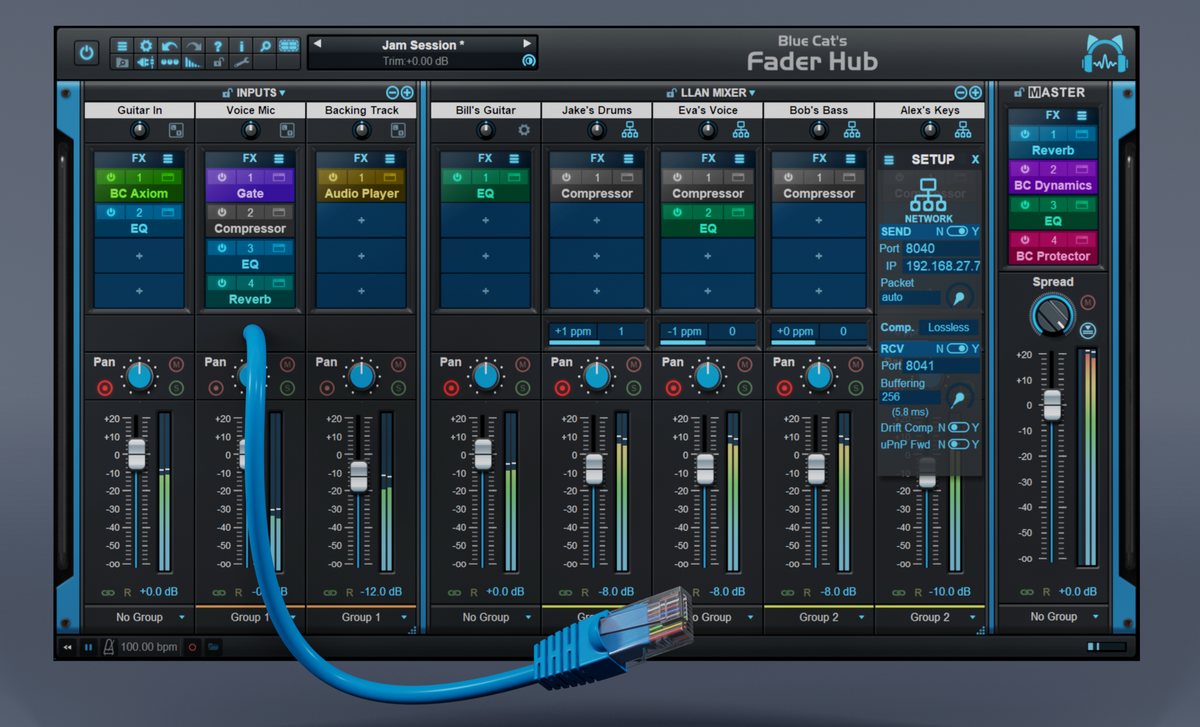
Fader Hub is a network mixing and streaming application from Blue Cat Audio. It is meant for playing and recording with other musicians in real time over a local network or the internet, and runs as a standalone app or as a plug-in.
It has two parts: a local mixing console for several inputs from an audio interface, and a network mixer that sends the local mix, or individual inputs, to other computers and mixes the streams received from them. It is compatible with Blue Cat's Connector plug-in.
Because it uses a low-latency peer-to-peer connection, each band member with a laptop can manage a personal headphone mix while keeping latency low for their own instrument. With Synced inputs, a backing track or click can be played in sync for everyone across all connections.
It can also record the full mix and individual streams to disk. Remote multitrack recording, online teaching and remote collaboration are listed as typical uses. Third-party VST, VST3 and Audio Unit plug-ins can be loaded, and built-in effects such as EQ, compressor, gate, delays and reverb are included.
Key features
Network mixing console
Audio is exchanged and mixed with other musicians over a local network or the internet, which may suit playing together from different places.
Multitrack recording
The full mix and individual streams can be recorded on your own machine, which may help when you want to handle parts separately later.
Distributed recording and synced input
Playback and recording are synchronized across instances with network latency compensation, and a SYNCED input delivers a backing track or click in sync to everyone.
Built-in effects and plug-in hosting
It includes EQ, compressor, gate, delays and reverb, and can load third-party VST, VST3 and AU plug-ins.
Multiple sample rates
Different sample rates can be used on one connection, with built-in resampling and drift compensation, which may help when connecting with different setups.
Channel aggregation
Up to 128 audio channels from up to 8 computers can be aggregated, mixed and recorded, with optional audio compression to reduce bandwidth.
Blue Cat standards
MIDI Learn, automation, no CPU load on idle, scalable UI, preset management and undo/redo are included.
Specifications
| Item | Details |
|---|---|
| Maker | Blue Cat Audio |
| Type | Network mixing and streaming (app / plug-in) |
| Connected musicians | Up to 8 (more by loading the plug-in into itself) |
| Local inputs | Up to 8 stereo |
| Formats (Mac) | AAX, AU, App, VST, VST3 |
| Formats (Windows) | AAX, App, VST, VST3 |
What is included and system requirements
- Mac: Intel or Apple silicon, Mac OS 10.9 or newer, 64-bit VST / AU / AAX host for the plug-in
- Windows: SSE2 processor, Windows Vista, 7, 8, 10 or 11, VST / AAX host (32 or 64-bit)
- For the standalone app: a Core Audio interface on Mac, or an ASIO, MME or WASAPI interface on Windows
How to use it
- Register the serial on the Blue Cat Audio site and download the format that suits your OS and DAW.
- Run the installer and activate with the email address and key sent to you.
- Launch the standalone app or insert the plug-in in your DAW.
- Assign the audio interface inputs to channels of the local mixer.
- Connect to other musicians' Fader Hub (or Connector) instances.
- Adjust your personal headphone mix.
- Choose the streams to record and start recording to disk.
- Set up the SYNCED input if you use a backing track or click.
Where it may come in handy
Remote jam sessions
The low-latency connection may be useful for playing in real time with members in different places.
Remote multitrack recording
It may help when you want each partner's instrument recorded on its own track.
Online lessons
Online music teaching is listed by the maker as a typical use.
Personal headphone mixes
It could also be used so each member builds their own monitor balance.
Who it may suit
- Those who want to play and record with members in other places
- Bands who want individual headphone mixes
- Those teaching music online
- Those who want to try a demo first (a demo is available)
Good to know before you buy
- The demo limits the number of plug-in instances and is regularly bypassed for a few milliseconds.
- Latency depends on network conditions, so it needs to be tested in your own environment.
- The maker lists the price as 99 EUR or 99 USD (tax included).
Price
$99 (Blue Cat Audio official site, checked 2026-10-27). Prices can vary by region and promotion, so check the official page before buying.
See Fader Hub on the product page
More of the same kind
Other introduction articles of the same kind.
- Zynaptiq TIME FACTORY II
- NUGEN Audio AMB
- Parakeet Paravo
- Digital Brain Instruments DSP Manager 2
- Digital Brain Instruments Digital Brain Instruments Batch Pro 2
- Stagecraft Software Universal Plug
We have introduced 21 other products from Blue Cat Audio.
- Blue Cat Audio Blue Cat's StereoScope Multi
- Blue Cat Audio AcouFiend
- Blue Cat Audio Blue Cat's Re-Guitar
- Blue Cat Audio Blue Cat's PolyVibe
- Blue Cat Audio Blue Cat's Chorus
See the full list in Product database: Streaming and recording software and others.
Sources: bluecataudio.com pluginboutique.com (checked 2026-10-27)










Comments