
Disclosure: This page may contain affiliate links. Prices were checked on the date shown and may change.
An introduction to MeldaProduction MCenter, based on information from the maker and distributors: what it does, how to use it and who it may suit. It is not scored.
If you don't want to go into too much detail, MCenter can serve you with a single-knob operation.
— MeldaProduction official site
What is MCenter?
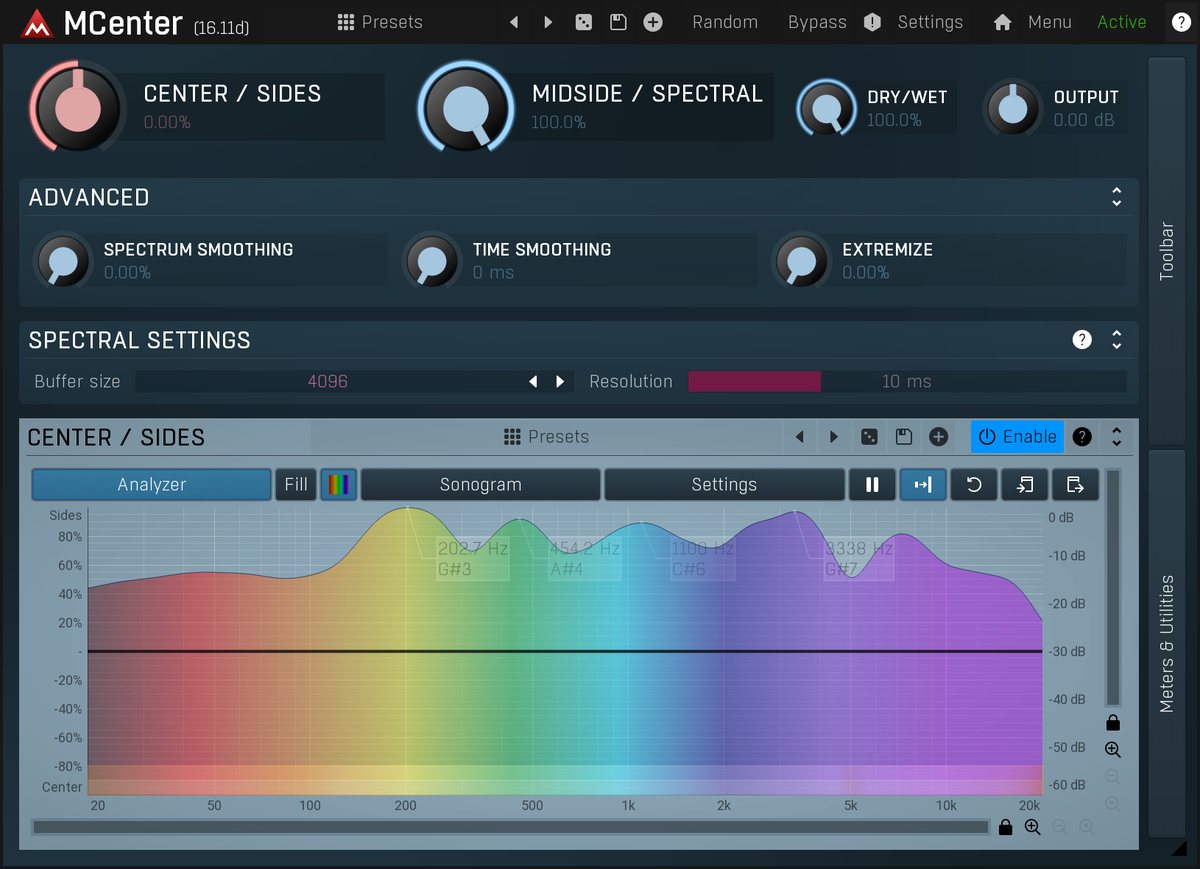
MCenter is a stereo-processing plugin from MeldaProduction that adjusts the balance between the phantom center and the remaining stereo components. The maker presents it as going beyond traditional mid/side processing by handling the center and sides separately.
The core idea is a spectral algorithm. In ordinary mid/side processing, a hard-panned track counts as 50% mid and 50% side even though it sounds stereophonic. MCenter is described as separating what sounds really stereo from what sounds really mono.
The basic control is a single CENTER/SIDES knob, which lets you balance the center and the sides without going into detail. The maker says it is meant not only for mastering but for mixing and creative uses.
Two processing algorithms, spectral and traditional mid/side, can be compared. Frequency-specific adjustment is done with freeform drawing. It supports Mac and Windows, including native Apple silicon.
Key features
Phantom center control
The component perceived in the center is adjusted separately from the sides, which may help when you want to bring forward or reduce the center.
Spectral algorithm
Mono-sounding and stereo-sounding components are separated frequency by frequency, so hard-panned tracks can be handled as stereo content.
CENTER/SIDES knob
One knob balances the center and sides, giving a quick starting point.
Dual processing algorithms
Spectral and traditional mid/side processing can be compared so you can pick the one that suits the material.
Freeform frequency drawing
The response can be drawn per frequency, for example keeping the low end centered while the highs are handled differently.
Apple silicon support
On macOS 10.14 and newer, native Apple silicon CPUs are supported.
Specifications
| Item | Details |
|---|---|
| Maker | MeldaProduction |
| Type | Stereo processing (phantom center / sides) |
| Windows | Windows 8 / 10 / 11 (64-bit), VST / VST3 / AAX |
| macOS | macOS 10.14 and newer (64-bit), VST / VST3 / AU / AAX, native Apple silicon |
| Processor | Intel / AMD with SSE2 |
What is included and system requirements
- Windows: Windows 8 / 10 / 11 (64-bit), VST / VST3 / AAX host
- macOS: 10.14 or newer (64-bit), VST / VST3 / AU / AAX host
- Installation instructions in the product PDF documentation
How to use it
- After installing, insert MCenter on a stereo track or bus in your DAW.
- Move the CENTER/SIDES knob first to hear how the balance changes.
- Switch between the spectral and traditional mid/side algorithms and compare.
- If needed, draw frequency-specific adjustments.
- Use bypass to compare with the original.
- On a master bus, start with small changes.
- Check how center material such as vocals is affected.
Where it may come in handy
Mastering
It may be used to adjust the balance of center and sides across a stereo mix.
Checking and adjusting mixes
When center material feels buried, it could be used to reconsider the ratio with the sides.
Creative sound design
It could be tried for larger changes in stereo feel, such as lifting only the sides.
Who it may suit
- Those who find hard-panned tracks awkward in standard mid/side processing
- Those who want to adjust stereo balance quickly
- Those who want to start from one knob and refine if needed
Good to know before you buy
- A free trial is available (Try for free on the maker's page).
- The maker lists a regular price of $55.
Price
Please check the official page for the price.
See MCenter on the product page
More of the same kind
Other introduction articles of the same kind.
- Waves StudioRack
- United Plugins BassRift
- LEWITT Space Replicator
- accentize dxLevel
- McDSP SA-2 Dialog Processor HD v7
- Leapwing Audio Al Schmitt
We have introduced 32 other products from MeldaProduction.
- MeldaProduction MVintageRotary
- MeldaProduction MMicSim
- MeldaProduction MAmp
- MeldaProduction MTrackAlign
- MeldaProduction MCompare
See the full list in Product database: Effects.
Sources: meldaproduction.com pluginboutique.com (checked 2026-10-27)










Comments