
Disclosure: This page may contain affiliate links. Prices were checked on the date shown and may change.
An introduction to Digital Brain Instruments Multiplex Vocoder 3, based on information from the maker and distributors: what it does, how to use it and who it may suit. It is not scored.
Multiplex Vocoder 3 is a 64-bit standalone software developed for sound design and music production purposes.
— Digital Brain Instruments official site
What is Multiplex Vocoder 3?
Multiplex Vocoder 3 is a 64-bit standalone vocoder application from Digital Brain Instruments, made for sound design and music production. It can use VST or AU instruments as the carrier signal.
Inputs can be a microphone or audio files in WAV, AIFF or MP3 format. Several vocoder layers are stacked to build processed sounds from a voice or a file.
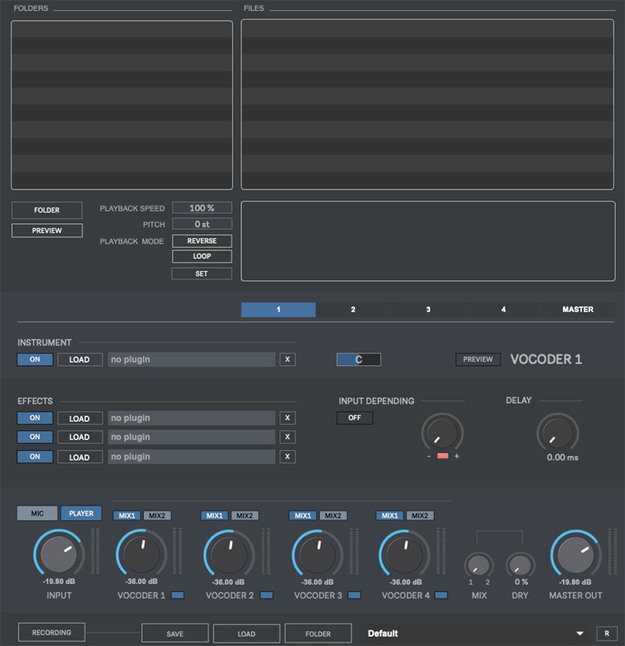
A key feature is that the input signal passes through four vocoders at once. Each output can be switched on or off by input level, and a master rack handles finishing effects.
Because it is a standalone application rather than a plug-in, you can create and export sounds without opening a DAW. This is the full version; a separate upgrade exists for Multiplex Vocoder 2 owners.
Key features
Four vocoders
The input passes through four vocoders at once, so each layer can have a different character before they are mixed.
External instruments as carrier
Any VST or AU instrument can serve as the carrier, which is useful for imprinting a voice onto a favorite sound source.
Sample editor
You can choose the region to process and set playback speed, pitch shifting, reverse playback and loop.
Input depending mode
Each vocoder output can be turned on or off by input level, with individual thresholds, to add movement.
Master rack
It hosts three VST or AU plug-ins and offers pitch and frequency shifting, plus a dry/wet mix.
Recording
It records WAV or AIFF up to 192 kHz and 32 bits, depending on the audio hardware. The source and the processed signal can be recorded together, or each layer to its own file.
Autokey and MIDI
Autokey plays the vocoders without a MIDI keyboard using a chosen key, and MIDI devices can control the application.
Specifications
| Item | Details |
|---|---|
| Type | Standalone vocoder application |
| Inputs | Microphone, WAV, AIFF, MP3 |
| Simultaneous vocoders | 4 |
| Recording | WAV, AIFF (up to 192 kHz / 32-bit, depending on hardware) |
| Mac | Intel: OS X 10.11.6 or later (64-bit, 4 GB RAM recommended) / Apple M1: macOS 11.0 or later |
| Windows | Windows 8 or later, multi-core CPU, 64-bit, 4 GB RAM recommended |
What is included and system requirements
- Multiplex Vocoder 3 application (standalone)
- Supported systems: Mac (Intel, Apple M1), Windows (64-bit)
How to use it
- After purchase, extract the downloaded zip file.
- On Mac, open the dmg and right-click the app icon to open it.
- On Windows, launch the application in the extracted folder.
- Choose a microphone or an audio file as the input.
- Load a VST or AU instrument as the carrier.
- Adjust the settings of the four vocoders.
- Add finishing effects in the master rack.
- Record the processed sound with the recording function.
Where it may come in handy
Vocal processing
It may help when layering a voice over an instrument to create an unusual vocal texture.
Sound design
It may suit building sound-design material from audio files.
Performance
Using MIDI, you could play a voice from a keyboard.
Work outside a DAW
As a standalone app, it may allow preparing and exporting material first.
Who it may suit
- People who want to make vocoder sounds
- People who build their own sound-design material
- People who want to drive existing instruments with a voice
Good to know before you buy
- It is a standalone application, not a plug-in.
- This is the full version; an upgrade for Multiplex Vocoder 2 owners is sold separately.
- The maker's site could not be confirmed, so the details follow the Plugin Boutique product page.
Price
Please check the official page for the price.
See Multiplex Vocoder 3 on the product page
More of the same kind
Other introduction articles of the same kind.
- Audacity Team Audacity
- Elgato Wave Link
- Shark LabsBogdan Sharkov Clownfish Voice Changer
- Zynaptiq TIME FACTORY II
- Tracktion StageBox
- VB-Audio Voicemeeter Banana
We have introduced 8 other products from Digital Brain Instruments.
- Digital Brain Instruments Digital Brain Instruments Batch Pro 2
- Digital Brain Instruments Voxpat Pro
- Digital Brain Instruments Digital Brain Instruments cMixer
- Digital Brain Instruments Oscar
- Digital Brain Instruments Podcaster
See the full list in Product database: Streaming and recording software and others.
Sources: pluginboutique.com (checked 2026-10-27)










Comments