
Disclosure: This page may contain affiliate links. Prices were checked on the date shown and may change.
An introduction to Waves Manny Marroquin Distortion, based on information from the maker and distributors: what it does, how to use it and who it may suit. It is not scored.
Parallel processing layers distortion that growls and teases instead of crushes—thicken digital synths, add grit to bass amps, toughen up drums, and more.
— Waves official site
What is Manny Marroquin Distortion?
Manny Marroquin Distortion is a distortion plug-in from Waves, developed with mix engineer Manny Marroquin. It layers distortion through parallel processing and is described as adding a growling texture rather than crushing the signal.
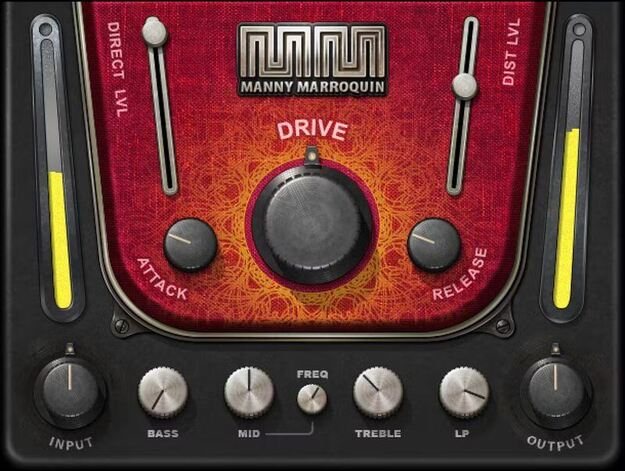
The signal path centers on four pre-distortion EQ stages and a compressor. The EQ narrows which frequencies get distorted, and the compressor shapes the dynamics before the signal reaches the distortion, which makes it easy to color only the part of a sound you care about.
The Attack and Release controls decide how quickly the distortion develops and whether it lingers in the tails of notes. The product page lists uses on synths, drums, bass amps, vocals and single-coil guitar pickups.
Formats are VST, AU and AAX on Mac and VST and AAX on Windows. Supported systems are listed as macOS Monterey 12 through Sequoia 15 and Windows 10 or later.
Key features
Four pre-distortion EQ stages
Four EQ stages sit before the distortion and focus on the frequencies to be saturated. This may help when you want to color only the low or mid range without making the whole sound rough.
Pre-distortion compressor
A compressor ahead of the distortion shapes the dynamics before saturation. Material with large level swings may produce a steadier amount of distortion.
Attack control
Attack sets how rapidly the distortion develops. It can be used to place distortion on drum hits only, or to let it build more slowly.
Release control
Release determines whether distortion lingers with note tails. Shorter settings keep it tight, while longer ones carry the color into the decay.
Parallel distortion
The distortion is layered in parallel with the original sound. It may suit cases where you want to keep the outline of the source while adding a light distorted texture.
Uses across sources
The product page lists making digital synths less sterile, beefing up drums, giving vocals more punch with subtle settings, and making single-coil pickups sound less thin.
Specifications
| Item | Details |
|---|---|
| Maker | Waves |
| Type | Distortion |
| Formats (Mac) | VST / AU / AAX |
| Formats (Windows) | VST / AAX |
| OS (Mac) | macOS Monterey 12 / Ventura 13 / Sonoma 14 / Sequoia 15 |
| OS (Windows) | Windows 10 or later |
| Pre-distortion EQ | 4 stages |
What is included and system requirements
- Plug-in (distortion)
- Mac: VST, AU, AAX
- Windows: VST, AAX
How to use it
- Obtain the product from Waves and activate the license.
- Insert the plug-in on the track you want to distort in your DAW.
- Use the pre-distortion EQ to choose the frequencies to be distorted.
- Adjust the pre-distortion compressor to shape the dynamics going in.
- Set Attack to decide how quickly the distortion develops.
- Set Release to decide how long it lingers in the tails.
- Start with subtle settings and raise the amount while listening against the dry sound.
- Repeat the steps on other tracks as needed.
Where it may come in handy
Making synths less sterile
When a digital synth feels flat, a thin layer of distortion may add texture and help it sit in the mix.
Adding weight to drums
On a drum bus or kick, Attack and Release let you decide where the distortion lands. Starting with a modest amount before pushing harder may be wise.
Giving vocals more push
The product page lists subtle settings on vocals. A small amount may add push while keeping the outline of the singing.
Shaping guitar and bass tone
It may help when single-coil guitars or bass amps need a little extra grit.
Who it may suit
- People who want to try distortion designed with a mix engineer
- Those who want to add texture to synths or drums
- Anyone who likes layering distortion in parallel
- Existing Waves plug-in users
Good to know before you buy
- Waves license management is required.
- Formats are VST, AU and AAX on Mac and VST and AAX on Windows.
- Other Manny Marroquin plug-ins from Waves are separate products.
How it differs from similar products
We do not pick a winner; the official figures are placed side by side.
Waves Berzerk Distortion
Manny Marroquin Distortion has four pre-distortion EQ stages and a pre-distortion compressor, while Berzerk Distortion has 10 distortion shapes and three parametric EQ stages.
Price
Please check the official page for the price.
See Manny Marroquin Distortion on the product page
More of the same kind
We have introduced 82 saturation and distortion effects. Here are some of the others.
- Eventide MangledVerb
- AIR Music Technology Tape Saturator
- MeldaProduction MWaveFolderMB
- D16 Group Redoptor 2
- Antelope Audio ZHEGA
- Metric Halo MH Character v4
We have introduced 215 other products from Waves.
- Waves OneKnob Driver
- Waves MDMX Distortion Modules
- Waves J37 Tape
- Waves Abbey Road Saturator
- Waves Kramer Master Tape
For a side-by-side comparison scored on the same criteria, see our comparison of saturation and distortion effects.
See the full list in Product database: Effects.
Sources: pluginboutique.com (checked 2026-10-27)










Comments